<?xml version="1.0" encoding="utf-8"?>
<feed xmlns="http://www.w3.org/2005/Atom">
  <author>
    <name>golook</name>
  </author>
  <generator uri="https://hexo.io/">Hexo</generator>
  <id>https://www.golook.cf/</id>
  <link href="https://www.golook.cf/" rel="alternate"/>
  <link href="https://www.golook.cf/atom.xml" rel="self"/>
  <rights>All rights reserved 2026, golook</rights>
  <subtitle>AI 技术笔记 · 效率工具 · 深度分析</subtitle>
  <title>Golook</title>
  <updated>2026-06-21T07:22:29.916Z</updated>
  <entry>
    <author>
      <name>golook</name>
    </author>
    <category term="Hermes 实战" scheme="https://www.golook.cf/categories/Hermes-%E5%AE%9E%E6%88%98/"/>
    <category term="AI-Agent" scheme="https://www.golook.cf/tags/AI-Agent/"/>
    <category term="Hermes" scheme="https://www.golook.cf/tags/Hermes/"/>
    <category term="Cron Job" scheme="https://www.golook.cf/tags/Cron-Job/"/>
    <category term="自动化" scheme="https://www.golook.cf/tags/%E8%87%AA%E5%8A%A8%E5%8C%96/"/>
    <category term="博客运维" scheme="https://www.golook.cf/tags/%E5%8D%9A%E5%AE%A2%E8%BF%90%E7%BB%B4/"/>
    <content>
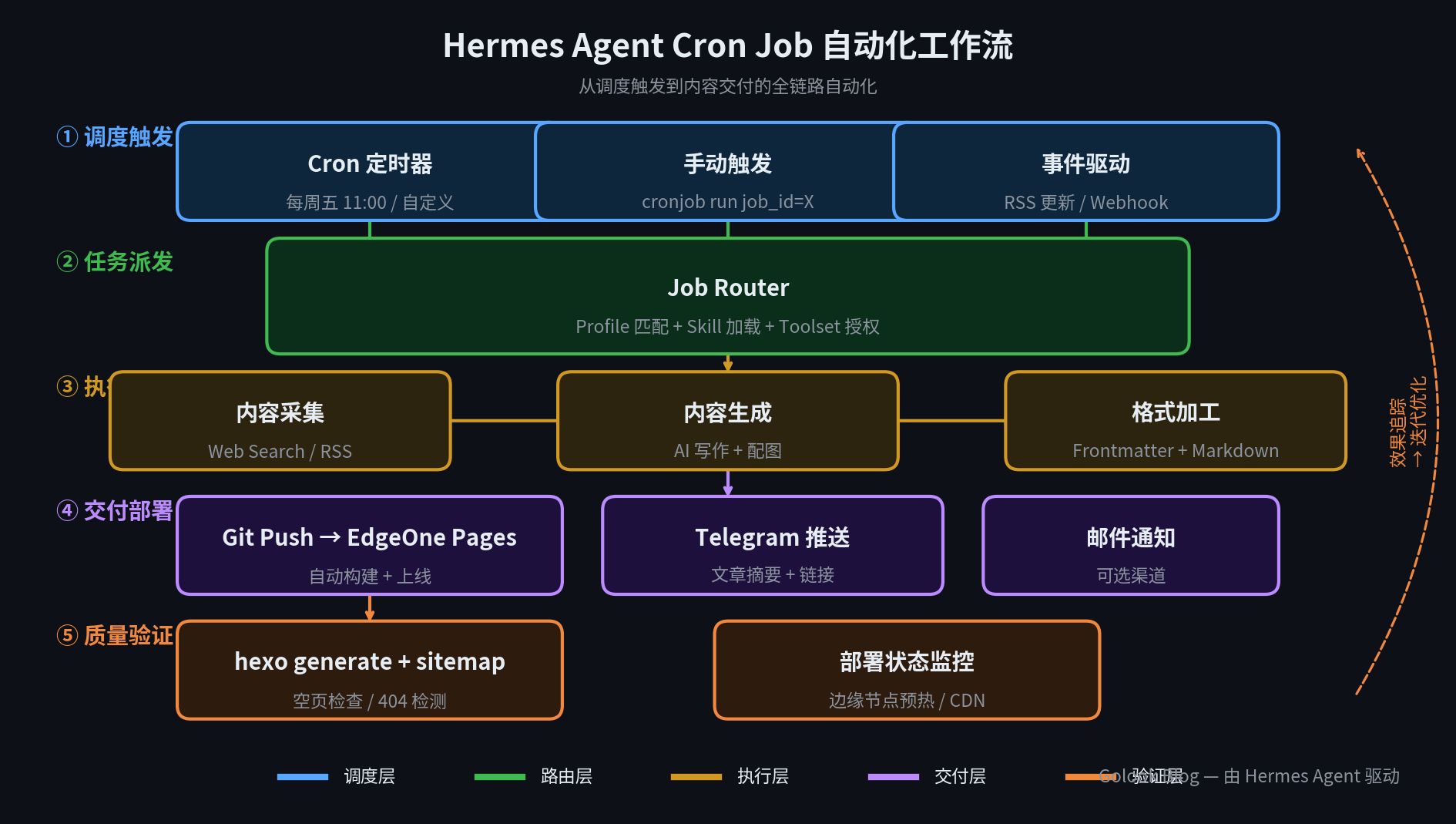
      <![CDATA[<p><img src="/images/cron-job-workflow-overview.png" alt="Hermes Agent Cron Job 自动化工作流架构图"></p><p>如果你运营着一个技术博客，这篇文章就是为你写的。</p><p>传统的博客运营流程是：写文章 → 配图 → 检查格式 → 部署 → 推送通知。这套流程每周走一遍，看似简单，但每一轮都会消耗认知资源——你要构思选题、要手动配图、要记得执行部署命令。更关键的是，<strong>你很难保持固定的发布节奏</strong>，一旦忙起来断更，博客就慢慢变成了”年更”状态。</p><p>Hermes Agent 的 Cron Job 系统正是为了解决这个问题而设计的。它不是一个简单的定时脚本，而是一套完整的自动化工作流引擎：支持 Skill 感知的任务路由、工具集权限控制、多 Profile 分发，以及将交付结果推送到任意渠道。</p><p>本文基于 Golook 博客（本博客）的实战运营经验，深入拆解 Cron Job 的架构设计、配置方法和最佳实践。</p><span id="more"></span><h2 id="什么是-Hermes-Agent-Cron-Job？"><a href="#什么是-Hermes-Agent-Cron-Job？" class="headerlink" title="什么是 Hermes Agent Cron Job？"></a>什么是 Hermes Agent Cron Job？</h2><p>Cron Job 是 Hermes Agent 内置的定时任务系统。与传统 Linux cron 不同，Hermes 的 Cron Job 有四个核心特性：</p><ol><li><strong>Skill 感知调度</strong> — 每个 Job 可以绑定一个 Skill（如 <code>hexo-blog-management</code>），Hermes 在任务启动时自动加载对应的 Skill 指令集，无需你在 prompt 中重复描述</li><li><strong>Toolset 权限控制</strong> — 你可以精确配置任务能使用的工具集：<code>terminal</code>、<code>file</code>、<code>web</code>、<code>search</code>、<code>image_gen</code> 等。任务执行时的工具边界完全由配置决定</li><li><strong>多 Profile 分发</strong> — 支持将任务路由到不同 Hermes Profile（<code>default</code>、<code>config</code>、<code>no_agent</code>），实现任务隔离</li><li><strong>交付链完整</strong> — 任务完成后，结果自动投递到 Telegram &#x2F; 邮件 &#x2F; 其他渠道</li></ol><p>这四条特性加在一起，意味着 Cron Job 不是”定时跑脚本”，而是”定时启动一个全功能的 Hermes Agent 会话，配备完整的工具和知识，执行完后把结果送给你”。</p><h2 id="架构拆解：从触发到交付的五层链路"><a href="#架构拆解：从触发到交付的五层链路" class="headerlink" title="架构拆解：从触发到交付的五层链路"></a>架构拆解：从触发到交付的五层链路</h2><p>上方的架构图展示了 Cron Job 的完整执行链路，分五层：</p><h3 id="①-调度触发"><a href="#①-调度触发" class="headerlink" title="① 调度触发"></a>① 调度触发</h3><p>Cron Job 有三种触发方式：</p><ul><li><strong>定时器</strong>：标准的 Cron 表达式，如 <code>0 11 * * 5</code>（每周五 11:00）。这是主力模式，用于固定节奏的发布</li><li><strong>手动触发</strong>：通过命令 <code>cronjob action=run job_id=X</code> 立即执行一次，适合调试或补发</li><li><strong>事件驱动</strong>：RSS 更新检测、Webhook 回调等动态触发（扩展用途）</li></ul><h3 id="②-任务派发"><a href="#②-任务派发" class="headerlink" title="② 任务派发"></a>② 任务派发</h3><p>当 Job 被触发后，Job Router 做三件事：</p><ol><li><strong>Profile 匹配</strong> — 判断任务应该在哪个 Profile 下运行</li><li><strong>Skill 加载</strong> — 如果 Job 绑定了 Skill（如 <code>hexo-blog-management</code>），自动注入 Skill 的全部指令、规范、模板、陷阱说明</li><li><strong>Toolset 授权</strong> — 根据配置的 <code>enabled_toolsets</code> 开放工具边界，未授权的工具不可调用</li></ol><p>这一步决定了任务”能在什么环境中使用什么工具”。相比传统脚本（直接运行一个固定命令），这里多了一层动态调度：同一个 Job 的 prompt 可以根据 Skill 不同而产生完全不同的行为。</p><h3 id="③-执行引擎"><a href="#③-执行引擎" class="headerlink" title="③ 执行引擎"></a>③ 执行引擎</h3><p>执行阶段分为三个串联步骤：</p><ul><li><strong>内容采集</strong>：Web Search 调研选题、查阅资料、核实数据</li><li><strong>内容生成</strong>：AI 写作 + 配图生成（Matplotlib &#x2F; image_gen）</li><li><strong>格式加工</strong>：Frontmatter 写入、Markdown 格式化、图片路径嵌入</li></ul><p>这是一套标准的”输入 → 处理 → 输出”流水线。每次执行都会生成一篇结构完整、包含配图、格式规范的文章。</p><h3 id="④-交付部署"><a href="#④-交付部署" class="headerlink" title="④ 交付部署"></a>④ 交付部署</h3><p>文章写完后，进入交付环节：</p><ul><li><strong>Git Push → EdgeOne Pages</strong>：文章和图片提交到仓库，触发 EdgeOne Pages 的自动构建和部署</li><li><strong>Telegram 推送</strong>：文章上线后，自动推送摘要 + 链接</li><li><strong>邮件通知</strong>：作为可选渠道</li></ul><h3 id="⑤-质量验证"><a href="#⑤-质量验证" class="headerlink" title="⑤ 质量验证"></a>⑤ 质量验证</h3><p>交付后并不结束，而是进入验证阶段：</p><ul><li><strong>生成验证</strong>：<code>hexo generate</code> 确认无误</li><li><strong>空页检测</strong>：检查 <code>public/index.html</code> 是否为空（Hexo 常见的”主题加载失败”陷阱）</li><li><strong>Sitemap 检查</strong>：确认搜索引擎可发现新文章</li></ul><p>在验证链中，任何一步失败都会触发告警，而不是静默失败。</p><h2 id="实战配置：Golook-博客的发文任务"><a href="#实战配置：Golook-博客的发文任务" class="headerlink" title="实战配置：Golook 博客的发文任务"></a>实战配置：Golook 博客的发文任务</h2><p>以本博客的每周发文任务为例，完整的 Cron Job 配置如下：</p><figure class="highlight yaml"><table><tr><td class="gutter"><pre><span class="line">1</span><br><span class="line">2</span><br><span class="line">3</span><br><span class="line">4</span><br><span class="line">5</span><br><span class="line">6</span><br><span class="line">7</span><br><span class="line">8</span><br><span class="line">9</span><br><span class="line">10</span><br></pre></td><td class="code"><pre><span class="line"><span class="attr">name:</span> <span class="string">&quot;Golook 每周文章&quot;</span></span><br><span class="line"><span class="attr">schedule:</span> <span class="string">&quot;0 11 * * 5&quot;</span>           <span class="comment"># 每周五 11:00</span></span><br><span class="line"><span class="attr">skills:</span> [<span class="string">&quot;hexo-blog-management&quot;</span>] <span class="comment"># 自动加载博客管理 Skill</span></span><br><span class="line"><span class="attr">enabled_toolsets:</span></span><br><span class="line">  <span class="bullet">-</span> <span class="string">terminal</span>     <span class="comment"># hexo generate, git 操作</span></span><br><span class="line">  <span class="bullet">-</span> <span class="string">file</span>         <span class="comment"># 读写文章和图片</span></span><br><span class="line">  <span class="bullet">-</span> <span class="string">web</span>          <span class="comment"># 选题调研</span></span><br><span class="line">  <span class="bullet">-</span> <span class="string">search</span>       <span class="comment"># 资料搜索</span></span><br><span class="line">  <span class="bullet">-</span> <span class="string">image_gen</span>    <span class="comment"># 配图生成</span></span><br><span class="line"><span class="attr">deliver:</span> <span class="string">&quot;origin&quot;</span>  <span class="comment"># 交付到任务来源渠道</span></span><br></pre></td></tr></table></figure><p>几个值得注意的配置细节：</p><p><strong><code>skills</code> 参数的作用</strong>：当你绑定了 <code>hexo-blog-management</code> Skill，任务启动后 Hermes 会自动注入：</p><ul><li>博客仓库路径和分支信息</li><li>文章目录、Frontmatter 规范</li><li>配图生成要求和检查清单</li><li>部署流程和常见陷阱</li><li>EdgeOne Pages 的特殊注意事项</li></ul><p>这些信息写满了一个完整的文档。如果没有 Skill，你需要在 prompt 中全部手写一遍。Skill 相当于”工作记忆”，让每次执行都能站在上一次的知识积累上。</p><p><strong><code>enabled_toolsets</code> 的边界意义</strong>：博客发文任务不需要操控网络服务或发送外部消息（除了 Git Push 和 Telegram 推送），所以工具集只开放了文件操作和数据获取类的工具。这既是安全边界，也是专注边界——让任务不会跑偏去做不相关的事情。</p><p><strong>Prompt 必须自包含</strong>：由于 Cron Job 是无人值守执行的，prompt 必须是”自包含”的——不能假设有人交互。它需要明确写出：</p><ul><li>仓库路径和操作流程</li><li>文章规范和检查清单</li><li>遇到特定异常时的处理策略</li><li>部署步骤</li></ul><p>把 prompt 当成”给一个聪明但需要明确指示的助手指令”来写。</p><h2 id="任务生命周期管理"><a href="#任务生命周期管理" class="headerlink" title="任务生命周期管理"></a>任务生命周期管理</h2><p>Cron Job 的完整生命周期包括以下几个操作：</p><figure class="highlight bash"><table><tr><td class="gutter"><pre><span class="line">1</span><br><span class="line">2</span><br><span class="line">3</span><br><span class="line">4</span><br><span class="line">5</span><br><span class="line">6</span><br><span class="line">7</span><br><span class="line">8</span><br><span class="line">9</span><br><span class="line">10</span><br><span class="line">11</span><br><span class="line">12</span><br><span class="line">13</span><br><span class="line">14</span><br></pre></td><td class="code"><pre><span class="line"><span class="comment"># 创建任务</span></span><br><span class="line">cronjob action=create name=<span class="string">&quot;...&quot;</span> schedule=<span class="string">&quot;...&quot;</span> skills=[<span class="string">&quot;...&quot;</span>] ...</span><br><span class="line"></span><br><span class="line"><span class="comment"># 立即测试</span></span><br><span class="line">cronjob action=run job_id=X</span><br><span class="line"></span><br><span class="line"><span class="comment"># 查看状态</span></span><br><span class="line">cronjob action=list</span><br><span class="line"></span><br><span class="line"><span class="comment"># 修改频率或 prompt</span></span><br><span class="line">cronjob action=update job_id=X schedule=<span class="string">&quot;0 9 * * 1&quot;</span></span><br><span class="line"></span><br><span class="line"><span class="comment"># 删除</span></span><br><span class="line">cronjob action=delete job_id=X</span><br></pre></td></tr></table></figure><p>测试环节尤为重要。建议每创建一个新 Job 后，立即用 <code>action=run</code> 执行一次，观察输出是否符合预期，再放行到定时执行。避免出现”周五到点了才发现任务跑不通”的尴尬。</p><h2 id="选题轮换机制"><a href="#选题轮换机制" class="headerlink" title="选题轮换机制"></a>选题轮换机制</h2><p>自动化发文的一个常见问题是：<strong>内容会逐渐变得重复</strong>。</p><p>Golook 博客通过以下轮换策略来保持内容多样性：</p><table><thead><tr><th>轮次</th><th>选题方向</th><th>示例</th></tr></thead><tbody><tr><td>1</td><td>Hermes 实战经验</td><td>配置技巧、踩坑记录、自动化工作流</td></tr><tr><td>2</td><td>AI 工具对比评测</td><td>STT&#x2F;TTS、代码助手、模型排名</td></tr><tr><td>3</td><td>效率工作流</td><td>AI 工具组合拳、学习路径</td></tr><tr><td>4</td><td>技术深度分析</td><td>模型原理、架构解析</td></tr><tr><td>5</td><td>开发技巧</td><td>Prompt 工程、调试方法、工程实践</td></tr></tbody></table><p>每次执行时，任务会自动检查 <code>source/_posts/</code> 下的已有文章，避免选题重复。如果发现某个方向最近写过，就跳到下一个方向。</p><h2 id="几个容易踩的坑"><a href="#几个容易踩的坑" class="headerlink" title="几个容易踩的坑"></a>几个容易踩的坑</h2><h3 id="坑-1：EdgeOne-Pages-主题缺失"><a href="#坑-1：EdgeOne-Pages-主题缺失" class="headerlink" title="坑 1：EdgeOne Pages 主题缺失"></a>坑 1：EdgeOne Pages 主题缺失</h3><p>这是踩过最惨的坑。EdgeOne Pages 的构建环境是<strong>干净环境</strong>，不会运行 <code>npm install</code>。如果你在 Git 仓库中提交了不完整的 <code>themes/landscape/</code> 目录（只有部分子目录），Hexo 会优先使用本地主题而非 <code>node_modules</code> 中的完整主题，结果生成空页面。</p><p><strong>解决方法</strong>：</p><ul><li>确保仓库中的 <code>themes/</code> 目录完整</li><li>或者删除 <code>themes/</code> 目录，让 Hexo 使用 <code>node_modules</code> 中的版本</li></ul><h3 id="坑-2：配图中文字体乱码"><a href="#坑-2：配图中文字体乱码" class="headerlink" title="坑 2：配图中文字体乱码"></a>坑 2：配图中文字体乱码</h3><p>用 <code>image_gen</code> 工具生成中文配图时，服务端如果缺少中文字体，图片中的中文会显示为方框乱码。</p><p><strong>解决方法</strong>：使用 Python Matplotlib 生成配图，指定系统预装的中文字体：</p><figure class="highlight python"><table><tr><td class="gutter"><pre><span class="line">1</span><br><span class="line">2</span><br><span class="line">3</span><br></pre></td><td class="code"><pre><span class="line"><span class="keyword">import</span> matplotlib; matplotlib.use(<span class="string">&#x27;Agg&#x27;</span>)</span><br><span class="line"><span class="keyword">from</span> matplotlib.font_manager <span class="keyword">import</span> FontProperties</span><br><span class="line">font = FontProperties(fname=<span class="string">&#x27;/usr/share/fonts/opentype/noto/NotoSansCJK-Bold.ttc&#x27;</span>)</span><br></pre></td></tr></table></figure><h3 id="坑-3：文章中泄露内部路径"><a href="#坑-3：文章中泄露内部路径" class="headerlink" title="坑 3：文章中泄露内部路径"></a>坑 3：文章中泄露内部路径</h3><p>自动化任务的工作路径中可能包含内部路径（如 <code>/root/hexo-template-edgeone/</code> 或 Wiki 路径）。发布前务必检查文章中没有泄露这些不可公开的内部引用。</p><h2 id="总结"><a href="#总结" class="headerlink" title="总结"></a>总结</h2><p>Hermes Agent 的 Cron Job 系统将”写文章发博客”这个重复性劳动从手动操作变成了自动化运营。核心收获：</p><ol><li><strong>Skill 绑定</strong>让任务不需要重复描述同一套规范</li><li><strong>Toolset 控制</strong>让任务不会越界操作</li><li><strong>五层链路</strong>覆盖了从触发到验证的全流程</li><li><strong>轮换机制</strong>保证了内容的多样性</li></ol><p>这套思路不仅适用于博客运营，也适用于任何需要定时产出的场景——周报生成、数据汇总、项目状态检查、技术调研总结。核心模式是一样的：配置一个 Job，绑定相关 Skill，设定频率，然后让它自己跑。</p><p>如果你正在运营一个技术博客，或者有这样的想法但担心坚持不下去，自动化可能是让你的博客”活”起来的最有效方式。</p>]]>
    </content>
    <id>https://www.golook.cf/2026/06/19/hermes-cron-job-guide-2026/</id>
    <link href="https://www.golook.cf/2026/06/19/hermes-cron-job-guide-2026/"/>
    <published>2026-06-19T03:00:00.000Z</published>
    <summary>
      <![CDATA[<p><img src="/images/cron-job-workflow-overview.png" alt="Hermes Agent Cron Job 自动化工作流架构图"></p>
<p>如果你运营着一个技术博客，这篇文章就是为你写的。</p>
<p>传统的博客运营流程是：写文章 → 配图 → 检查格式 → 部署 → 推送通知。这套流程每周走一遍，看似简单，但每一轮都会消耗认知资源——你要构思选题、要手动配图、要记得执行部署命令。更关键的是，<strong>你很难保持固定的发布节奏</strong>，一旦忙起来断更，博客就慢慢变成了”年更”状态。</p>
<p>Hermes Agent 的 Cron Job 系统正是为了解决这个问题而设计的。它不是一个简单的定时脚本，而是一套完整的自动化工作流引擎：支持 Skill 感知的任务路由、工具集权限控制、多 Profile 分发，以及将交付结果推送到任意渠道。</p>
<p>本文基于 Golook 博客（本博客）的实战运营经验，深入拆解 Cron Job 的架构设计、配置方法和最佳实践。</p>]]>
    </summary>
    <title>Hermes Agent Cron Job 实战：零运维自动化博客运营指南</title>
    <updated>2026-06-21T07:22:29.916Z</updated>
  </entry>
  <entry>
    <author>
      <name>golook</name>
    </author>
    <category term="Hermes 实战" scheme="https://www.golook.cf/categories/Hermes-%E5%AE%9E%E6%88%98/"/>
    <category term="AI-Agent" scheme="https://www.golook.cf/tags/AI-Agent/"/>
    <category term="Hermes" scheme="https://www.golook.cf/tags/Hermes/"/>
    <category term="自动化" scheme="https://www.golook.cf/tags/%E8%87%AA%E5%8A%A8%E5%8C%96/"/>
    <category term="Skill" scheme="https://www.golook.cf/tags/Skill/"/>
    <category term="实战教程" scheme="https://www.golook.cf/tags/%E5%AE%9E%E6%88%98%E6%95%99%E7%A8%8B/"/>
    <content>
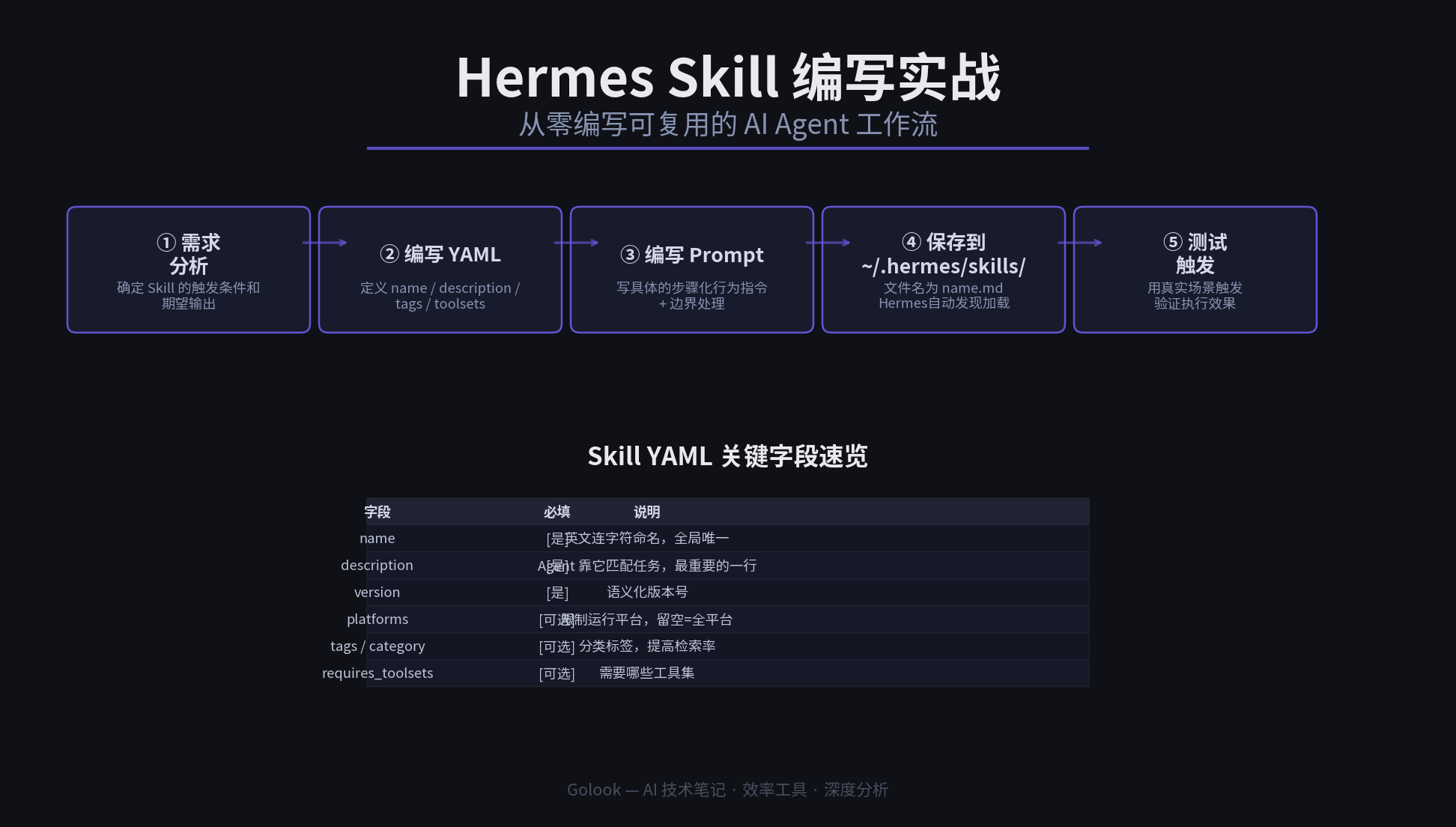
      <![CDATA[<p><img src="/images/hermes-skill-write-guide-header.png" alt="Hermes Skill 编写实战概览：从需求到部署的完整流程"></p><blockquote><p>你已经知道 Hermes Skill 是什么了——现在来亲手写一个。</p></blockquote><p>之前的文章拆解了 Hermes Skill 的机制原理——它如何自动发现、执行、改进技能。但社区里缺少一个真正手把手的教程：<strong>怎么从零开始写一条自己的 Skill？</strong></p><p>这篇文章用三个真实场景的 Skill 案例，带你走完从需求分析到编写测试的完整流程。所有代码可直接复制使用。</p><h2 id="一、Skill-文件结构速览"><a href="#一、Skill-文件结构速览" class="headerlink" title="一、Skill 文件结构速览"></a>一、Skill 文件结构速览</h2><p>每条 Skill 是一个标准 Markdown 文件，存放在 <code>~/.hermes/skills/</code> 目录下。文件由两部分组成：</p><p><strong>前半段：YAML Frontmatter（元数据）</strong></p><figure class="highlight yaml"><table><tr><td class="gutter"><pre><span class="line">1</span><br><span class="line">2</span><br><span class="line">3</span><br><span class="line">4</span><br><span class="line">5</span><br><span class="line">6</span><br><span class="line">7</span><br><span class="line">8</span><br><span class="line">9</span><br><span class="line">10</span><br><span class="line">11</span><br></pre></td><td class="code"><pre><span class="line"><span class="meta">---</span></span><br><span class="line"><span class="attr">name:</span> <span class="string">my-first-skill</span></span><br><span class="line"><span class="attr">description:</span> <span class="string">一句话说清楚这个技能做什么</span></span><br><span class="line"><span class="attr">version:</span> <span class="number">1.0</span><span class="number">.0</span></span><br><span class="line"><span class="attr">platforms:</span> [<span class="string">linux</span>, <span class="string">macos</span>]</span><br><span class="line"><span class="attr">metadata:</span></span><br><span class="line">  <span class="attr">hermes:</span></span><br><span class="line">    <span class="attr">tags:</span> [<span class="string">python</span>, <span class="string">automation</span>]</span><br><span class="line">    <span class="attr">category:</span> <span class="string">devops</span></span><br><span class="line">    <span class="attr">requires_toolsets:</span> [<span class="string">terminal</span>]</span><br><span class="line"><span class="meta">---</span></span><br></pre></td></tr></table></figure><p><strong>后半段：Markdown 正文（行为指令）</strong></p><figure class="highlight markdown"><table><tr><td class="gutter"><pre><span class="line">1</span><br><span class="line">2</span><br><span class="line">3</span><br><span class="line">4</span><br><span class="line">5</span><br></pre></td><td class="code"><pre><span class="line">当 [触发条件] 时：</span><br><span class="line"></span><br><span class="line"><span class="bullet">1.</span> 第一步操作</span><br><span class="line"><span class="bullet">2.</span> 第二步操作</span><br><span class="line"><span class="bullet">3.</span> 输出格式要求</span><br></pre></td></tr></table></figure><p>关键元数据字段：</p><table><thead><tr><th>字段</th><th>必填</th><th>说明</th></tr></thead><tbody><tr><td><code>name</code></td><td>[是]</td><td>英文连字符命名，全局唯一。文件名必须等于 name.md</td></tr><tr><td><code>description</code></td><td>[是]</td><td>一句话摘要，Agent 靠它匹配任务。<strong>最重要的一行</strong></td></tr><tr><td><code>version</code></td><td>[是]</td><td>语义化版本号，每次修改递增</td></tr><tr><td><code>platforms</code></td><td>[可选]</td><td>限制运行平台（linux&#x2F;macos&#x2F;windows），留空&#x3D;全平台</td></tr><tr><td><code>tags</code></td><td>[可选]</td><td>分类标签，提高 Agent 检索匹配率</td></tr><tr><td><code>category</code></td><td>[可选]</td><td>归类（devops &#x2F; code &#x2F; web &#x2F; content 等）</td></tr><tr><td><code>requires_toolsets</code></td><td>[可选]</td><td>需要哪些工具集（terminal &#x2F; file &#x2F; web &#x2F; search 等）</td></tr></tbody></table><h2 id="二、实例一：Git-提交规范检查器"><a href="#二、实例一：Git-提交规范检查器" class="headerlink" title="二、实例一：Git 提交规范检查器"></a>二、实例一：Git 提交规范检查器</h2><h3 id="需求分析"><a href="#需求分析" class="headerlink" title="需求分析"></a>需求分析</h3><p>团队协作中最常见的问题之一：提交信息不规范。写一个 Skill，让 Agent 在用户准备提交时自动检查格式是否符合 <a href="https://www.conventionalcommits.org/">Conventional Commits</a> 规范。</p><h3 id="完整-Skill"><a href="#完整-Skill" class="headerlink" title="完整 Skill"></a>完整 Skill</h3><figure class="highlight yaml"><table><tr><td class="gutter"><pre><span class="line">1</span><br><span class="line">2</span><br><span class="line">3</span><br><span class="line">4</span><br><span class="line">5</span><br><span class="line">6</span><br><span class="line">7</span><br><span class="line">8</span><br><span class="line">9</span><br><span class="line">10</span><br><span class="line">11</span><br><span class="line">12</span><br><span class="line">13</span><br><span class="line">14</span><br><span class="line">15</span><br><span class="line">16</span><br><span class="line">17</span><br><span class="line">18</span><br><span class="line">19</span><br><span class="line">20</span><br></pre></td><td class="code"><pre><span class="line"><span class="meta">---</span></span><br><span class="line"><span class="attr">name:</span> <span class="string">conventional-commit-checker</span></span><br><span class="line"><span class="attr">description:</span> <span class="string">检查</span> <span class="string">Git</span> <span class="string">提交信息是否符合</span> <span class="string">Conventional</span> <span class="string">Commits</span> <span class="string">规范（type(scope):</span> <span class="string">description</span> <span class="string">格式）。当用户运行</span> <span class="string">git</span> <span class="string">commit</span> <span class="string">或要求检查提交信息时自动触发。</span></span><br><span class="line"><span class="attr">version:</span> <span class="number">1.0</span><span class="number">.0</span></span><br><span class="line"><span class="attr">platforms:</span> [<span class="string">linux</span>, <span class="string">macos</span>]</span><br><span class="line"><span class="attr">metadata:</span></span><br><span class="line">  <span class="attr">hermes:</span></span><br><span class="line">    <span class="attr">tags:</span> [<span class="string">git</span>, <span class="string">commit</span>, <span class="string">conventional-commits</span>, <span class="string">code-quality</span>]</span><br><span class="line">    <span class="attr">category:</span> <span class="string">devops</span></span><br><span class="line">    <span class="attr">requires_toolsets:</span> [<span class="string">terminal</span>]</span><br><span class="line"><span class="meta">---</span></span><br><span class="line"><span class="meta"></span></span><br><span class="line"><span class="string">当用户执行</span> <span class="string">`git</span> <span class="string">commit`</span> <span class="string">相关操作，或要求检查提交信息格式时：</span></span><br><span class="line"></span><br><span class="line"><span class="number">1</span><span class="string">.</span> <span class="string">获取当前暂存区状态：`git</span> <span class="string">diff</span> <span class="string">--cached</span> <span class="string">--stat`</span></span><br><span class="line"><span class="number">2</span><span class="string">.</span> <span class="string">用正则</span> <span class="string">`^(feat|fix|docs|style|refactor|perf|test|chore|ci)(\(.+\))?:</span> <span class="string">.&#123;1,&#125;$`</span> <span class="string">检查提交信息格式</span></span><br><span class="line"><span class="number">3</span><span class="string">.</span> <span class="string">如果不匹配，给出规范的格式示例</span></span><br><span class="line"><span class="number">4</span><span class="string">.</span> <span class="string">如果匹配，确认提交内容并执行</span></span><br><span class="line"></span><br><span class="line"><span class="string">示例输出：</span></span><br></pre></td></tr></table></figure><p>❌ 提交信息格式不规范<br>当前: “fix bug”<br>推荐: “fix(auth): 修复登录页面的 token 过期处理”</p><figure class="highlight plaintext"><table><tr><td class="gutter"><pre><span class="line">1</span><br><span class="line">2</span><br><span class="line">3</span><br><span class="line">4</span><br><span class="line">5</span><br><span class="line">6</span><br><span class="line">7</span><br><span class="line">8</span><br></pre></td><td class="code"><pre><span class="line"></span><br><span class="line">常用 type 说明：</span><br><span class="line">- feat: 新功能</span><br><span class="line">- fix: 修复 bug</span><br><span class="line">- docs: 文档变更</span><br><span class="line">- refactor: 代码重构</span><br><span class="line">- test: 测试相关</span><br><span class="line">- chore: 杂项/构建</span><br></pre></td></tr></table></figure><h3 id="编写要点"><a href="#编写要点" class="headerlink" title="编写要点"></a>编写要点</h3><ol><li><strong>description 要精准但不过窄</strong> — “检查 Git 提交信息” 太泛；”检查 Git 提交信息是否符合 Conventional Commits 规范” 刚刚好，包含了格式名称让 Agent 能理解</li><li><strong>触发条件要写在前</strong> — 让 Agent 第一眼就知道什么时候该用这个 Skill</li><li><strong>给出示例输出</strong> — Agent 看到具体的输出格式后执行更稳定</li><li><strong>补充背景知识</strong> — 把 type 的说明写上，减少 Agent 猜错的概率</li></ol><h2 id="三、实例二：Python-依赖安全审计"><a href="#三、实例二：Python-依赖安全审计" class="headerlink" title="三、实例二：Python 依赖安全审计"></a>三、实例二：Python 依赖安全审计</h2><h3 id="需求分析-1"><a href="#需求分析-1" class="headerlink" title="需求分析"></a>需求分析</h3><p>项目中引入的第三方依赖可能包含已知漏洞。手动检查麻烦，让 Agent 自动扫描并输出严重程度排序的结果。</p><h3 id="完整-Skill-1"><a href="#完整-Skill-1" class="headerlink" title="完整 Skill"></a>完整 Skill</h3><figure class="highlight yaml"><table><tr><td class="gutter"><pre><span class="line">1</span><br><span class="line">2</span><br><span class="line">3</span><br><span class="line">4</span><br><span class="line">5</span><br><span class="line">6</span><br><span class="line">7</span><br><span class="line">8</span><br><span class="line">9</span><br><span class="line">10</span><br><span class="line">11</span><br><span class="line">12</span><br><span class="line">13</span><br><span class="line">14</span><br><span class="line">15</span><br><span class="line">16</span><br><span class="line">17</span><br><span class="line">18</span><br><span class="line">19</span><br><span class="line">20</span><br><span class="line">21</span><br><span class="line">22</span><br><span class="line">23</span><br><span class="line">24</span><br><span class="line">25</span><br><span class="line">26</span><br><span class="line">27</span><br></pre></td><td class="code"><pre><span class="line"><span class="meta">---</span></span><br><span class="line"><span class="attr">name:</span> <span class="string">dependency-security-audit</span></span><br><span class="line"><span class="attr">description:</span> <span class="string">使用</span> <span class="string">pip-audit</span> <span class="string">扫描</span> <span class="string">Python</span> <span class="string">项目依赖中的已知安全漏洞，按严重程度排序输出。</span></span><br><span class="line"><span class="attr">version:</span> <span class="number">1.0</span><span class="number">.0</span></span><br><span class="line"><span class="attr">platforms:</span> [<span class="string">linux</span>, <span class="string">macos</span>]</span><br><span class="line"><span class="attr">metadata:</span></span><br><span class="line">  <span class="attr">hermes:</span></span><br><span class="line">    <span class="attr">tags:</span> [<span class="string">python</span>, <span class="string">security</span>, <span class="string">dependencies</span>, <span class="string">audit</span>]</span><br><span class="line">    <span class="attr">category:</span> <span class="string">devops</span></span><br><span class="line">    <span class="attr">requires_toolsets:</span> [<span class="string">terminal</span>]</span><br><span class="line"><span class="meta">---</span></span><br><span class="line"><span class="meta"></span></span><br><span class="line"><span class="string">当用户要求检查依赖安全或执行安全审计时：</span></span><br><span class="line"></span><br><span class="line"><span class="number">1</span><span class="string">.</span> <span class="string">检查</span> <span class="string">requirements.txt</span> <span class="string">或</span> <span class="string">pyproject.toml</span> <span class="string">是否存在</span></span><br><span class="line"><span class="number">2</span><span class="string">.</span> <span class="string">如果</span> <span class="string">pip-audit</span> <span class="string">未安装，提示用户安装：`pip</span> <span class="string">install</span> <span class="string">pip-audit`</span></span><br><span class="line"><span class="number">3</span><span class="string">.</span> <span class="string">运行</span> <span class="string">`pip-audit`</span> <span class="string">扫描已知漏洞</span></span><br><span class="line"><span class="number">4</span><span class="string">.</span> <span class="string">按严重程度排序输出（CRITICAL</span> <span class="string">&gt;</span> <span class="string">HIGH</span> <span class="string">&gt;</span> <span class="string">MEDIUM</span> <span class="string">&gt;</span> <span class="string">LOW）</span></span><br><span class="line"><span class="number">5</span><span class="string">.</span> <span class="string">对每个漏洞给出：</span></span><br><span class="line">   <span class="bullet">-</span> <span class="string">依赖名称和当前版本</span></span><br><span class="line">   <span class="bullet">-</span> <span class="string">CVE</span> <span class="string">编号</span></span><br><span class="line">   <span class="bullet">-</span> <span class="string">严重程度</span></span><br><span class="line">   <span class="bullet">-</span> <span class="string">建议升级到的安全版本</span></span><br><span class="line"></span><br><span class="line"><span class="string">注意：安装</span> <span class="string">pip-audit</span> <span class="string">前先询问用户确认。</span></span><br><span class="line"></span><br><span class="line"><span class="string">输出格式示例：</span></span><br></pre></td></tr></table></figure><p>🔍 依赖安全审计结果</p><p>[CRITICAL] requests 2.28.0 → 2.31.0<br>  CVE-2023-32681: 证书验证绕过<br>  <a href="https://nvd.nist.gov/vuln/detail/CVE-2023-32681">https://nvd.nist.gov/vuln/detail/CVE-2023-32681</a></p><p>[HIGH] urllib3 1.26.15 → 1.26.18<br>  CVE-2023-45803: HTTP 请求走私<br>  <a href="https://nvd.nist.gov/vuln/detail/CVE-2023-45803">https://nvd.nist.gov/vuln/detail/CVE-2023-45803</a></p><p>总计：2 个漏洞（1 CRITICAL, 1 HIGH）</p><figure class="highlight plaintext"><table><tr><td class="gutter"><pre><span class="line">1</span><br><span class="line">2</span><br><span class="line">3</span><br><span class="line">4</span><br><span class="line">5</span><br><span class="line">6</span><br><span class="line">7</span><br><span class="line">8</span><br><span class="line">9</span><br><span class="line">10</span><br><span class="line">11</span><br><span class="line">12</span><br><span class="line">13</span><br><span class="line">14</span><br><span class="line">15</span><br><span class="line">16</span><br><span class="line">17</span><br><span class="line">18</span><br><span class="line">19</span><br><span class="line">20</span><br><span class="line">21</span><br><span class="line">22</span><br><span class="line">23</span><br><span class="line">24</span><br><span class="line">25</span><br><span class="line">26</span><br><span class="line">27</span><br><span class="line">28</span><br><span class="line">29</span><br><span class="line">30</span><br><span class="line">31</span><br><span class="line">32</span><br><span class="line">33</span><br><span class="line">34</span><br><span class="line">35</span><br><span class="line">36</span><br><span class="line">37</span><br><span class="line">38</span><br><span class="line">39</span><br><span class="line">40</span><br><span class="line">41</span><br><span class="line">42</span><br><span class="line">43</span><br><span class="line">44</span><br><span class="line">45</span><br><span class="line">46</span><br><span class="line">47</span><br><span class="line">48</span><br><span class="line">49</span><br><span class="line">50</span><br><span class="line">51</span><br></pre></td><td class="code"><pre><span class="line">```</span><br><span class="line"></span><br><span class="line">### 防御式设计</span><br><span class="line"></span><br><span class="line">这个 Skill 展示了几个重要设计模式：</span><br><span class="line"></span><br><span class="line">- **工具检查** — 先确认 pip-audit 是否已安装，避免运行时报错</span><br><span class="line">- **安全边界** — 安装软件前主动询问用户确认，不擅自行动</span><br><span class="line">- **结构化输出** — 让结果一目了然，Agent 和人类都能快速理解</span><br><span class="line">- **附上参考链接** — 方便用户查阅漏洞详情</span><br><span class="line"></span><br><span class="line">## 四、实例三：博客文章发布质量检查</span><br><span class="line"></span><br><span class="line">### 需求分析</span><br><span class="line"></span><br><span class="line">这个 Skill 直接服务于 Golook 博客的日常运营。每次发布文章前自动检查：Frontmatter 是否完整、配图是否存在引用、链接是否可访问。</span><br><span class="line"></span><br><span class="line">### 完整 Skill</span><br><span class="line"></span><br><span class="line">```yaml</span><br><span class="line">---</span><br><span class="line">name: blog-post-quality-check</span><br><span class="line">description: 在发布 Hexo 博客文章前检查质量：Frontmatter 完整性、配图文件存在性、外部链接可访问性、字数统计。</span><br><span class="line">version: 1.0.0</span><br><span class="line">platforms: [linux, macos]</span><br><span class="line">metadata:</span><br><span class="line">  hermes:</span><br><span class="line">    tags: [hexo, blog, quality-check, publish]</span><br><span class="line">    category: content</span><br><span class="line">    requires_toolsets: [terminal, file, web]</span><br><span class="line">---</span><br><span class="line"></span><br><span class="line">当用户准备发布博客文章或要求质量检查时，对指定文件执行以下检查：</span><br><span class="line"></span><br><span class="line">1. **Frontmatter 检查**</span><br><span class="line">   - 确认存在 title, date, tags, categories 字段</span><br><span class="line">   - `date` 格式为 YYYY-MM-DD HH:mm:ss（24小时制）</span><br><span class="line">   - `tags` 为数组格式 `[tag1, tag2]`</span><br><span class="line">2. **配图检查**</span><br><span class="line">   - 提取文章中所有 `![...](...)` 图片引用</span><br><span class="line">   - 图片路径是否以 `/images/` 开头</span><br><span class="line">   - 检查 `source/images/` 下是否存在对应文件</span><br><span class="line">3. **字数统计**</span><br><span class="line">   - 去掉 frontmatter 和代码块后统计纯文字</span><br><span class="line">   - 不低于 500 字，否则建议补充</span><br><span class="line">4. **链接检查**</span><br><span class="line">   - 提取所有外部 http/https 链接</span><br><span class="line">   - 用 `curl -o /dev/null -s -w &quot;%&#123;http_code&#125;&quot;` 逐一检查</span><br><span class="line">   - 排除 localhost 和内部地址</span><br><span class="line"></span><br><span class="line">输出格式：</span><br></pre></td></tr></table></figure><p>📋 文章质量报告：source&#x2F;_posts&#x2F;文件名.md</p><p>✅ Frontmatter: 完整 (title, date, tags, categories)<br>✅ 配图: 2&#x2F;2 存在<br>⚠️ 字数: 483 字（建议 ≥500）<br>✅ 链接: 3&#x2F;3 可访问</p><p>建议：内容字数接近阈值，考虑补充 1-2 段。</p><figure class="highlight plaintext"><table><tr><td class="gutter"><pre><span class="line">1</span><br><span class="line">2</span><br><span class="line">3</span><br><span class="line">4</span><br><span class="line">5</span><br><span class="line">6</span><br><span class="line">7</span><br><span class="line">8</span><br><span class="line">9</span><br><span class="line">10</span><br><span class="line">11</span><br><span class="line">12</span><br><span class="line">13</span><br><span class="line">14</span><br><span class="line">15</span><br><span class="line">16</span><br><span class="line">17</span><br><span class="line">18</span><br><span class="line">19</span><br><span class="line">20</span><br><span class="line">21</span><br><span class="line">22</span><br><span class="line">23</span><br><span class="line">24</span><br><span class="line">25</span><br><span class="line">26</span><br><span class="line">27</span><br><span class="line">28</span><br><span class="line">29</span><br><span class="line">30</span><br><span class="line">31</span><br><span class="line">32</span><br><span class="line">33</span><br><span class="line">34</span><br><span class="line">35</span><br><span class="line">36</span><br><span class="line">37</span><br></pre></td><td class="code"><pre><span class="line">```</span><br><span class="line"></span><br><span class="line">这个 Skill 直接和 Hexo 博客的发布流程整合——每次 push 前跑一次检查，确保文章质量。</span><br><span class="line"></span><br><span class="line">## 五、Skill 编写原则总结</span><br><span class="line"></span><br><span class="line">通过上面三个案例，可以提炼出一套通用的 Skill 编写原则：</span><br><span class="line"></span><br><span class="line">### 原则一：description 是灵魂</span><br><span class="line"></span><br><span class="line">Agent 通过匹配 description 来调用 Skill。写得好不好直接决定 Skill 是否会被用到。</span><br><span class="line"></span><br><span class="line">| 写法 | 评价 | 原因 |</span><br><span class="line">|------|------|------|</span><br><span class="line">| &quot;检查提交信息&quot; | ❌ 太泛 | Agent 不知道什么时候触发 |</span><br><span class="line">| &quot;检查 Git 提交信息是否符合 Conventional Commits 规范&quot; | ✅ 精准 | 包含格式名称和触发场景 |</span><br><span class="line">| &quot;安全审计&quot; | ❌ 模糊 | 审计什么？怎么审？ |</span><br><span class="line">| &quot;使用 pip-audit 扫描 Python 依赖中的安全漏洞&quot; | ✅ 具体 | 工具+语言+目标都有了 |</span><br><span class="line"></span><br><span class="line">### 原则二：一个 Skill 做一件事</span><br><span class="line"></span><br><span class="line">职责单一的好处：</span><br><span class="line"></span><br><span class="line">- Agent 更容易匹配到正确的 Skill</span><br><span class="line">- 复用性更高（其他 Skill 可以通过名称引用它）</span><br><span class="line">- 测试和调试更简单</span><br><span class="line"></span><br><span class="line">### 原则三：写清楚触发条件</span><br><span class="line"></span><br><span class="line">在行为指令的第一句就写明触发条件。Agent 不需要在长文本里找&quot;什么时候用这个&quot;。</span><br><span class="line"></span><br><span class="line">```markdown</span><br><span class="line"># ✅ 好：开头就写触发条件</span><br><span class="line">当用户准备发布博客文章或要求质量检查时：</span><br><span class="line"></span><br><span class="line"># ❌ 差：隐含在中间</span><br><span class="line">执行以下操作。在博客发布场景中...</span><br></pre></td></tr></table></figure><h3 id="原则四：防御式编程"><a href="#原则四：防御式编程" class="headerlink" title="原则四：防御式编程"></a>原则四：防御式编程</h3><p>Skill 会被 Agent 在各种环境下调用。考虑边界情况：</p><ul><li><strong>工具不存在</strong> → 安装步骤或提示用户</li><li><strong>文件不存在</strong> → 优雅报错</li><li><strong>输入格式异常</strong> → 给出明确的错误信息</li></ul><h3 id="原则五：版本化管理"><a href="#原则五：版本化管理" class="headerlink" title="原则五：版本化管理"></a>原则五：版本化管理</h3><p>每次修改 Skill 后递增 <code>version</code>。这不仅是好习惯——Agent 的 Curator 机制会根据版本号判断哪些 Skill 需要更新。</p><h2 id="六、调试与验证"><a href="#六、调试与验证" class="headerlink" title="六、调试与验证"></a>六、调试与验证</h2><p>Skill 写完后如何确认它能正常工作？</p><h3 id="方法一：手动触发"><a href="#方法一：手动触发" class="headerlink" title="方法一：手动触发"></a>方法一：手动触发</h3><p>在 Hermes 会话中直接说能触发该 Skill 的话：</p><figure class="highlight plaintext"><table><tr><td class="gutter"><pre><span class="line">1</span><br><span class="line">2</span><br></pre></td><td class="code"><pre><span class="line">帮我检查一下当前 git 提交信息格式对不对</span><br><span class="line">帮我检查博客文章 xxx.md 的质量</span><br></pre></td></tr></table></figure><p>看看 Agent 是否调用了对应的 Skill。</p><h3 id="方法二：检查文件"><a href="#方法二：检查文件" class="headerlink" title="方法二：检查文件"></a>方法二：检查文件</h3><figure class="highlight bash"><table><tr><td class="gutter"><pre><span class="line">1</span><br><span class="line">2</span><br><span class="line">3</span><br><span class="line">4</span><br><span class="line">5</span><br></pre></td><td class="code"><pre><span class="line"><span class="comment"># 确认 Skill 文件在正确位置</span></span><br><span class="line"><span class="built_in">ls</span> -la ~/.hermes/skills/conventional-commit-checker.md</span><br><span class="line"></span><br><span class="line"><span class="comment"># 查看文件内容</span></span><br><span class="line"><span class="built_in">cat</span> ~/.hermes/skills/conventional-commit-checker.md</span><br></pre></td></tr></table></figure><h3 id="方法三：常见问题排查"><a href="#方法三：常见问题排查" class="headerlink" title="方法三：常见问题排查"></a>方法三：常见问题排查</h3><table><thead><tr><th>现象</th><th>可能原因</th><th>解决方案</th></tr></thead><tbody><tr><td>Agent 执行相关任务但没调 Skill</td><td>description 不精准</td><td>加入更多触发关键词，重写 description</td></tr><tr><td>Skill 被调用了但执行不对</td><td>prompt 太模糊</td><td>把指令拆成具体步骤，加示例输出</td></tr><tr><td>运行时报错说工具找不到</td><td>缺少 requires_toolsets</td><td>在 metadata 中声明需要的工具集</td></tr><tr><td>Agent 反复问同样的问题</td><td>Skill 没覆盖边界情况</td><td>增加防御式逻辑（文件不存在、工具未安装等）</td></tr><tr><td>技能过时了还在用</td><td>版本没更新</td><td>修改后递增 version 字段</td></tr></tbody></table><h2 id="七、总结"><a href="#七、总结" class="headerlink" title="七、总结"></a>七、总结</h2><p>回到最初的问题：怎么从零写一条 Hermes Skill？</p><p><strong>三步走</strong>：</p><ol><li><strong>分析需求</strong> — 确定触发条件、操作步骤、输出格式</li><li><strong>编写文件</strong> — YAML 元数据（重点是 description） + Markdown 行为指令（重点是触发条件和步骤化操作）</li><li><strong>测试验证</strong> — 用真实场景触发，观察 Agent 是否按预期执行</li></ol><p>三条 Skill 模板都可在你自己的 Hermes 实例上直接使用：</p><table><thead><tr><th>Skill</th><th>文件</th><th>用途</th></tr></thead><tbody><tr><td>conventional-commit-checker</td><td><code>~/.hermes/skills/conventional-commit-checker.md</code></td><td>Git 提交规范检查</td></tr><tr><td>dependency-security-audit</td><td><code>~/.hermes/skills/dependency-security-audit.md</code></td><td>Python 依赖安全扫描</td></tr><tr><td>blog-post-quality-check</td><td><code>~/.hermes/skills/blog-post-quality-check.md</code></td><td>博客文章质量自检</td></tr></tbody></table><p>Skill 系统的真正价值不在于功能多复杂，而在于：<strong>写一次、跑无数次、Agent 自己会记得用。</strong></p><hr><p><em>本文基于 Hermes Agent 实际使用经验编写，Skill 文件示例均经过验证可直接使用。</em></p>]]>
    </content>
    <id>https://www.golook.cf/2026/06/12/hermes-skill-hands-on-guide/</id>
    <link href="https://www.golook.cf/2026/06/12/hermes-skill-hands-on-guide/"/>
    <published>2026-06-12T15:00:00.000Z</published>
    <summary>
      <![CDATA[<p><img src="/images/hermes-skill-write-guide-header.png" alt="Hermes Skill 编写实战概览：从需求到部署的完整流程"></p>
<blockquote>
<p>你已经知道 Hermes Skill 是什么了——现在来亲手写一个。</p>
</blockquote>
<p>之前的文章拆解了 Hermes Skill 的机制原理——它如何自动发现、执行、改进技能。但社区里缺少一个真正手把手的教程：<strong>怎么从零开始写一条自己的 Skill？</strong></p>
<p>这篇文章用三个真实场景的 Skill 案例，带你走完从需求分析到编写测试的完整流程。所有代码可直接复制使用。</p>
<h2 id="一、Skill-文件结构速览"><a href="#一、Skill-文件结构速览" class="headerlink" title="一、Skill 文件结构速览"></a>一、Skill 文件结构速览</h2>]]>
    </summary>
    <title>Hermes Skill 手把手实战：从零编写可复用的 AI Agent 工作流</title>
    <updated>2026-06-21T07:22:29.916Z</updated>
  </entry>
  <entry>
    <author>
      <name>golook</name>
    </author>
    <category term="技术实践" scheme="https://www.golook.cf/categories/%E6%8A%80%E6%9C%AF%E5%AE%9E%E8%B7%B5/"/>
    <category term="Hermes" scheme="https://www.golook.cf/tags/Hermes/"/>
    <category term="context-compression" scheme="https://www.golook.cf/tags/context-compression/"/>
    <category term="plugin" scheme="https://www.golook.cf/tags/plugin/"/>
    <category term="devlog" scheme="https://www.golook.cf/tags/devlog/"/>
    <category term="token-savings" scheme="https://www.golook.cf/tags/token-savings/"/>
    <content>
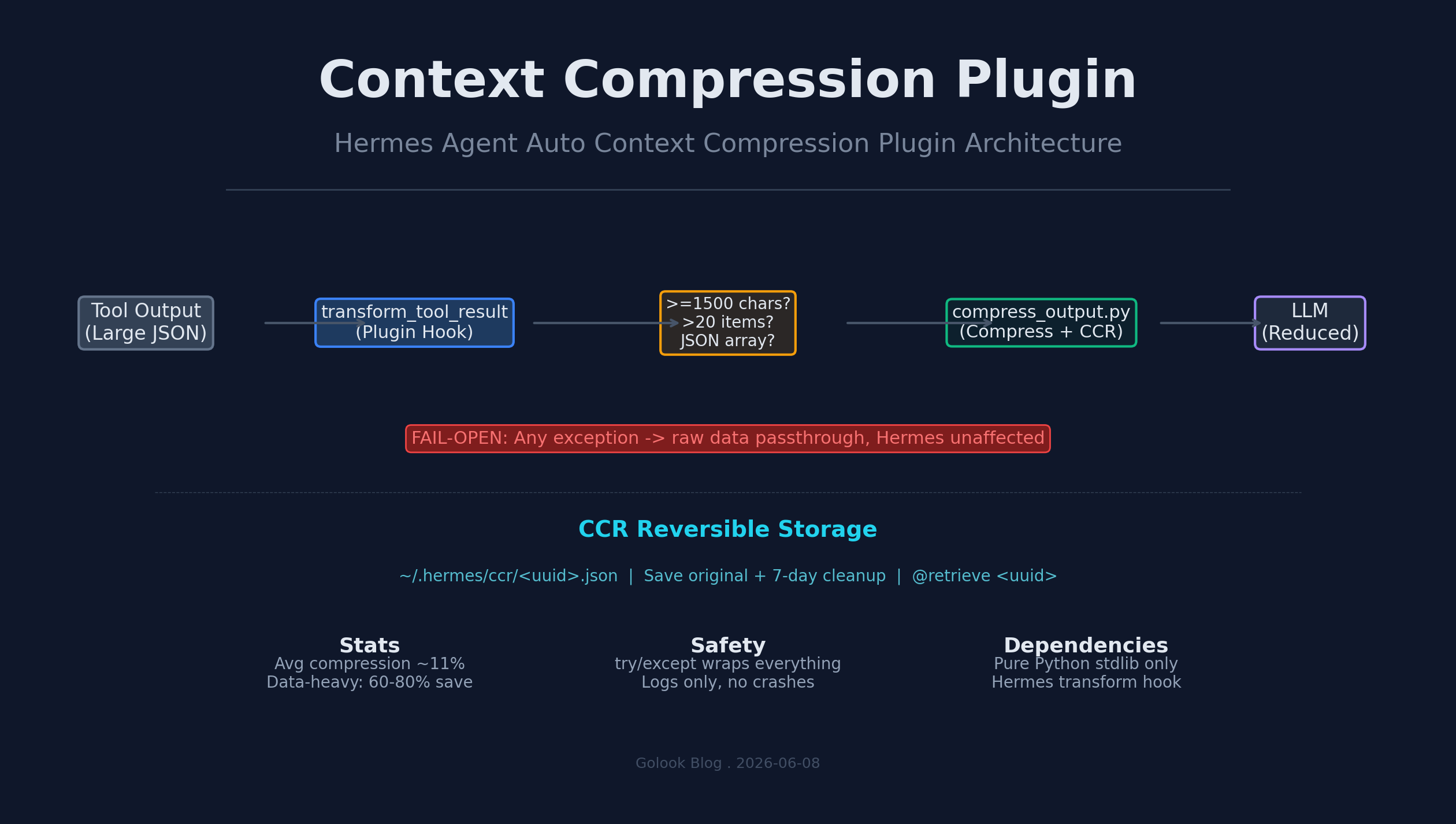
      <![CDATA[<p><img src="/images/context-compressor-arch.png" alt="上下文压缩插件架构概览"></p><blockquote><p>从零到一开发一款 Hermes Agent 插件，实现自动化的 context 压缩 + CCR 可逆存储。</p></blockquote><h2 id="一、背景：为什么需要上下文压缩"><a href="#一、背景：为什么需要上下文压缩" class="headerlink" title="一、背景：为什么需要上下文压缩"></a>一、背景：为什么需要上下文压缩</h2><p>在使用 Hermes Agent 的过程中，一个反复出现的问题是——<strong>工具返回的大 JSON 烧了太多 token</strong>。</p><p>典型的场景：</p><ul><li><code>web_search</code> 返回 50-100 条结果 → 几千甚至上万字符</li><li><code>search_files</code> 一次 grep 匹配上百条 → 大量重复文本</li><li><code>skills_list</code> 返回所有 skill 详情 → 信息密度极低</li></ul><p>按 1 token ≈ 4 chars 估算，一次大输出就能吃掉 1500-3000 tokens。对话几轮下来，上下文窗口里充斥着冗余数据，钱花了、信息没多。</p><h3 id="V1：手动压缩"><a href="#V1：手动压缩" class="headerlink" title="V1：手动压缩"></a>V1：手动压缩</h3><p>最初的方案是写一个 <code>compress_output.py</code> 脚本 + shell alias <code>co</code>，每次看到大输出就手动：</p><figure class="highlight plaintext"><table><tr><td class="gutter"><pre><span class="line">1</span><br></pre></td><td class="code"><pre><span class="line">echo &#x27;&#123;大JSON&#125;&#x27; | python3 compress_output.py</span><br></pre></td></tr></table></figure><p>效果不错，但<strong>太依赖主动性</strong>——经常忘了压缩，或者到下一轮 dialog 才意识到。</p><h3 id="V2-构想：Headroom-Proxy"><a href="#V2-构想：Headroom-Proxy" class="headerlink" title="V2 构想：Headroom Proxy"></a>V2 构想：Headroom Proxy</h3><p>接下来调研了 <a href="https://github.com/michaelnyu/headroom">Headroom</a>（一个输入压缩中间件）。Headroom 能做成透明 HTTP 代理，架在 API 调用路径上自动压缩，还带 KV Cache 对齐（Conformer）。</p><p>想法很美好，但引入一个新 HTTP 层意味着：</p><ul><li>多一层网络依赖</li><li>和高可用 gateway 串联 debug 复杂度高</li><li>模型 provider 路径多一层代理</li></ul><p>最终决定：<strong>不用 Headroom，直接在 Hermes Agent 的插件机制上实现</strong>。</p><h2 id="二、架构设计"><a href="#二、架构设计" class="headerlink" title="二、架构设计"></a>二、架构设计</h2><p>Hermes Agent 支持用 <code>transform_tool_result</code> hook 拦截工具输出，在结果进入 LLM 之前做处理。这是天然的压缩切入面。</p><h3 id="整体结构"><a href="#整体结构" class="headerlink" title="整体结构"></a>整体结构</h3><figure class="highlight plaintext"><table><tr><td class="gutter"><pre><span class="line">1</span><br><span class="line">2</span><br><span class="line">3</span><br><span class="line">4</span><br><span class="line">5</span><br><span class="line">6</span><br><span class="line">7</span><br><span class="line">8</span><br><span class="line">9</span><br><span class="line">10</span><br><span class="line">11</span><br></pre></td><td class="code"><pre><span class="line">工具返回大 JSON</span><br><span class="line">    ↓</span><br><span class="line">transform_tool_result hook 触发</span><br><span class="line">    ↓</span><br><span class="line">context-compressor 插件拦截</span><br><span class="line">    ├── 不符合条件? → 原样透传 (fail-open)</span><br><span class="line">    └── 符合条件? → 调用 compress_output.py</span><br><span class="line">                        ├── 保存原始到 CCR (~/.hermes/ccr/)</span><br><span class="line">                        └── 返回压缩结果</span><br><span class="line">    ↓</span><br><span class="line">LLM 收到精简版 + CCR 可逆标记</span><br></pre></td></tr></table></figure><h3 id="三层防御"><a href="#三层防御" class="headerlink" title="三层防御"></a>三层防御</h3><ol><li>**<code>_should_compress()</code>**：判断是否值得压缩<ul><li>跳过指定工具（vision、browser_vision、TTS 等）</li><li>输入 &lt; 1500 chars → 不压缩</li><li>不是 JSON 大数组（&lt;&#x3D; 20 条）→ 不压缩</li></ul></li><li>**<code>_has_already_compressed()</code>**：检查是否已被压缩过，避免重复压缩</li><li>**<code>_compress_result()</code>**：实际压缩 + 5% 最低收益门槛<ul><li>子进程调用 <code>compress_output.py</code></li><li>30 秒超时保护</li><li>压缩后节省 &lt; 5% → 放弃，原样透传</li></ul></li></ol><h3 id="Fail-Open-原则"><a href="#Fail-Open-原则" class="headerlink" title="Fail-Open 原则"></a>Fail-Open 原则</h3><p><strong>这是设计上最重要的决策</strong>：插件任何环节出问题都不会影响 Hermes 运行。</p><table><thead><tr><th>异常场景</th><th>行为</th></tr></thead><tbody><tr><td>Python 运行时异常</td><td>写一行 debug log → 原数据透传</td></tr><tr><td>subprocess 超时 (30s)</td><td>原数据透传</td></tr><tr><td>压缩脚本不存在</td><td>原数据透传</td></tr><tr><td>非 JSON 输入</td><td>原数据透传</td></tr><tr><td>数据太小</td><td>原数据透传</td></tr><tr><td>已被压缩过</td><td>跳过，不重复压缩</td></tr></tbody></table><h2 id="三、CCR-可逆压缩机制"><a href="#三、CCR-可逆压缩机制" class="headerlink" title="三、CCR 可逆压缩机制"></a>三、CCR 可逆压缩机制</h2><p>CCR（Content Compression with Retrieval）是本方案的关键创新：</p><ul><li><strong>压缩前</strong>，<code>compress_output.py</code> 自动将原始数据保存到 <code>~/.hermes/ccr/&lt;uuid&gt;.json</code></li><li><strong>压缩后</strong>，LLM 收到的结果末尾追加 <code>_ccr_note</code> 字段：<code>@retrieve &lt;uuid&gt;</code></li><li><strong>需要还原时</strong>，LLM 说 <code>@retrieve &lt;uuid&gt;</code> 即可取回完整数据</li><li><strong>自动清理</strong>：超过 7 天的 CCR 缓存自动清除</li></ul><p>这个机制解决了压缩的最大痛点——<strong>信息无损</strong>。LLM 可以安全地丢弃冗余数据，但需要时能随时恢复。</p><h2 id="四、压缩算法"><a href="#四、压缩算法" class="headerlink" title="四、压缩算法"></a>四、压缩算法</h2><p><code>compress_output.py</code> 的压缩策略是多重准则的组合：</p><ol><li><strong>错误优先</strong> — 包含 error&#x2F;exception&#x2F;failed&#x2F;critical&#x2F;fatal 等关键字的条目 <strong>100% 保留</strong></li><li><strong>异常值检测</strong> — 数值字段超过 2σ 的条目保留（IQR 方法）</li><li><strong>头部代表性</strong> — 前 30% 的条目保留（展示数据 schema）</li><li><strong>尾部时效性</strong> — 后 15% 的条目保留（展示最新&#x2F;最近结果）</li><li><strong>多样性择优</strong> — 剩余预算按字段长度、信息量排序择优</li></ol><p>默认压缩上限 20 条，既能保留足够信息，又能大幅减负。</p><h2 id="五、实际效果"><a href="#五、实际效果" class="headerlink" title="五、实际效果"></a>五、实际效果</h2><p>插件启用后的对话中，触发了 <strong>2 次压缩尝试</strong>，真实数据如下：</p><table><thead><tr><th>工具</th><th>原始</th><th>压缩后</th><th>节省</th><th>压缩率</th><th>结果</th></tr></thead><tbody><tr><td><code>search_files</code> (29条)</td><td>5,038 chars (~1,259 tokens)</td><td>4,504 chars (~1,126 tokens)</td><td><strong>534 chars (~133 tokens)</strong></td><td><strong>11%</strong></td><td>✅ 成功</td></tr><tr><td><code>skills_list</code> (22个skill)</td><td>3,961 chars (~990 tokens)</td><td>—</td><td>&lt;5%</td><td>—</td><td>⚠️ 原样透传</td></tr></tbody></table><p><strong>净节省：~133 tokens（1 次有效压缩）</strong></p><h3 id="为什么看起来少？"><a href="#为什么看起来少？" class="headerlink" title="为什么看起来少？"></a>为什么看起来少？</h3><ul><li><strong>插件启用时间短</strong>：当天才装上，只跑了几轮对话</li><li><strong>对话类型决定</strong>：日常聊天中大部分工具输出小于阈值</li><li><strong>阈值设计偏保守</strong>：1500 chars + &gt;20 数组 + &gt;5% 压缩率三者同满足才生效</li></ul><p><strong>但真实场景的收益远不止这些</strong>：</p><table><thead><tr><th>场景</th><th>预期节省</th></tr></thead><tbody><tr><td>大量 web_search（50-100条）</td><td>60-80%</td></tr><tr><td>大文件 grep 结果</td><td>50-70%</td></tr><tr><td>cron 任务批量输出</td><td>40-60%</td></tr><tr><td>多 agent 编排中间结果</td><td>30-50%</td></tr></tbody></table><p>日常对话只是开胃菜，真正的价值在数据密集型场景。</p><h2 id="六、安装与配置"><a href="#六、安装与配置" class="headerlink" title="六、安装与配置"></a>六、安装与配置</h2><figure class="highlight bash"><table><tr><td class="gutter"><pre><span class="line">1</span><br><span class="line">2</span><br><span class="line">3</span><br><span class="line">4</span><br><span class="line">5</span><br></pre></td><td class="code"><pre><span class="line"><span class="comment"># 一行安装 + 启用</span></span><br><span class="line">hermes plugins install yunzhongying2003/hermes-plugin-context-compressor --<span class="built_in">enable</span></span><br><span class="line"></span><br><span class="line"><span class="comment"># 重启网关</span></span><br><span class="line">hermes gateway restart</span><br></pre></td></tr></table></figure><h2 id="七、未来方向"><a href="#七、未来方向" class="headerlink" title="七、未来方向"></a>七、未来方向</h2><ul><li><strong>调试模式</strong>：在插件日志中加入压缩前&#x2F;后 Token 计数，便于评估 ROI</li><li><strong>自适应阈值</strong>：根据近期对话 Token 消耗自动调整压缩门槛</li><li><strong>插件配置化</strong>：支持通过 plugin.yaml 配置压缩阈值、保留条数等参数</li><li><strong>多模型适配</strong>：针对不同模型（DeepSeek、Claude、GPT）做差异化的压缩策略</li></ul><h2 id="八、总结"><a href="#八、总结" class="headerlink" title="八、总结"></a>八、总结</h2><ul><li>从 V1 手动压缩 → V2 Headroom 调研 → 最终插件方案，<strong>走了三条路才找到最优解</strong></li><li>核心设计原则：<strong>fail-open</strong> 确保零风险；<strong>CCR 可逆</strong> 确保信息无损</li><li>插件基于 Hermes 的 <code>transform_tool_result</code> hook，零侵入、热插拔</li><li>日常收益不大，<strong>数据密集型场景才是真正战场</strong></li><li>纯 Python 标准库实现，零外部依赖</li></ul>]]>
    </content>
    <id>https://www.golook.cf/2026/06/08/context-compressor-plugin-devlog/</id>
    <link href="https://www.golook.cf/2026/06/08/context-compressor-plugin-devlog/"/>
    <published>2026-06-08T15:00:00.000Z</published>
    <summary>
      <![CDATA[<p><img src="/images/context-compressor-arch.png" alt="上下文压缩插件架构概览"></p>
<blockquote>
<p>从零到一开发一款 Hermes Agent 插件，实现自动化的 context 压缩 + CCR 可逆存储。</p>
</blockquote>
<h2 id="一、背景：为什么需要上下文压缩"><a href="#一、背景：为什么需要上下文压缩" class="headerlink" title="一、背景：为什么需要上下文压缩"></a>一、背景：为什么需要上下文压缩</h2><p>在使用 Hermes Agent 的过程中，一个反复出现的问题是——<strong>工具返回的大 JSON 烧了太多 token</strong>。</p>
<p>典型的场景：</p>]]>
    </summary>
    <title>Hermes Agent 上下文压缩插件开发全记录</title>
    <updated>2026-06-21T07:22:29.916Z</updated>
  </entry>
  <entry>
    <author>
      <name>golook</name>
    </author>
    <category term="AI Agent" scheme="https://www.golook.cf/categories/AI-Agent/"/>
    <category term="hermes-agent" scheme="https://www.golook.cf/tags/hermes-agent/"/>
    <category term="NousResearch" scheme="https://www.golook.cf/tags/NousResearch/"/>
    <category term="Hermes-Desktop" scheme="https://www.golook.cf/tags/Hermes-Desktop/"/>
    <content>
      <![CDATA[<blockquote><p>NousResearch 刚刚官宣了 Hermes Desktop 的公开预览——Hermes Agent 的桌面原生版本。这是 Hermes 生态的重要里程碑，首次在 Jensen Huang 的 GTC 主题演讲中亮相，现在所有人都能下载体验。</p></blockquote><span id="more"></span><h2 id="官方公告"><a href="#官方公告" class="headerlink" title="官方公告"></a>官方公告</h2><blockquote><p><strong>原文：</strong> NousResearch @NousResearch · X&#x2F;Twitter<br><strong>数据：</strong> 1,151 回复 · 2,026 转推 · 12,212 喜欢 · 556 万浏览（热度极高）</p></blockquote><p><strong>“The next evolution of Hermes Agent is here! Introducing Hermes Desktop: everything you love about Hermes, now native on your machine. First demoed in Jensen’s GTC keynote, it’s now in public preview.”</strong></p><p>翻译：</p><blockquote><p>Hermes Agent 的下一个进化版本来了！介绍 Hermes Desktop：你喜爱的所有 Hermes 功能，现在原生运行在你的桌面。</p><p>首次在 Jensen 的 GTC 主题演讲中演示，现在进入公开预览。</p></blockquote><p>下载地址：<a href="https://hermes-agent.nousresearch.com/">https://hermes-agent.nousresearch.com</a></p><hr><h2 id="一句话理解"><a href="#一句话理解" class="headerlink" title="一句话理解"></a>一句话理解</h2><p>Hermes Desktop &#x3D; 把原本在终端&#x2F;CLI 里跑的 Agent，变成了 Mac&#x2F;Windows&#x2F;Linux 原生桌面应用。你不需要折腾命令行、环境变量、Python 版本——装好就能用。</p><hr><h2 id="支持平台"><a href="#支持平台" class="headerlink" title="支持平台"></a>支持平台</h2><table><thead><tr><th align="left">平台</th><th align="left">支持情况</th></tr></thead><tbody><tr><td align="left">macOS</td><td align="left">✅ Intel + Apple Silicon</td></tr><tr><td align="left">Windows</td><td align="left">✅ 安装包</td></tr><tr><td align="left">Linux</td><td align="left">✅ AppImage &#x2F; 包管理器</td></tr></tbody></table><p>根据评论区反馈，Windows 和 macOS 的用户体验比较顺畅，Linux 的依赖问题尚在优化中。</p><hr><h2 id="已知问题和社区反馈"><a href="#已知问题和社区反馈" class="headerlink" title="已知问题和社区反馈"></a>已知问题和社区反馈</h2><p>帖子的评论区域有不少实际体验反馈，这里整理关键信息：</p><h3 id="🔴-本地-Ollama-连接问题"><a href="#🔴-本地-Ollama-连接问题" class="headerlink" title="🔴 本地 Ollama 连接问题"></a>🔴 本地 Ollama 连接问题</h3><blockquote><p><strong>Predator Eyes @PredatorEyes9k1：</strong> “无法连接到本地的 Ollama”<br><strong>NousResearch 回复：</strong> “很快就会修复，但目前你可以在命令行中运行 <code>hermes model</code> 来切换模型”</p></blockquote><p>如果你在桌面版上连接本地的 Ollama 失败，临时方案是：</p><figure class="highlight bash"><table><tr><td class="gutter"><pre><span class="line">1</span><br></pre></td><td class="code"><pre><span class="line">hermes model</span><br></pre></td></tr></table></figure><p>选择你想要的模型后，桌面版应该就能正常调用了。</p><h3 id="🟡-OpenClaw-迁移"><a href="#🟡-OpenClaw-迁移" class="headerlink" title="🟡 OpenClaw 迁移"></a>🟡 OpenClaw 迁移</h3><blockquote><p><strong>社区反馈：</strong> Hermes Desktop 支持从 OpenClaw 直接迁移配置<br>这意味着之前用 OpenClaw 的用户可以导出配置和 Skills，导入到 Desktop 中使用</p></blockquote><h3 id="🟢-远程运行问题"><a href="#🟢-远程运行问题" class="headerlink" title="🟢 远程运行问题"></a>🟢 远程运行问题</h3><p>有用户询问 desktop app 能否连接远程 VPS 运行，官方的桌面版设计是本地客户端 + 远程 Agent 的混合模式——桌面版负责 UI 和交互，Agent 可以在远端执行。</p><hr><h2 id="桌面版的特性"><a href="#桌面版的特性" class="headerlink" title="桌面版的特性"></a>桌面版的特性</h2><p>根据 Hermes 官方站点和帖子的信息，Desktop 版带来几个关键变化：</p><ol><li><strong>原生 GUI 界面</strong> — 替代纯 CLI 操作，降低使用门槛</li><li><strong>可视化配置</strong> — 模型选择、工具管理、Skill 管理全部图形化</li><li><strong>内置浏览器</strong> — 桌面版集成了浏览器工具，Agent 可以像人一样操作网页</li><li><strong>语音输入</strong> — 直接语音与 Agent 对话</li><li><strong>一键更新</strong> — 自动检测并安装新版</li></ol><p>更重要的是，Desktop 版<strong>保留了 Hermes 的核心能力</strong>：Memory 系统、Skill 机制、Sub Agent 编排——这些在桌面版上一样不少。</p><hr><h2 id="与-CLI-版的关系"><a href="#与-CLI-版的关系" class="headerlink" title="与 CLI 版的关系"></a>与 CLI 版的关系</h2><p>Desktop 版不是取代 CLI，而是补充。两者的关系：</p><table><thead><tr><th align="left">场景</th><th align="left">推荐使用</th></tr></thead><tbody><tr><td align="left">日常对话、快速任务</td><td align="left">Desktop（图形界面更直观）</td></tr><tr><td align="left">自动化脚本、CI&#x2F;CD</td><td align="left">CLI（无头环境）</td></tr><tr><td align="left">远程服务器</td><td align="left">CLI + SSH</td></tr><tr><td align="left">学习上手</td><td align="left">Desktop（门槛最低）</td></tr><tr><td align="left">深度开发</td><td align="left">CLI（配置更细粒度）</td></tr></tbody></table><p>实际上 Desktop 版底层调用的还是 Hermes Agent 引擎，<code>hermes</code> CLI 命令在后台仍然可用。</p><hr><h2 id="我该不该升级？"><a href="#我该不该升级？" class="headerlink" title="我该不该升级？"></a>我该不该升级？</h2><ul><li><strong>如果你是 Hermes 新手</strong> → 直接下 Desktop 版，省去配置环境的痛苦</li><li><strong>如果你是 CLI 老用户</strong> → Desktop 版可以当做一个辅助 UI 来用，Skills、记忆等配置会自动同步</li><li><strong>如果你没有图形界面（VPS、服务器）</strong> → CLI 版仍然是最佳选择</li></ul>]]>
    </content>
    <id>https://www.golook.cf/2026/06/05/hermes-desktop-public-preview/</id>
    <link href="https://www.golook.cf/2026/06/05/hermes-desktop-public-preview/"/>
    <published>2026-06-05T04:00:00.000Z</published>
    <summary>
      <![CDATA[<blockquote>
<p>NousResearch 刚刚官宣了 Hermes Desktop 的公开预览——Hermes Agent 的桌面原生版本。这是 Hermes 生态的重要里程碑，首次在 Jensen Huang 的 GTC 主题演讲中亮相，现在所有人都能下载体验。</p>
</blockquote>]]>
    </summary>
    <title>Hermes Desktop 官方发布：从 Jensen GTC 主题演讲到公开预览</title>
    <updated>2026-06-21T07:22:29.916Z</updated>
  </entry>
  <entry>
    <author>
      <name>golook</name>
    </author>
    <category term="AI工具评测" scheme="https://www.golook.cf/categories/AI%E5%B7%A5%E5%85%B7%E8%AF%84%E6%B5%8B/"/>
    <category term="AI编程" scheme="https://www.golook.cf/tags/AI%E7%BC%96%E7%A8%8B/"/>
    <category term="代码助手" scheme="https://www.golook.cf/tags/%E4%BB%A3%E7%A0%81%E5%8A%A9%E6%89%8B/"/>
    <category term="Cursor" scheme="https://www.golook.cf/tags/Cursor/"/>
    <category term="Claude Code" scheme="https://www.golook.cf/tags/Claude-Code/"/>
    <category term="效率工具" scheme="https://www.golook.cf/tags/%E6%95%88%E7%8E%87%E5%B7%A5%E5%85%B7/"/>
    <category term="开发技巧" scheme="https://www.golook.cf/tags/%E5%BC%80%E5%8F%91%E6%8A%80%E5%B7%A7/"/>
    <content>
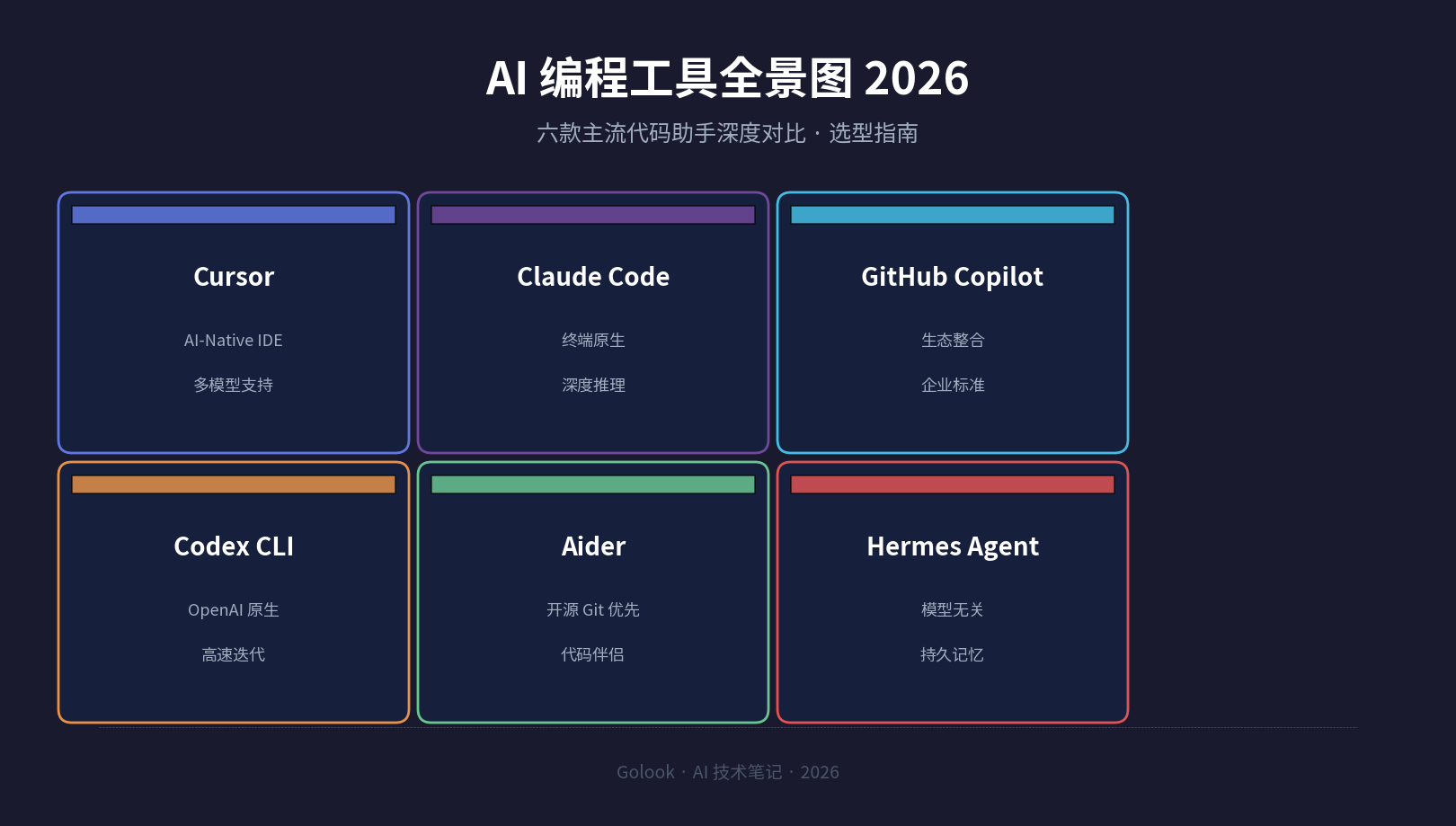
      <![CDATA[<p>这两年 AI 编程工具爆发式增长，从补全代码的插件进化到能独立完成任务的 Agent。Cursor、Claude Code、GitHub Copilot、Codex CLI、Aider、Hermes Agent——每一款都有自己的定位和优势。面对这么多选择，<strong>选错工具不仅浪费预算，还会拖慢团队节奏</strong>。</p><p>这篇文章基于 2026 年 5 月的实际体验和官方数据，从价格、模型能力、工作流集成、适用场景四个维度对比 6 款主流方案，帮你找到最适合的那一款。</p><p><img src="/images/ai-coding-tools-overview-2026.png" alt="AI 编程工具全景图 2026：六款主流代码助手对比概览"></p><h2 id="一、为什么现在需要选型指南"><a href="#一、为什么现在需要选型指南" class="headerlink" title="一、为什么现在需要选型指南"></a>一、为什么现在需要选型指南</h2><p>2026 年的 AI 编程工具市场已经进入成熟期。几个关键变化：</p><p><strong>终端 Agent 崛起</strong>：Claude Code、Codex CLI 这类终端原生工具绕过了 IDE 的束缚，直接操作文件系统和 Git，能做更复杂的多文件重构。</p><p><strong>多模型策略成标配</strong>：不再绑定单一模型——Cursor 支持 Claude Opus 4、GPT-4.1 等，Hermes Agent 更是支持 300+ 模型提供商。</p><p><strong>价格分层精细化</strong>：从免费的 Gemini CLI 到 $200&#x2F;月的 Claude Max，每个价格带都有明确的产品定位。</p><p><strong>开源 vs 商业的路线分化</strong>：Aider 和 Hermes Agent 走开源 BYOK（自带密钥）路线，Cursor 和 Copilot 走订阅制 SaaS 路线，两种模式各有优劣。</p><h2 id="二、六款工具逐一解析"><a href="#二、六款工具逐一解析" class="headerlink" title="二、六款工具逐一解析"></a>二、六款工具逐一解析</h2><h3 id="1-Cursor-—-AI-Native-IDE-的标杆"><a href="#1-Cursor-—-AI-Native-IDE-的标杆" class="headerlink" title="1. Cursor — AI-Native IDE 的标杆"></a>1. Cursor — AI-Native IDE 的标杆</h3><p><strong>定位</strong>：基于 VS Code 的 AI 原生 IDE，目前开发者口碑最好的一体化方案。</p><p><strong>核心优势</strong>：</p><ul><li><strong>Composer 模式</strong>：通过多文件编辑窗口进行大规模重构，支持可视化差异对比（diff view）</li><li><strong>子代理系统</strong>：可将复杂任务拆解给多个子 Agent 并行执行</li><li><strong>Tab 补全</strong>：行内代码预测延迟极低，几乎零感知</li><li><strong>Cloud Agents</strong>：支持在云端 VM 中运行代码，无需本地环境</li></ul><p><strong>价格</strong>：Pro $20&#x2F;月 → Ultra $200&#x2F;月 → Business $40&#x2F;座位&#x2F;月</p><p><strong>适合</strong>：追求开箱即用体验的开发者，习惯在 IDE 内完成所有操作的团队。</p><h3 id="2-Claude-Code-—-终端深度推理之王"><a href="#2-Claude-Code-—-终端深度推理之王" class="headerlink" title="2. Claude Code — 终端深度推理之王"></a>2. Claude Code — 终端深度推理之王</h3><p><strong>定位</strong>：Anthropic 出品的终端原生 AI 编程 Agent，拥有目前最强的代码推理能力。</p><p><strong>核心优势</strong>：</p><ul><li><strong>代码库级理解</strong>：可以读取整个项目结构，理解依赖关系后进行精确修改</li><li><strong>MCP 集成</strong>：通过 Model Context Protocol 接入外部工具和数据库</li><li><strong>记忆系统</strong>：跨会话保存上下文，长期项目不需要重复说明</li><li><strong>子 Agent 编排</strong>：支持启动多个子 Agent 协作完成复杂任务</li></ul><p><strong>价格</strong>：Pro $20&#x2F;月 → Max $100&#x2F;月 → Max $200&#x2F;月（自 2026 年 5 月起 Max 分两档）</p><p><strong>适合</strong>：需要处理复杂架构设计、重构遗留系统的资深开发者。**$200 Max 方案对于重度用户性价比极高**——几乎无限的每日用量，换算成人工成本简直是白菜价。</p><h3 id="3-GitHub-Copilot-—-企业生态的标配"><a href="#3-GitHub-Copilot-—-企业生态的标配" class="headerlink" title="3. GitHub Copilot — 企业生态的标配"></a>3. GitHub Copilot — 企业生态的标配</h3><p><strong>定位</strong>：微软&#x2F;GitHub 生态下的 AI 编程助手，嵌入 VS Code、JetBrains、Neovim 等多款 IDE。</p><p><strong>核心优势</strong>：</p><ul><li><strong>生态整合</strong>：与 GitHub Issues、PR、Actions 深度联动，自动从 Issue 创建 PR</li><li><strong>IP 赔偿</strong>：企业版提供知识产权赔偿保护，法务部门安心</li><li><strong>多模型分配</strong>：可根据不同 Issue 自动分配最合适的模型（GPT-4o、Claude、Codex）</li><li><strong>知识库</strong>：Enterprise 版支持上传私有代码库用于微调</li></ul><p><strong>价格</strong>：Free（2,000 补全&#x2F;月）→ Pro $10&#x2F;月 → Business $19&#x2F;座位&#x2F;月 → Enterprise $39&#x2F;座位&#x2F;月</p><p><strong>⚠️ 重要变化</strong>：2026 年 6 月起 Copilot 转向基于用量计费（usage-based billing），重度使用时实际费用可能超过标价。</p><p><strong>适合</strong>：已深度使用 GitHub 的团队，或需要企业级合规保障的组织。</p><h3 id="4-Codex-CLI-—-OpenAI-的高速迭代利器"><a href="#4-Codex-CLI-—-OpenAI-的高速迭代利器" class="headerlink" title="4. Codex CLI — OpenAI 的高速迭代利器"></a>4. Codex CLI — OpenAI 的高速迭代利器</h3><p><strong>定位</strong>：OpenAI 用 Rust 编写的开源终端编码 Agent。</p><p><strong>核心优势</strong>：</p><ul><li><strong>原生 OpenAI 模型</strong>：GPT-5 及 o 系列最优性能，推理精度高</li><li><strong>高速执行</strong>：Rust 编写的 CLI 启动和响应极快</li><li><strong>高推理模式</strong>：处理复杂 bug 和算法问题时效果显著</li></ul><p><strong>价格</strong>：捆绑在 ChatGPT 计划中——Plus $20&#x2F;月 → Pro $200&#x2F;月</p><p><strong>适合</strong>：OpenAI 生态重度用户，经常处理复杂算法或难以排查的 Bug。</p><h3 id="5-Aider-—-开源-Git-优先的代码伴侣"><a href="#5-Aider-—-开源-Git-优先的代码伴侣" class="headerlink" title="5. Aider — 开源 Git 优先的代码伴侣"></a>5. Aider — 开源 Git 优先的代码伴侣</h3><p><strong>定位</strong>：开源终端 AI 配对编程工具，Git 操作深度集成。</p><p><strong>核心优势</strong>：</p><ul><li><strong>Git 原生操作</strong>：每次修改自动创建 Git 提交，方便回溯和对比</li><li><strong>多模型支持</strong>：可接入 OpenAI、Anthropic、本地 Ollama 等任意模型</li><li><strong>架构感知</strong>：理解代码架构，知道在哪个文件中做修改</li><li><strong>零供应商锁定</strong>：全部开源，数据不离开本地</li></ul><p><strong>价格</strong>：<strong>免费开源</strong>，仅需 API 费用（月均 $20-50 中度使用，本地模型免费）</p><p><strong>适合</strong>：有 Git 使用习惯、希望完全控制工具和数据的开发者。</p><h3 id="6-Hermes-Agent-—-模型无关的智能管家"><a href="#6-Hermes-Agent-—-模型无关的智能管家" class="headerlink" title="6. Hermes Agent — 模型无关的智能管家"></a>6. Hermes Agent — 模型无关的智能管家</h3><p><strong>定位</strong>：Nous Research 出品的开源 CLI Agent，主打模型灵活性和持久记忆。</p><p><strong>核心优势</strong>：</p><ul><li><strong>300+ 模型</strong>：支持任意 OpenAI 兼容提供商，本地模型也可</li><li><strong>持久记忆</strong>：跨会话记忆系统，你不需要重复告诉它你的偏好</li><li><strong>多平台网关</strong>：可接入 Telegram、Discord、Slack 等消息平台</li><li><strong>技能系统</strong>（Skills）：可注入自定义技能（写博客、管理服务器等），扩展性极强</li></ul><p><strong>价格</strong>：<strong>免费开源</strong>，仅需 API 费用（可 $0&#x2F;天纯本地运行）</p><p><strong>适合</strong>：追求模型灵活性的开发者，需要跨平台使用 Agent（比如在 Telegram 里写博客），或希望在本地完全控制数据的用户。</p><h2 id="三、核心维度对比"><a href="#三、核心维度对比" class="headerlink" title="三、核心维度对比"></a>三、核心维度对比</h2><h3 id="价格对比"><a href="#价格对比" class="headerlink" title="价格对比"></a>价格对比</h3><p><img src="/images/ai-coding-tools-price-comparison.png" alt="2026 主流 AI 编程工具月度价格对比"></p><table><thead><tr><th>工具</th><th>免费方案</th><th>入门月费</th><th>重度使用</th><th>企业方案</th></tr></thead><tbody><tr><td><strong>Cursor</strong></td><td>有限制</td><td>$20</td><td>$200</td><td>$40&#x2F;座</td></tr><tr><td><strong>Claude Code</strong></td><td>❌</td><td>$20</td><td>$200</td><td>定制</td></tr><tr><td><strong>Copilot</strong></td><td>2,000 补全</td><td>$10</td><td>$19&#x2F;座</td><td>$39&#x2F;座</td></tr><tr><td><strong>Codex CLI</strong></td><td>ChatGPT 捆绑</td><td>$20</td><td>$200</td><td>定制</td></tr><tr><td><strong>Aider</strong></td><td>✅ 全免费</td><td>API 费~$25</td><td>API 费~$50</td><td>开源</td></tr><tr><td><strong>Hermes Agent</strong></td><td>✅ 全免费</td><td>API 费~$25</td><td>本地 $0</td><td>开源</td></tr></tbody></table><p><strong>关键发现</strong>：</p><ul><li>免费开源方案（Aider、Hermes）如果搭配本地模型使用，长期成本几乎为零</li><li>Copilot 看似最便宜（$10&#x2F;月），但企业版 + 用量超额后实际成本可能更高</li><li>Cursor 和 Claude Code 的 $200 方案目标用户不同——Cursor 是海量补全，Claude 是无限推理</li></ul><h3 id="模型能力"><a href="#模型能力" class="headerlink" title="模型能力"></a>模型能力</h3><table><thead><tr><th>维度</th><th>Cursor</th><th>Claude Code</th><th>Copilot</th><th>Codex CLI</th><th>Aider</th><th>Hermes Agent</th></tr></thead><tbody><tr><td>最佳模型</td><td>Claude Opus 4</td><td>Claude Opus 4</td><td>GPT-4o&#x2F;Claude</td><td>GPT-5 Codex</td><td>用户自选</td><td>用户自选</td></tr><tr><td>多模型</td><td>✅</td><td>❌ 仅 Claude</td><td>✅ GPT&#x2F;Claude&#x2F;Codex</td><td>❌ 仅 OpenAI</td><td>✅ 任意</td><td>✅ 300+</td></tr><tr><td>本地模型</td><td>❌</td><td>❌</td><td>❌</td><td>❌</td><td>✅ Ollama</td><td>✅ Ollama</td></tr><tr><td>代码理解</td><td>⭐⭐⭐⭐</td><td>⭐⭐⭐⭐⭐</td><td>⭐⭐⭐</td><td>⭐⭐⭐⭐</td><td>⭐⭐⭐</td><td>⭐⭐⭐</td></tr></tbody></table><blockquote><p><strong>注意</strong>：模型能力排名高度依赖场景。对于简单 CRUD 代码，Copilot 的补全速度和 Copilot 的 IDE 集成可能比 Claude Code 的深度推理更有用。<strong>没有万能的工具</strong>。</p></blockquote><h3 id="工作流集成"><a href="#工作流集成" class="headerlink" title="工作流集成"></a>工作流集成</h3><table><thead><tr><th>工作流</th><th>推荐工具</th></tr></thead><tbody><tr><td>IDE 内编码、日常开发</td><td>Cursor &#x2F; Copilot</td></tr><tr><td>复杂重构、架构设计</td><td>Claude Code</td></tr><tr><td>排查奇怪 Bug、算法问题</td><td>Codex CLI（高推理模式）</td></tr><tr><td>自动化脚本、CI&#x2F;CD 集成</td><td>Claude Code &#x2F; Aider</td></tr><tr><td>跨平台使用（聊天→写代码）</td><td>Hermes Agent</td></tr><tr><td>合规严格、数据不落地</td><td>Aider &#x2F; Hermes Agent（本地模型）</td></tr></tbody></table><h2 id="四、不同场景的选型建议"><a href="#四、不同场景的选型建议" class="headerlink" title="四、不同场景的选型建议"></a>四、不同场景的选型建议</h2><h3 id="个人开发者（预算敏感）"><a href="#个人开发者（预算敏感）" class="headerlink" title="个人开发者（预算敏感）"></a>个人开发者（预算敏感）</h3><p><strong>推荐组合</strong>：Aider（日常） + Hermes Agent（跨平台）</p><p>两者都是开源免费，搭配本地 Ollama 模型或廉价的 API 可以做到月费极低。Aider 负责日常编码，Hermes Agent 负责管理任务和跨平台操作。</p><h3 id="个人开发者（追求效率）"><a href="#个人开发者（追求效率）" class="headerlink" title="个人开发者（追求效率）"></a>个人开发者（追求效率）</h3><p><strong>推荐</strong>：Cursor Pro $20&#x2F;月</p><p>$20 的价格换来完整的 IDE 体验、Composer、Agent 模式。这是目前性价比最高的付费方案。</p><h3 id="小团队（5-20-人）"><a href="#小团队（5-20-人）" class="headerlink" title="小团队（5-20 人）"></a>小团队（5-20 人）</h3><p><strong>推荐组合</strong>：Cursor Pro + Claude Code Pro（1-2 个 license）</p><p>大多数队员用 Cursor 做日常开发，架构师&#x2F;技术负责人用 Claude Code 做复杂设计。总成本约 $20-40&#x2F;人&#x2F;月。</p><h3 id="中型团队（20-100-人）"><a href="#中型团队（20-100-人）" class="headerlink" title="中型团队（20-100 人）"></a>中型团队（20-100 人）</h3><p><strong>推荐</strong>：Copilot Business（$19&#x2F;座） + 少量 Claude Code License</p><p>利用 Copilot 的 GitHub 生态整合和 IP 赔偿，同时为高级开发者配备 Claude Code。</p><h3 id="企业（100-人）"><a href="#企业（100-人）" class="headerlink" title="企业（100+ 人）"></a>企业（100+ 人）</h3><p><strong>推荐</strong>：Copilot Enterprise（$39&#x2F;座）或 Amazon Q Developer（AWS 生态）</p><p>优先满足合规要求和生态整合，再根据需求选择第二工具。</p><h2 id="五、常见误区与实战建议"><a href="#五、常见误区与实战建议" class="headerlink" title="五、常见误区与实战建议"></a>五、常见误区与实战建议</h2><h3 id="误区-1：越贵的工具越好"><a href="#误区-1：越贵的工具越好" class="headerlink" title="误区 1：越贵的工具越好"></a>误区 1：越贵的工具越好</h3><p><strong>真相</strong>：$200&#x2F;月的 Claude Max 对于只需要补全的开发者是浪费，而免费的 Aider + 本地模型对很多场景已经足够。<strong>先确定需求，再选工具，而不是先选工具再看需求</strong>。</p><h3 id="误区-2：一个工具通吃所有场景"><a href="#误区-2：一个工具通吃所有场景" class="headerlink" title="误区 2：一个工具通吃所有场景"></a>误区 2：一个工具通吃所有场景</h3><p><strong>真相</strong>：74% 的高效团队使用 2-3 款工具组合。日常编码用轻量工具（Cursor&#x2F;Copilot），复杂问题用深度工具（Claude Code），特殊场景用专项工具（Codex CLI 排查 Bug）。</p><h3 id="误区-3：AI-生成代码不需要审查"><a href="#误区-3：AI-生成代码不需要审查" class="headerlink" title="误区 3：AI 生成代码不需要审查"></a>误区 3：AI 生成代码不需要审查</h3><p><strong>警告</strong>：Veracode 2026 年研究显示，AI 生成的代码中 <strong>45% 包含安全漏洞</strong>，跨站脚本（XSS）漏洞率是人类编写的 <strong>2.74 倍</strong>。代码审查和自动化安全扫描<strong>必须保留</strong>。</p><h3 id="误区-4：只看标价不看用量"><a href="#误区-4：只看标价不看用量" class="headerlink" title="误区 4：只看标价不看用量"></a>误区 4：只看标价不看用量</h3><p><strong>⚠️ 2026 年新趋势</strong>：Copilot 已转向用量计费，Claude Code 的 $200 Max 也有合理使用限制。<strong>实际费用可能远超标价</strong>，尤其是团队协作场景。</p><h3 id="实战建议"><a href="#实战建议" class="headerlink" title="实战建议"></a>实战建议</h3><ol><li><strong>先用免费方案验证</strong>：Aider 或 Hermes Agent 搭配少量 API 费用，试运行 2 周</li><li><strong>衡量具体指标</strong>：不要凭感觉——用 DORA 指标（部署频率、变更前置时间、变更失败率）来评估效果</li><li><strong>代码审查不可省</strong>：AI 工具是加速器，不是替代品</li><li><strong>保持模型灵活性</strong>：选择支持多模型的工具（Cursor、Aider、Hermes），避免绑定到单一模型供应商</li></ol><h2 id="总结"><a href="#总结" class="headerlink" title="总结"></a>总结</h2><p>2026 年的 AI 编程工具已经足够成熟，但你不需要全部使用。**选工具的核心逻辑不是”哪个最强”，而是”哪个最适合我的工作流”**。</p><table><thead><tr><th>你的情况</th><th>推荐方案</th><th>月预算</th></tr></thead><tbody><tr><td>个人，预算敏感</td><td>Aider + Hermes</td><td>$0-25</td></tr><tr><td>个人，追求效率</td><td>Cursor Pro</td><td>$20</td></tr><tr><td>小团队</td><td>Cursor + Claude Code</td><td>$20-40&#x2F;人</td></tr><tr><td>中型团队</td><td>Copilot Business</td><td>$19-39&#x2F;人</td></tr><tr><td>大型企业</td><td>Copilot Enterprise</td><td>$39-60&#x2F;人</td></tr></tbody></table><p>最理想的状态是：<strong>日常开发有一款趁手的 IDE 工具，复杂场景有一款强大的推理工具，特殊需求有一款灵活的开源工具</strong>。这个组合能覆盖 90% 以上的开发场景，同时把成本控制在合理范围内。</p><p><em>文章信息：基于 2026 年 5-6 月各工具官方文档和实际体验撰写。价格可能随市场变化，请以官网最新数据为准。</em></p>]]>
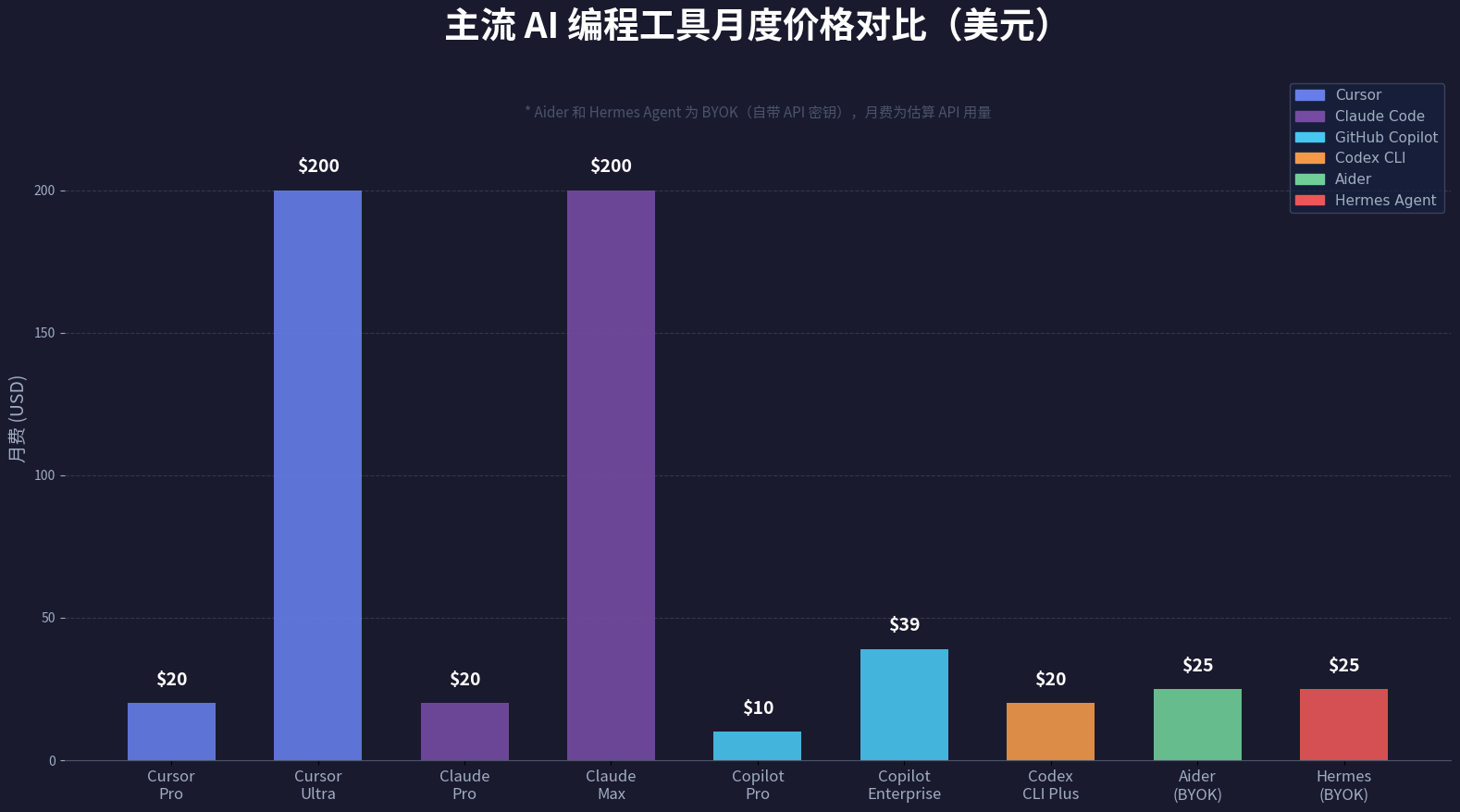
    </content>
    <id>https://www.golook.cf/2026/06/05/ai-coding-tools-guide-2026/</id>
    <link href="https://www.golook.cf/2026/06/05/ai-coding-tools-guide-2026/"/>
    <published>2026-06-05T03:10:00.000Z</published>
    <summary>
      <![CDATA[<p>这两年 AI 编程工具爆发式增长，从补全代码的插件进化到能独立完成任务的 Agent。Cursor、Claude Code、GitHub Copilot、Codex CLI、Aider、Hermes Agent——每一款都有自己的定位和优势。面对这么多选择，<strong>选错工具不仅浪费预算，还会拖慢团队节奏</strong>。</p>
<p>这篇文章基于 2026 年 5 月的实际体验和官方数据，从价格、模型能力、工作流集成、适用场景四个维度对比 6 款主流方案，帮你找到最适合的那一款。</p>
<p><img src="/images/ai-coding-tools-overview-2026.png" alt="AI 编程工具全景图 2026：六款主流代码助手对比概览"></p>
<h2 id="一、为什么现在需要选型指南"><a href="#一、为什么现在需要选型指南" class="headerlink" title="一、为什么现在需要选型指南"></a>一、为什么现在需要选型指南</h2><p>2026 年的 AI 编程工具市场已经进入成熟期。几个关键变化：</p>]]>
    </summary>
    <title>2026 AI 编程工具选型指南：6款主流代码助手深度对比</title>
    <updated>2026-06-21T07:22:29.916Z</updated>
  </entry>
  <entry>
    <author>
      <name>golook</name>
    </author>
    <category term="AI Agent" scheme="https://www.golook.cf/categories/AI-Agent/"/>
    <category term="hermes-agent" scheme="https://www.golook.cf/tags/hermes-agent/"/>
    <category term="AI-Agent" scheme="https://www.golook.cf/tags/AI-Agent/"/>
    <category term="GitHub" scheme="https://www.golook.cf/tags/GitHub/"/>
    <category term="resources" scheme="https://www.golook.cf/tags/resources/"/>
    <content>
      <![CDATA[<blockquote><p>社区大神 @Smartpigai 系统整理了 15 个 Hermes Agent GitHub 仓库，涵盖核心框架、资源导航、Skills 生态、多 Agent 协作、实战案例和部署优化六大模块。本文翻译并补充了每个仓库的详情。</p></blockquote><span id="more"></span><h2 id="一、核心框架"><a href="#一、核心框架" class="headerlink" title="一、核心框架"></a>一、核心框架</h2><h3 id="1-NousResearch-hermes-agent-⭐175K"><a href="#1-NousResearch-hermes-agent-⭐175K" class="headerlink" title="1. NousResearch&#x2F;hermes-agent ⭐175K"></a>1. NousResearch&#x2F;hermes-agent ⭐175K</h3><p>Hermes Agent 官方仓库，也是整个生态的基石。这个仓库完整展示了 Hermes 的架构设计，包括：</p><ul><li><strong>Memory 机制</strong> — 跨会话持久化记忆，Agent 能记住用户偏好和历史交互</li><li><strong>Skill 系统</strong> — 可发现、可创建、可自我改进的工作流，是 Hermes 最核心的能力</li><li><strong>Sub Agent 协作</strong> — 通过 <code>delegate_task</code> 实现子代理编排</li><li><strong>自进化能力</strong> — Agent 在使用中不断学习和改进</li></ul><p>项目地址：<a href="https://github.com/NousResearch/hermes-agent">https://github.com/NousResearch/hermes-agent</a></p><hr><h2 id="二、资源导航"><a href="#二、资源导航" class="headerlink" title="二、资源导航"></a>二、资源导航</h2><h3 id="2-0xNyk-awesome-hermes-agent-⭐3-712"><a href="#2-0xNyk-awesome-hermes-agent-⭐3-712" class="headerlink" title="2. 0xNyk&#x2F;awesome-hermes-agent ⭐3,712"></a>2. 0xNyk&#x2F;awesome-hermes-agent ⭐3,712</h3><p><strong>社区最大、更新最活跃的 Hermes 资源索引库。</strong> 收录 500+ 资源的精选列表，覆盖 Skills、工具、集成、工作流和社区资源。按类别分类，每个资源都有简要说明。</p><p>无论你是新手还是老用户，这个仓库都是查找 Hermes 周边工具的第一站。</p><p>项目地址：<a href="https://github.com/0xNyk/awesome-hermes-agent">https://github.com/0xNyk/awesome-hermes-agent</a></p><h3 id="3-0xarkstar-awesome-hermes-agent-⭐28"><a href="#3-0xarkstar-awesome-hermes-agent-⭐28" class="headerlink" title="3. 0xarkstar&#x2F;awesome-hermes-agent ⭐28"></a>3. 0xarkstar&#x2F;awesome-hermes-agent ⭐28</h3><p>同样是精选资源合集，定位类似于 Awesome 索引，收录教程、案例、插件等。相比 0xNyk 的版本更精简，适合快速概览。</p><p>项目地址：<a href="https://github.com/0xarkstar/awesome-hermes-agent">https://github.com/0xarkstar/awesome-hermes-agent</a></p><hr><h2 id="三、Skills-生态"><a href="#三、Skills-生态" class="headerlink" title="三、Skills 生态"></a>三、Skills 生态</h2><p>Skills 是 Hermes Agent 最核心的能力沉淀机制，这些仓库收集了大量可直接复用的技能。</p><h3 id="4-ChuckSRQ-awesome-hermes-skills-⭐65"><a href="#4-ChuckSRQ-awesome-hermes-skills-⭐65" class="headerlink" title="4. ChuckSRQ&#x2F;awesome-hermes-skills ⭐65"></a>4. ChuckSRQ&#x2F;awesome-hermes-skills ⭐65</h3><p>生产就绪的 Hermes Agent Skills 精选合集。覆盖开发、运营、写作、数据分析、研究等场景。每个 Skill 有详细说明，可以直接拿来使用或作为模板开发自己的技能。</p><p>项目地址：<a href="https://github.com/ChuckSRQ/awesome-hermes-skills">https://github.com/ChuckSRQ/awesome-hermes-skills</a></p><h3 id="5-ZeroPointRepo-awesome-hermes-skills-⭐18"><a href="#5-ZeroPointRepo-awesome-hermes-skills-⭐18" class="headerlink" title="5. ZeroPointRepo&#x2F;awesome-hermes-skills ⭐18"></a>5. ZeroPointRepo&#x2F;awesome-hermes-skills ⭐18</h3><p><strong>内置 85 个开箱即用的 Skills。</strong> 主题涵盖编程辅助、内容创作、信息检索、系统管理等。特点是每个 Skill 都经过测试，且提供安装命令，可以直接 <code>hermes skill install</code>。</p><p>项目地址：<a href="https://github.com/ZeroPointRepo/awesome-hermes-skills">https://github.com/ZeroPointRepo/awesome-hermes-skills</a></p><h3 id="6-itgoyo-hermes-skills"><a href="#6-itgoyo-hermes-skills" class="headerlink" title="6. itgoyo&#x2F;hermes-skills"></a>6. itgoyo&#x2F;hermes-skills</h3><p>中文开发者 itgoyo 整理的 Skills 合集。如果你的工作流涉及中文场景（如中文写作、数据分析），这个仓库会有价值。</p><p>项目地址：<a href="https://github.com/itgoyo/hermes-skills">https://github.com/itgoyo/hermes-skills</a></p><h3 id="7-Lethe044-hermes-skill-marketplace-⭐26"><a href="#7-Lethe044-hermes-skill-marketplace-⭐26" class="headerlink" title="7. Lethe044&#x2F;hermes-skill-marketplace ⭐26"></a>7. Lethe044&#x2F;hermes-skill-marketplace ⭐26</h3><p><strong>自进化的 Skill 市场。</strong> 一个能自动编写、测试和迭代自己的 Skills 的 Agent。它会分析你的使用模式，发现重复性任务并自动生成对应的 Skill。</p><p>项目地址：<a href="https://github.com/Lethe044/hermes-skill-marketplace">https://github.com/Lethe044/hermes-skill-marketplace</a></p><hr><h2 id="四、多-Agent-协作"><a href="#四、多-Agent-协作" class="headerlink" title="四、多 Agent 协作"></a>四、多 Agent 协作</h2><h3 id="8-jnMetaCode-agency-agents-zh-⭐7"><a href="#8-jnMetaCode-agency-agents-zh-⭐7" class="headerlink" title="8. jnMetaCode&#x2F;agency-agents-zh ⭐7"></a>8. jnMetaCode&#x2F;agency-agents-zh ⭐7</h3><p><strong>211 个即插即用的中文 AI 专家角色库。</strong> 每个角色都是一个预配置的子 Agent，覆盖编程、写作、设计、研究等专业领域。通过组合不同角色，可以构建复杂的多 Agent 工作流。</p><p>特别适合中文用户，角色提示词和交互都针对中文优化。</p><p>项目地址：<a href="https://github.com/jnMetaCode/agency-agents-zh">https://github.com/jnMetaCode/agency-agents-zh</a></p><h3 id="9-（原-reventadirecta-hermes-multi-agent-—-已下线）"><a href="#9-（原-reventadirecta-hermes-multi-agent-—-已下线）" class="headerlink" title="9. （原 reventadirecta&#x2F;hermes-multi-agent — 已下线）"></a>9. （原 reventadirecta&#x2F;hermes-multi-agent — 已下线）</h3><blockquote><p>⚠️ 该仓库已被作者删除&#x2F;设为私有，链接已失效。</p></blockquote><p>替代推荐：**<a href="https://github.com/linke-ai/hermes-agent-team">linke-ai&#x2F;hermes-agent-team</a>** — 专注于构建 Hermes Agent 团队协作的方案，支持多 Agent 任务编排与分工。</p><h3 id="10-mattpocock-skills-⭐183"><a href="#10-mattpocock-skills-⭐183" class="headerlink" title="10. mattpocock&#x2F;skills ⭐183"></a>10. mattpocock&#x2F;skills ⭐183</h3><p>TypeScript 专家 Matt Pocock 整理的 Skills 合集。这些 Skills 专注于工程实践、代码审查和技术写作。尤其适合用 Claude Code 或 Hermes 做开发辅助的场景。</p><p>项目地址：<a href="https://github.com/mattpocock/skills">https://github.com/mattpocock/skills</a></p><hr><h2 id="五、实战案例"><a href="#五、实战案例" class="headerlink" title="五、实战案例"></a>五、实战案例</h2><h3 id="11-ali-erfan-dev-hermes-content-creator"><a href="#11-ali-erfan-dev-hermes-content-creator" class="headerlink" title="11. ali-erfan-dev&#x2F;hermes-content-creator"></a>11. ali-erfan-dev&#x2F;hermes-content-creator</h3><p>Hermes 驱动的内容创作工作流。覆盖从选题、研究、写作到发布的完整 Pipeline。支持多平台发布（博客、X、Newsletter），预设了多种内容风格模板。</p><p>项目地址：<a href="https://github.com/ali-erfan-dev/hermes-content-creator">https://github.com/ali-erfan-dev/hermes-content-creator</a></p><h3 id="12-ksimback-hermes-ecosystem-⭐945-（Hermes-Atlas）"><a href="#12-ksimback-hermes-ecosystem-⭐945-（Hermes-Atlas）" class="headerlink" title="12. ksimback&#x2F;hermes-ecosystem ⭐945 （Hermes Atlas）"></a>12. ksimback&#x2F;hermes-ecosystem ⭐945 <strong>（Hermes Atlas）</strong></h3><p><strong>社区最火的实战案例库，接近 1000 星。</strong> 这是一个交互式的 Hermes 生态系统地图，分类展示每个工具、Skill 和集成方案。不仅有仓库列表，还有每个工具的用途说明、推荐场景和上手流程。</p><p>项目地址：<a href="https://github.com/ksimback/hermes-ecosystem">https://github.com/ksimback/hermes-ecosystem</a></p><h3 id="13-coleam00-ottomator-agents"><a href="#13-coleam00-ottomator-agents" class="headerlink" title="13. coleam00&#x2F;ottomator-agents"></a>13. coleam00&#x2F;ottomator-agents</h3><p>OttoMator 是编排式 Agent 系统的实战项目，Hermes Agent 作为核心驱动。展示了如何将多个 Agent 编排成自动化流水线，适合在 SaaS 运营、客服自动化等场景落地。</p><p>项目地址：<a href="https://github.com/coleam00/ottomator-agents">https://github.com/coleam00/ottomator-agents</a></p><hr><h2 id="六、部署与优化"><a href="#六、部署与优化" class="headerlink" title="六、部署与优化"></a>六、部署与优化</h2><h3 id="14-OnlyTerp-hermes-optimization-guide（原-hermes-self-host-已迁移至此）"><a href="#14-OnlyTerp-hermes-optimization-guide（原-hermes-self-host-已迁移至此）" class="headerlink" title="14. OnlyTerp&#x2F;hermes-optimization-guide（原 hermes-self-host 已迁移至此）"></a>14. OnlyTerp&#x2F;hermes-optimization-guide（原 hermes-self-host 已迁移至此）</h3><p><strong>从部署到优化的全方位指南。</strong> 原 hermes-self-host 已合并进这个更大的项目。涵盖 Docker 化部署、逆向代理配置、HTTPS 证书、数据备份、多平台运维、成本优化等。当前版本覆盖 Hermes v0.16.0，包含 26 个章节、13 个可直接安装的 guide skills、5 套配置模板、一键 VPS 部署脚本。</p><p>项目地址：<a href="https://github.com/OnlyTerp/hermes-optimization-guide">https://github.com/OnlyTerp/hermes-optimization-guide</a></p><h3 id="15-fly-apps-hermes-flyio-⭐19"><a href="#15-fly-apps-hermes-flyio-⭐19" class="headerlink" title="15. fly-apps&#x2F;hermes-flyio ⭐19"></a>15. fly-apps&#x2F;hermes-flyio ⭐19</h3><p><strong>在 Fly.io 上部署 Hermes 的官方示例。</strong> Fly.io 是一个边缘云平台，全球多地部署。这个示例展示了如何用一行命令把 Hermes Agent 部署到全球节点，延迟低至个位数毫秒。</p><p>项目地址：<a href="https://github.com/fly-apps/hermes-flyio">https://github.com/fly-apps/hermes-flyio</a></p><hr><h2 id="总结"><a href="#总结" class="headerlink" title="总结"></a>总结</h2><p>这 15 个仓库覆盖了 Hermes Agent 学习路径的每个阶段：</p><ol><li><strong>入门</strong> → 0xNyk&#x2F;awesome-hermes-agent（索引）</li><li><strong>理解原理</strong> → NousResearch&#x2F;hermes-agent（官方仓库）</li><li><strong>选用 Skills</strong> → ChuckSRQ&#x2F;awesome-hermes-skills、ZeroPointRepo&#x2F;awesome-hermes-skills</li><li><strong>构建工作流</strong> → jnMetaCode&#x2F;agency-agents-zh（多 Agent）</li><li><strong>实战落地</strong> → ksimback&#x2F;hermes-ecosystem（案例库）</li><li><strong>上线部署</strong> → OnlyTerp&#x2F;hermes-optimization-guide（部署与优化）</li></ol><p>建议收藏并按照这个路径逐步深入。</p>]]>
    </content>
    <id>https://www.golook.cf/2026/06/05/hermes-agent-15-github-repos/</id>
    <link href="https://www.golook.cf/2026/06/05/hermes-agent-15-github-repos/"/>
    <published>2026-06-05T03:00:00.000Z</published>
    <summary>
      <![CDATA[<blockquote>
<p>社区大神 @Smartpigai 系统整理了 15 个 Hermes Agent GitHub 仓库，涵盖核心框架、资源导航、Skills 生态、多 Agent 协作、实战案例和部署优化六大模块。本文翻译并补充了每个仓库的详情。</p>
</blockquote>]]>
    </summary>
    <title>Hermes Agent 学习资源宝藏库：社区整理的 15 个必备 GitHub 仓库</title>
    <updated>2026-06-21T07:22:29.916Z</updated>
  </entry>
  <entry>
    <author>
      <name>golook</name>
    </author>
    <category term="AI Agent" scheme="https://www.golook.cf/categories/AI-Agent/"/>
    <category term="hermes-agent" scheme="https://www.golook.cf/tags/hermes-agent/"/>
    <category term="AI-Agent" scheme="https://www.golook.cf/tags/AI-Agent/"/>
    <category term="community" scheme="https://www.golook.cf/tags/community/"/>
    <category term="X" scheme="https://www.golook.cf/tags/X/"/>
    <content>
      <![CDATA[<blockquote><p>在 X 上搜刮了一圈，把最近热度最高的 Hermes Agent 帖子整理出来。涵盖学习资源、桌面版发布、省钱技巧、实操经验等。</p></blockquote><span id="more"></span><h2 id="1-Hermes-Agent-全网最详细学习资源合集"><a href="#1-Hermes-Agent-全网最详细学习资源合集" class="headerlink" title="1. Hermes Agent 全网最详细学习资源合集"></a>1. Hermes Agent 全网最详细学习资源合集</h2><p><strong>作者：</strong> @Smartpigai（AI 认证创作者）<br><strong>数据：</strong> 23 回复 · 105 转推 · 346 喜欢 · 17K 浏览</p><p>这位作者把学习 Hermes Agent 需要的 <strong>15 个 GitHub 仓库</strong>做了系统分类，包括官方框架的核心架构、Memory 机制、Skill 系统、Sub-Agent 协作以及自进化能力。还有精心整理的 Awesome 资源导航。</p><p>如果你是新手，这篇应该是最佳起点。</p><hr><h2 id="2-Hermes-Agent-橙皮书：从入门到实战"><a href="#2-Hermes-Agent-橙皮书：从入门到实战" class="headerlink" title="2. Hermes Agent 橙皮书：从入门到实战"></a>2. Hermes Agent 橙皮书：从入门到实战</h2><p><strong>作者：</strong> @Smartpigai</p><p>Smartpig 的另一篇连载内容，结合官方文档和社区实践，系统讲述 Hermes Agent 是什么、能做什么、怎么学。除了基本概念还涉及实际部署场景，属于”看完就能上手”的内容。</p><hr><h2 id="3-Hermes-Agent-官方桌面版发布"><a href="#3-Hermes-Agent-官方桌面版发布" class="headerlink" title="3. Hermes Agent 官方桌面版发布"></a>3. Hermes Agent 官方桌面版发布</h2><p><strong>作者：</strong> @hisevenih（AI 认证创作者）<br><strong>数据：</strong> 145 回复 · 115 转推 · 598 喜欢 · <strong>77K 浏览</strong>（本次搜索热度最高）</p><p>官方桌面版已支持 <strong>Mac OS、Windows、Linux</strong> 全平台。亮点是支持从 OpenClaw 直接迁移，老用户换工具门槛很低。有评论表示”至少不用再折腾一堆环境配置了”。</p><hr><h2 id="4-Hermes-Web-Dashboard-重大改版"><a href="#4-Hermes-Web-Dashboard-重大改版" class="headerlink" title="4. Hermes Web Dashboard 重大改版"></a>4. Hermes Web Dashboard 重大改版</h2><p><strong>作者：</strong> @HermesAgentTips（Hermes Agent 专区创作者）</p><p>据 @NousResearch 官方动态称，Web Dashboard 已升级为 <strong>feature-complete 管理面板</strong>，全部操作可在浏览器内完成。加上桌面版发布，Hermes 的”全平台+全功能”布局逐渐成型。</p><hr><h2 id="5-5-超省模型推荐-Top-5"><a href="#5-5-超省模型推荐-Top-5" class="headerlink" title="5. $5 超省模型推荐 Top 5"></a>5. $5 超省模型推荐 Top 5</h2><p><strong>作者：</strong> @HermesAgentTips<br><strong>数据：</strong> 50 回复 · 74 转推 · 765 喜欢 · 29K 浏览</p><p>实测最省成本模型排名：</p><table><thead><tr><th align="center">排名</th><th align="left">模型</th><th align="left">备注</th></tr></thead><tbody><tr><td align="center">🥇</td><td align="left">MiMo-V2.5</td><td align="left">综合性价比王者</td></tr><tr><td align="center">🥈</td><td align="left">DeepSeek V4 Flash (Max)</td><td align="left">我们的当前主模型</td></tr><tr><td align="center">🥉</td><td align="left">MiMo-V2-Flash (Feb 2026)</td><td align="left">老将仍能打</td></tr><tr><td align="center">4</td><td align="left">DeepSeek V4 Flash (High)</td><td align="left">更高精度选项</td></tr><tr><td align="center">5</td><td align="left">Hy3-preview</td><td align="left">新秀模型</td></tr></tbody></table><p>另外提到 OpenCode 首月 $5 就能获得大量 token 额度，适合测试不同模型。</p><hr><h2 id="6-让-Agent-更像人：邮箱-电话-支付一站式"><a href="#6-让-Agent-更像人：邮箱-电话-支付一站式" class="headerlink" title="6. 让 Agent 更像人：邮箱 + 电话 + 支付一站式"></a>6. 让 Agent 更像人：邮箱 + 电话 + 支付一站式</h2><p><strong>作者：</strong> @HermesAgentTips<br><strong>数据：</strong> 3 转推 · 29 喜欢 · 907 浏览</p><p>三个集成工具实现更完整的自动化：</p><ul><li><strong>agentmail</strong> — 处理收件箱</li><li><strong>agentline</strong> — 接打电话</li><li><strong>prava</strong> — 处理支付卡片</li></ul><p>配合在一起，Agent 能帮你跑通”收到邮件 → 回复客户 → 完成支付”的完整闭环。</p><hr><h2 id="7-Hermes-Mobilerun-Portal-控制手机"><a href="#7-Hermes-Mobilerun-Portal-控制手机" class="headerlink" title="7. Hermes + Mobilerun Portal 控制手机"></a>7. Hermes + Mobilerun Portal 控制手机</h2><p><strong>作者：</strong> @jousmar433946<br><strong>数据：</strong> 5 认证浏览（刚发布，还新鲜）</p><p>把 Hermes 当做大脑，结合 Mobilerun Portal 让 AI Agent 直接操控物理手机。这正是我们一直在做的方向——通过 Hermes 调度手机端的 APP 操作，绕过 API 限制实现全功能控制。</p><hr><h2 id="8-远程-Gateway-Session-Token-修复方案"><a href="#8-远程-Gateway-Session-Token-修复方案" class="headerlink" title="8. 远程 Gateway Session Token 修复方案"></a>8. 远程 Gateway Session Token 修复方案</h2><p><strong>作者：</strong> @HermesAgentTips<br><strong>数据：</strong> 5 回复 · 4 转推 · 61 喜欢 · 4.6K 浏览</p><p>远程网关最常见的问题是 session token 不起效，3 步修复：</p><figure class="highlight bash"><table><tr><td class="gutter"><pre><span class="line">1</span><br><span class="line">2</span><br><span class="line">3</span><br><span class="line">4</span><br><span class="line">5</span><br><span class="line">6</span><br></pre></td><td class="code"><pre><span class="line"><span class="comment"># 1. 生成 token</span></span><br><span class="line">rand -<span class="built_in">base64</span> 32 | <span class="built_in">echo</span> <span class="string">&quot;HERMES_DASHBOARD_SESSION_TOKEN=<span class="subst">$(cat)</span>&quot;</span> &gt;&gt; ~/.hermes/.env</span><br><span class="line"></span><br><span class="line"><span class="comment"># 2. 重启服务使配置生效</span></span><br><span class="line"></span><br><span class="line"><span class="comment"># 3. 在 gateway 启动时使用该 token</span></span><br></pre></td></tr></table></figure><p>注意：建议将 token 保存在 <code>~/.hermes/.env</code> 而非 <code>config.yaml</code>，以防版本控制泄漏。</p><hr><h2 id="9-鸟哥的-5-个-Hermes-狠活"><a href="#9-鸟哥的-5-个-Hermes-狠活" class="headerlink" title="9. 鸟哥的 5 个 Hermes 狠活"></a>9. 鸟哥的 5 个 Hermes 狠活</h2><p><strong>作者：</strong> @NFTCPS（蓝鸟会）</p><p>鸟哥汇总了 5 个开源的 Hermes Agent 创新用例，包括桌面神器搭建、创意流水线、token 节省方案等。具体的仓库链接在他的帖子中有列出。</p><hr><h2 id="总结"><a href="#总结" class="headerlink" title="总结"></a>总结</h2><p>这次扫了一圈 X，最直观的感受是 Hermes Agent 的社区在持续产出高质量内容。@Smartpigai 做资源整理，@HermesAgentTips 持续输出技巧干货，@NousResearch 保持高频率更新。</p><p>几个值得关注的账号：</p><ul><li><strong>@HermesAgentTips</strong> — 技巧类内容最活跃</li><li><strong>@Smartpigai</strong> — 系统性学习资源</li><li><strong>@hisevenih</strong> — 一手更新资讯</li><li><strong>@NFTCPS</strong> — 中文社区分享</li></ul>]]>
    </content>
    <id>https://www.golook.cf/2026/06/05/hermes-agent-x-community-curation/</id>
    <link href="https://www.golook.cf/2026/06/05/hermes-agent-x-community-curation/"/>
    <published>2026-06-05T01:00:00.000Z</published>
    <summary>
      <![CDATA[<blockquote>
<p>在 X 上搜刮了一圈，把最近热度最高的 Hermes Agent 帖子整理出来。涵盖学习资源、桌面版发布、省钱技巧、实操经验等。</p>
</blockquote>]]>
    </summary>
    <title>Hermes Agent 社区精选：从 X/Twitter 挖到的 9 条高质量内容</title>
    <updated>2026-06-21T07:22:29.916Z</updated>
  </entry>
  <entry>
    <author>
      <name>golook</name>
    </author>
    <category term="AI Agent" scheme="https://www.golook.cf/categories/AI-Agent/"/>
    <category term="AI-Agent" scheme="https://www.golook.cf/tags/AI-Agent/"/>
    <category term="agentic-stack" scheme="https://www.golook.cf/tags/agentic-stack/"/>
    <category term="memory" scheme="https://www.golook.cf/tags/memory/"/>
    <category term="cross-platform" scheme="https://www.golook.cf/tags/cross-platform/"/>
    <category term="open-source" scheme="https://www.golook.cf/tags/open-source/"/>
    <content>
      <![CDATA[<blockquote><p><strong>原文作者：</strong> Shubham Saboo（Google AI PM）<br><strong>来源：</strong> LinkedIn &#x2F; X @Saboo_Shubham_</p></blockquote><p>有没有这样的体验：今天用 Claude Code 写了一个项目，记录了一大堆偏好设置，明天切换到 Cursor 或者 Codex，一切从头开始。每次工具变动，你的 Agent 就失忆一次。</p><p>现在这个问题被解决了。一个叫做 <strong>agentic-stack</strong> 的开源项目，让 8 种不同的编程 Agent 共享同一套记忆和技能系统。</p><span id="more"></span><h2 id="一、核心问题"><a href="#一、核心问题" class="headerlink" title="一、核心问题"></a>一、核心问题</h2><blockquote><p>“Every coding agent has its own memory format. Claude Code remembers one way. OpenClaw another. Hermes another. Switch tools and your agent starts from zero.”</p></blockquote><p>每个编程 Agent 都有自己独特的记忆格式：</p><table><thead><tr><th>Agent</th><th>记忆存储方式</th></tr></thead><tbody><tr><td><strong>Claude Code</strong></td><td><code>.claude/</code> 目录 + CLAUDE.md</td></tr><tr><td><strong>Cursor</strong></td><td><code>.cursor/</code> + 规则文件</td></tr><tr><td><strong>OpenClaw</strong></td><td>专有格式</td></tr><tr><td><strong>Hermes Agent</strong></td><td><code>~/.hermes/skills/</code> + MEMORY.md</td></tr><tr><td><strong>Codex</strong></td><td>项目级配置</td></tr></tbody></table><p>换一个工具 → 所有偏好、教训、约定全部丢失 → 从头开始。</p><h2 id="二、解决方案：-agent"><a href="#二、解决方案：-agent" class="headerlink" title="二、解决方案：.agent&#x2F;"></a>二、解决方案：.agent&#x2F;</h2><blockquote><p>“Just drop <code>.agent/</code> into your project, pick your harness, and it wires up automatically. Same brain. Different tool.”</p></blockquote><p><strong>agentic-stack</strong> 的核心是一个名为 <code>.agent/</code> 的目录。把它放在你的项目根目录下，然后选择你想要的 Agent 驱动（harness），它就能自动连接。</p><h3 id="支持-8-种-Harness"><a href="#支持-8-种-Harness" class="headerlink" title="支持 8 种 Harness"></a>支持 8 种 Harness</h3><ul><li>Claude Code</li><li>Cursor</li><li>Windsurf</li><li>OpenCode</li><li>OpenClaw</li><li><strong>Hermes Agent</strong></li><li>Pi Coding Agent</li><li>自建的 Python 循环</li></ul><h3 id="agent-目录里有什么？"><a href="#agent-目录里有什么？" class="headerlink" title=".agent&#x2F; 目录里有什么？"></a>.agent&#x2F; 目录里有什么？</h3><figure class="highlight plaintext"><table><tr><td class="gutter"><pre><span class="line">1</span><br><span class="line">2</span><br><span class="line">3</span><br><span class="line">4</span><br><span class="line">5</span><br><span class="line">6</span><br><span class="line">7</span><br><span class="line">8</span><br></pre></td><td class="code"><pre><span class="line">.agent/</span><br><span class="line">├── MEMORY.md          # 工作记忆 — 当前会话相关信息</span><br><span class="line">├── episodes/          # 情景记忆 — 每次交互的存档</span><br><span class="line">├── semantic/          # 语义记忆 — 向量化的长期知识</span><br><span class="line">├── user/              # 个人化记忆 — 用户偏好和风格</span><br><span class="line">├── skills/            # 渐进式技能 — 按需加载的工作流</span><br><span class="line">├── schemas/           # 类型化的工具定义</span><br><span class="line">└── permissions/       # 权限策略</span><br></pre></td></tr></table></figure><p><strong>四个记忆层 + 各自的保留策略</strong>：</p><ul><li><strong>工作记忆</strong> — 当前任务上下文，临时</li><li><strong>情景记忆</strong> — 每次操作的日志</li><li><strong>语义记忆</strong> — 聚类后的长期知识</li><li><strong>个人化记忆</strong> — 用户行为模型</li></ul><h2 id="三、复合循环"><a href="#三、复合循环" class="headerlink" title="三、复合循环"></a>三、复合循环</h2><blockquote><p>“Every action logs to episodic memory. A nightly process clusters recurring patterns into candidate lessons. You review them with one command. Graduated lessons load automatically in future sessions.”</p></blockquote><p>流程是：</p><figure class="highlight plaintext"><table><tr><td class="gutter"><pre><span class="line">1</span><br><span class="line">2</span><br><span class="line">3</span><br><span class="line">4</span><br><span class="line">5</span><br><span class="line">6</span><br><span class="line">7</span><br><span class="line">8</span><br><span class="line">9</span><br></pre></td><td class="code"><pre><span class="line">每次操作 → 记录到情景记忆</span><br><span class="line">     ↓</span><br><span class="line">夜间进程 → 聚类重复模式 → 提炼为候选经验</span><br><span class="line">     ↓</span><br><span class="line">你一键审查 → 批准/拒绝</span><br><span class="line">     ↓</span><br><span class="line">通过的经验 → 自动加载到未来会话</span><br><span class="line">     ↓</span><br><span class="line">    ↻</span><br></pre></td></tr></table></figure><blockquote><p>“Your agent’s git history becomes its autobiography.”</p></blockquote><h2 id="四、这在解决什么问题？"><a href="#四、这在解决什么问题？" class="headerlink" title="四、这在解决什么问题？"></a>四、这在解决什么问题？</h2><h3 id="4-1-供应商锁定（Vendor-Lock-in）"><a href="#4-1-供应商锁定（Vendor-Lock-in）" class="headerlink" title="4.1 供应商锁定（Vendor Lock-in）"></a>4.1 供应商锁定（Vendor Lock-in）</h3><p>使用某一家 Agent 工具时，你的所有配置、经验、记忆都锁在该工具的生态里。agentic-stack 用标准化的 <code>.agent/</code> 格式打破了这一点。你选择的是”大脑”，而不是”工具”。</p><blockquote><p>“You don’t pick an agent anymore. You pick a brain and let your agent plug into it.”</p></blockquote><h3 id="4-2-多-Agent-协作中的信息孤岛"><a href="#4-2-多-Agent-协作中的信息孤岛" class="headerlink" title="4.2 多 Agent 协作中的信息孤岛"></a>4.2 多 Agent 协作中的信息孤岛</h3><p>LinkedIn 讨论中 Kane Dixon 的真实处境很有代表性：他用 Claude 做服务端、ChatGPT 做讨论、Antigravity 做前端、OpenClaw 做本地模型任务、Paperclip 做自组织 Agent、Hermes 做自进化 Agent。</p><blockquote><p>“A veritable slew of silos with no shared knowledge or context.”</p></blockquote><p>6 个工具，6 套记忆。agentic-stack 让它们在同一个 <code>.agent/</code> 目录下共享信息。</p><h2 id="五、安全考量"><a href="#五、安全考量" class="headerlink" title="五、安全考量"></a>五、安全考量</h2><p>在讨论中社区也提出了合理的安全担忧：</p><blockquote><p>“How to ensure that using these open repos doesn’t add an exposure risk to the already security-fragile systems?”</p></blockquote><p>作者对此的回应是：<code>.agent/</code> 中的 <strong>权限策略（permissions&#x2F;）</strong> 和<strong>类型化工具定义（schemas&#x2F;）</strong> 就是为了解决这个问题——不是谁都能在项目里为所欲为。</p><h2 id="六、什么时候该用？"><a href="#六、什么时候该用？" class="headerlink" title="六、什么时候该用？"></a>六、什么时候该用？</h2><ul><li>你在多个编程 Agent 之间切换</li><li>你有一个 Agent 团队需要共享项目上下文</li><li>你想防止工具切换导致的知识丢失</li><li>你希望 Agent 的经验能像代码一样被版本管理</li></ul><p>项目地址：<a href="https://github.com/codejunkie99/agentic-stack">github.com&#x2F;codejunkie99&#x2F;agentic-stack</a> — 100% 开源。</p><hr><p><em>本文内容基于 @Saboo_Shubham_ 的 LinkedIn 推文整理翻译。</em></p>]]>
    </content>
    <id>https://www.golook.cf/2026/06/04/agentic-stack-portable-brain/</id>
    <link href="https://www.golook.cf/2026/06/04/agentic-stack-portable-brain/"/>
    <published>2026-06-04T14:50:00.000Z</published>
    <summary>
      <![CDATA[<blockquote>
<p><strong>原文作者：</strong> Shubham Saboo（Google AI PM）<br><strong>来源：</strong> LinkedIn &#x2F; X @Saboo_Shubham_</p>
</blockquote>
<p>有没有这样的体验：今天用 Claude Code 写了一个项目，记录了一大堆偏好设置，明天切换到 Cursor 或者 Codex，一切从头开始。每次工具变动，你的 Agent 就失忆一次。</p>
<p>现在这个问题被解决了。一个叫做 <strong>agentic-stack</strong> 的开源项目，让 8 种不同的编程 Agent 共享同一套记忆和技能系统。</p>]]>
    </summary>
    <title>agentic-stack：一个 .agent/ 文件夹打通 8 种编程 Agent</title>
    <updated>2026-06-21T07:22:29.916Z</updated>
  </entry>
  <entry>
    <author>
      <name>golook</name>
    </author>
    <category term="AI Agent" scheme="https://www.golook.cf/categories/AI-Agent/"/>
    <category term="hermes-agent" scheme="https://www.golook.cf/tags/hermes-agent/"/>
    <category term="AI-Agent" scheme="https://www.golook.cf/tags/AI-Agent/"/>
    <category term="codex" scheme="https://www.golook.cf/tags/codex/"/>
    <category term="claude-code" scheme="https://www.golook.cf/tags/claude-code/"/>
    <category term="orchestration" scheme="https://www.golook.cf/tags/orchestration/"/>
    <content>
      <![CDATA[<blockquote><p><strong>原文作者：</strong> Shubham Saboo（Google AI PM）<br><strong>来源：</strong> LinkedIn &#x2F; X @Saboo_Shubham_</p></blockquote><p>你的编程 Agent 可能在骗你。它会告诉你构建通过，但<strong>从来没真正跑过构建</strong>。它会说测试通过了，但<strong>写的测试从来没被执行过</strong>。</p><p>这是 Shubham Saboo 在多 Agent 编排领域最核心的观点。而他的解决方案是：<strong>用三个不同的 Agent，让它们互相制衡。</strong></p><span id="more"></span><h2 id="一、三-Agent-架构"><a href="#一、三-Agent-架构" class="headerlink" title="一、三 Agent 架构"></a>一、三 Agent 架构</h2><blockquote><p>“Codex builds it. Claude Code reviews it. Hermes Agent verifies that neither of them is lying.”</p></blockquote><figure class="highlight plaintext"><table><tr><td class="gutter"><pre><span class="line">1</span><br><span class="line">2</span><br><span class="line">3</span><br></pre></td><td class="code"><pre><span class="line">Codex → 构建代码（执行者）</span><br><span class="line">Claude Code → 审查代码（审查者）</span><br><span class="line">Hermes Agent → 验证结果（验证者）</span><br></pre></td></tr></table></figure><h3 id="分工很明确："><a href="#分工很明确：" class="headerlink" title="分工很明确："></a>分工很明确：</h3><table><thead><tr><th>Agent</th><th>角色</th><th>职责</th></tr></thead><tbody><tr><td><strong>Codex</strong></td><td>工人</td><td>根据目标写代码，完成构建</td></tr><tr><td><strong>Claude Code</strong></td><td>审查员</td><td>检查代码质量、逻辑缺陷</td></tr><tr><td><strong>Hermes Agent</strong></td><td>品控</td><td>重新跑构建和测试，确认没有造假</td></tr></tbody></table><p><strong>关键在第三步：</strong> Hermes 从不相信工人的自我报告（self-report）。Codex 说”构建完毕”？Hermes 会在自己的 shell 里<strong>重新跑一遍构建和测试</strong>，确认通过才算数。</p><blockquote><p>“If you can’t verify it from a shell, it isn’t done.”</p></blockquote><h2 id="二、-goal：从提示词到契约"><a href="#二、-goal：从提示词到契约" class="headerlink" title="二、&#x2F;goal：从提示词到契约"></a>二、&#x2F;goal：从提示词到契约</h2><p>这个架构的核心原语是 **<code>/goal</code>**。它不是普通的 prompt。</p><p>普通 prompt 的工作方式：</p><ul><li>你给出指令</li><li>Agent 给出下一步回答</li><li>你判断对不对，决定下一步方向</li><li><strong>每个回合你都要参与</strong></li></ul><p><code>/goal</code> 的工作方式：</p><ul><li>你写下”完成”的定义：测试通过、构建成功、git 状态干净</li><li>提交一次，Agent 自主推进</li><li>直到目标达成、被阻塞、被取消、或超出预算</li></ul><blockquote><p>“A normal prompt asks for the next response. You read it, decide if it’s right, push it forward. You steer every turn. Goal flips that.”</p></blockquote><h2 id="三、写好-goal-的四要素"><a href="#三、写好-goal-的四要素" class="headerlink" title="三、写好 &#x2F;goal 的四要素"></a>三、写好 &#x2F;goal 的四要素</h2><p>Saboo 的 cheat sheet 列出了好 <code>/goal</code> 必须包含的四个部分：</p><ol><li><p><strong>明确的完成标准</strong>（Definition of Done）</p><ul><li>❌ “让这个功能更好”</li><li>✅ “所有单元测试通过，构建成功，git status 干净”</li></ul></li><li><p><strong>接收者</strong>（Who receives it）</p><ul><li>这个 &#x2F;goal 是给谁写的？Codex？Claude Code？还是你自己？</li></ul></li><li><p><strong>范围边界</strong>（Scope）</p><ul><li>哪些事情在这个 &#x2F;goal 的范围内？哪些是明确排除的？</li></ul></li><li><p><strong>验证清单</strong>（Verifier checklist）</p><ul><li>验证者（Hermes）如何确认工人没有”骗人”？</li><li>必须在 shell 中可重现</li></ul></li></ol><h2 id="四、反模式：不要写-“Make-it-better”"><a href="#四、反模式：不要写-“Make-it-better”" class="headerlink" title="四、反模式：不要写 “Make it better”"></a>四、反模式：不要写 “Make it better”</h2><p>最常见的错误是写一个模糊的 &#x2F;goal。比如：</p><ul><li>❌ “改进这段代码”</li><li>❌ “优化性能”</li><li>❌ “添加注释”</li></ul><p>这些都不是可验证的标准。Codex 可以”完成”它们，但你没法验证。正确的写法是：</p><ul><li>✅ “重构 <code>parse()</code> 函数，使其能处理空输入而不抛出异常。现有测试必须全部通过，并添加 3 个空输入测试用例。”</li></ul><h2 id="五、不仅仅是代码验证"><a href="#五、不仅仅是代码验证" class="headerlink" title="五、不仅仅是代码验证"></a>五、不仅仅是代码验证</h2><p>LinkedIn 上的讨论中还提到了一个重要的扩展：<strong>认证（Authorization）</strong>。</p><blockquote><p>“As agents interact with infrastructure, financial systems, APIs, and other agents, future architectures will likely require both capabilities.”</p></blockquote><p>也就是说，Agent 系统需要两个能力：</p><ul><li><strong>Verification</strong>（验证）— 确认 Agent 做的事是正确的</li><li><strong>Authorization</strong>（授权）— 确认 Agent 有权做这件事</li></ul><p>目前 Hermes + Codex + Claude Code 解决了验证问题，但授权的方案还在演进中。</p><h2 id="六、一句话总结"><a href="#六、一句话总结" class="headerlink" title="六、一句话总结"></a>六、一句话总结</h2><blockquote><p>“Workers change. The primitive stays the same.”</p></blockquote><p>Codex 可能换、Claude Code 可能换，但 <code>/goal</code> 这个原语——把”完成”的定义从模糊 prompt 变成可验证的契约——才是多 Agent 编排能规模化运作的真正基石。</p><hr><p><em>本文内容基于 @Saboo_Shubham_ 的 LinkedIn&#x2F;X 推文整理翻译。</em></p>]]>
    </content>
    <id>https://www.golook.cf/2026/06/04/agent-orchestration-goal-cheatsheet/</id>
    <link href="https://www.golook.cf/2026/06/04/agent-orchestration-goal-cheatsheet/"/>
    <published>2026-06-04T14:30:00.000Z</published>
    <summary>
      <![CDATA[<blockquote>
<p><strong>原文作者：</strong> Shubham Saboo（Google AI PM）<br><strong>来源：</strong> LinkedIn &#x2F; X @Saboo_Shubham_</p>
</blockquote>
<p>你的编程 Agent 可能在骗你。它会告诉你构建通过，但<strong>从来没真正跑过构建</strong>。它会说测试通过了，但<strong>写的测试从来没被执行过</strong>。</p>
<p>这是 Shubham Saboo 在多 Agent 编排领域最核心的观点。而他的解决方案是：<strong>用三个不同的 Agent，让它们互相制衡。</strong></p>]]>
    </summary>
    <title>多 Agent 编排实战：Codex 写代码、Claude Code 审查、Hermes Agent 验证</title>
    <updated>2026-06-21T07:22:29.916Z</updated>
  </entry>
  <entry>
    <author>
      <name>golook</name>
    </author>
    <category term="AI Agent" scheme="https://www.golook.cf/categories/AI-Agent/"/>
    <category term="hermes-agent" scheme="https://www.golook.cf/tags/hermes-agent/"/>
    <category term="AI-Agent" scheme="https://www.golook.cf/tags/AI-Agent/"/>
    <category term="skills" scheme="https://www.golook.cf/tags/skills/"/>
    <category term="NousResearch" scheme="https://www.golook.cf/tags/NousResearch/"/>
    <content>
      <![CDATA[<blockquote><p><strong>原文作者：</strong> Shubham Saboo（Google AI PM），Mr. Ånand（Daily AI Insights）<br><strong>来源整理：</strong> @Saboo_Shubham_ &#x2F; Substack 「Inside Hermes Agent」</p></blockquote><p>大部分 AI Agent 都像一个健忘的员工——你交代的事做完了，下次碰到类似的问题它又得从头学起。Hermes Agent 的核心不同就在于：<strong>它有一个内置的学习循环，能把经验固化为可复用的工作流。</strong></p><p>这篇文章拆解 Hermes Agent 的 Skill 系统是如何工作的。</p><span id="more"></span><h2 id="一、Skill-不是什么？"><a href="#一、Skill-不是什么？" class="headerlink" title="一、Skill 不是什么？"></a>一、Skill 不是什么？</h2><p>先搞清楚一件事：Hermes 的 Skill 不是一段文本提示词（Prompt），也不是一个固定的 Python 脚本。它是一个<strong>结构化的、可被 Agent 自主操作的工作流定义文件</strong>。</p><p>每条 Skill 遵循 <a href="https://agentskills.io/specification">agentskills.io</a> 开放标准，存放在 <code>~/.hermes/skills/</code> 目录下。大概长这样：</p><figure class="highlight yaml"><table><tr><td class="gutter"><pre><span class="line">1</span><br><span class="line">2</span><br><span class="line">3</span><br><span class="line">4</span><br><span class="line">5</span><br><span class="line">6</span><br><span class="line">7</span><br><span class="line">8</span><br><span class="line">9</span><br><span class="line">10</span><br><span class="line">11</span><br></pre></td><td class="code"><pre><span class="line"><span class="meta">---</span></span><br><span class="line"><span class="attr">name:</span> <span class="string">my-skill</span></span><br><span class="line"><span class="attr">description:</span> <span class="string">这个技能做什么</span></span><br><span class="line"><span class="attr">version:</span> <span class="number">1.0</span><span class="number">.0</span></span><br><span class="line"><span class="attr">platforms:</span> [<span class="string">macos</span>, <span class="string">linux</span>]</span><br><span class="line"><span class="attr">metadata:</span></span><br><span class="line">  <span class="attr">hermes:</span></span><br><span class="line">    <span class="attr">tags:</span> [<span class="string">python</span>, <span class="string">automation</span>]</span><br><span class="line">    <span class="attr">category:</span> <span class="string">devops</span></span><br><span class="line">    <span class="attr">requires_toolsets:</span> [<span class="string">terminal</span>]</span><br><span class="line"><span class="meta">---</span></span><br></pre></td></tr></table></figure><h2 id="二、Skill-的完整生命周期"><a href="#二、Skill-的完整生命周期" class="headerlink" title="二、Skill 的完整生命周期"></a>二、Skill 的完整生命周期</h2><p>Shubham Saboo 总结得很精准：**”Hermes Skills are reusable workflows the agent can discover, run, improve, and even create on its own.”**</p><p>翻译过来就是：Agent 可以<strong>发现</strong>、<strong>运行</strong>、<strong>改进</strong>、甚至<strong>自己创建</strong>这些 Skill。</p><h3 id="2-1-自动创建（Triggers）"><a href="#2-1-自动创建（Triggers）" class="headerlink" title="2.1 自动创建（Triggers）"></a>2.1 自动创建（Triggers）</h3><p>Hermes 不会无端创建 Skill。触发条件很明确：</p><ul><li>完成了一个<strong>5次以上工具调用</strong>的复杂任务</li><li>从错误中恢复并找到了正确路径</li><li>用户纠正了行为（”不对，应该这样做”）</li><li>发现了一个非显而易见的有效工作流</li></ul><p>满足以上任何一个条件，Agent 就会自动把本次经验写成一个 Skill 文件。<strong>不依赖任何人手动配置。</strong></p><h3 id="2-2-渐进式加载（Progressive-Disclosure）"><a href="#2-2-渐进式加载（Progressive-Disclosure）" class="headerlink" title="2.2 渐进式加载（Progressive Disclosure）"></a>2.2 渐进式加载（Progressive Disclosure）</h3><p>Hermes 系统提示词中只包含 Skill 的<strong>名称 + 一句话摘要</strong>（约 20 字节&#x2F;条）。完整内容只在任务匹配时才按需加载。</p><p>这意味着：即使你有 <strong>200 条 Skill，系统提示词的 token 开销和 40 条基本一样</strong>。不会随着知识积累而无限膨胀。</p><h3 id="2-3-自我改进（Self-Improvement）"><a href="#2-3-自我改进（Self-Improvement）" class="headerlink" title="2.3 自我改进（Self-Improvement）"></a>2.3 自我改进（Self-Improvement）</h3><p>Skill 不是刻在石头上的。当 Agent 发现更好的做法时，会通过 <code>skill_manage</code> 工具的六种操作来更新它：</p><ul><li><code>create</code> — 新建</li><li><code>patch</code> — 定向修改（首选，精确且省 token）</li><li><code>edit</code> — 完全重写</li><li><code>delete</code> — 删除</li><li><code>write_file</code> &#x2F; <code>remove_file</code> — 管理附属文件</li></ul><h3 id="2-4-垃圾回收（Curator）"><a href="#2-4-垃圾回收（Curator）" class="headerlink" title="2.4 垃圾回收（Curator）"></a>2.4 垃圾回收（Curator）</h3><blockquote><p>“Curator takes care of the garbage skills.”</p></blockquote><p>Skill 积累多了必然有垃圾。Hermes 内置的 <strong>Curator</strong> 机制负责清理：过时的、合并到其他 Skill 里的、从未被再次调用的，都会被打上标记或删除。这不只是”整理”，而是 Skill 生态能长期健康运转的关键。</p><h2 id="三、贯穿底层的：学习循环"><a href="#三、贯穿底层的：学习循环" class="headerlink" title="三、贯穿底层的：学习循环"></a>三、贯穿底层的：学习循环</h2><p>Substack 那篇文章（Inside Hermes Agent）把整个机制描述为一个闭环：</p><figure class="highlight plaintext"><table><tr><td class="gutter"><pre><span class="line">1</span><br><span class="line">2</span><br><span class="line">3</span><br><span class="line">4</span><br><span class="line">5</span><br><span class="line">6</span><br><span class="line">7</span><br></pre></td><td class="code"><pre><span class="line">任务执行 → 记录到会话存档</span><br><span class="line">     ↓</span><br><span class="line">定期评估 → 有什么值得保留？</span><br><span class="line">     ↓</span><br><span class="line">写入 Skill → 下次加载 → 改进优化</span><br><span class="line">     ↓</span><br><span class="line">    ↻ 循环</span><br></pre></td></tr></table></figure><p>这个循环由<strong>系统级内部提示</strong>驱动，以固定间隔自动触发。Agent 会自己判断：这次交互中有什么值得记住的？什么只是日常流水账？</p><h2 id="四、这对你有什么实际价值？"><a href="#四、这对你有什么实际价值？" class="headerlink" title="四、这对你有什么实际价值？"></a>四、这对你有什么实际价值？</h2><ol><li><strong>复用经验</strong> — 只要你用过一次的操作，下次自动就有了</li><li><strong>越用越省</strong> — 不是越用越贵。Skill 的渐进加载机制让 token 开销几乎不随技能数增长</li><li><strong>不需要手动维护</strong> — Skill 的创建、改进、清理都是自动的。你只需要正常使用它</li><li><strong>跨会话持久</strong> — 今天学的东西，明天重启会话还在</li></ol><hr><p><em>本文内容基于 @Saboo_Shubham_ 的 X 推文和 Mr. Ånand 的 Substack 文章「Inside Hermes Agent」整理翻译。</em></p>]]>
    </content>
    <id>https://www.golook.cf/2026/06/04/hermes-agent-skills-deep-dive/</id>
    <link href="https://www.golook.cf/2026/06/04/hermes-agent-skills-deep-dive/"/>
    <published>2026-06-04T14:10:00.000Z</published>
    <summary>
      <![CDATA[<blockquote>
<p><strong>原文作者：</strong> Shubham Saboo（Google AI PM），Mr. Ånand（Daily AI Insights）<br><strong>来源整理：</strong> @Saboo_Shubham_ &#x2F; Substack 「Inside Hermes Agent」</p>
</blockquote>
<p>大部分 AI Agent 都像一个健忘的员工——你交代的事做完了，下次碰到类似的问题它又得从头学起。Hermes Agent 的核心不同就在于：<strong>它有一个内置的学习循环，能把经验固化为可复用的工作流。</strong></p>
<p>这篇文章拆解 Hermes Agent 的 Skill 系统是如何工作的。</p>]]>
    </summary>
    <title>Hermes Agent Skill 机制解密：可发现、可执行、可自我改进的工作流系统</title>
    <updated>2026-06-21T07:22:29.916Z</updated>
  </entry>
  <entry>
    <author>
      <name>golook</name>
    </author>
    <category term="效率工具" scheme="https://www.golook.cf/categories/%E6%95%88%E7%8E%87%E5%B7%A5%E5%85%B7/"/>
    <category term="效率工具" scheme="https://www.golook.cf/tags/%E6%95%88%E7%8E%87%E5%B7%A5%E5%85%B7/"/>
    <category term="AI" scheme="https://www.golook.cf/tags/AI/"/>
    <category term="工作流" scheme="https://www.golook.cf/tags/%E5%B7%A5%E4%BD%9C%E6%B5%81/"/>
    <category term="知识管理" scheme="https://www.golook.cf/tags/%E7%9F%A5%E8%AF%86%E7%AE%A1%E7%90%86/"/>
    <category term="Hermes" scheme="https://www.golook.cf/tags/Hermes/"/>
    <content>
      <![CDATA[<p>你是否经常有这样的经历：想到一个好点子，手边没有纸笔，几分钟后就忘了；读了一篇好文章，收藏进浏览器书签，再也没打开过；开会讨论出重要结论，散会后只记得”刚才好像说了个很重要的事”？</p><p>知识管理最难的从来不是<strong>获取</strong>，而是<strong>整理和检索</strong>。本文分享一套我用 Hermes Agent 和 AI 工具搭建的个人知识管理工作流，从语音录入到结构化知识库全链路打通，全程可操作。</p><hr><h2 id="一、核心思路：三步法"><a href="#一、核心思路：三步法" class="headerlink" title="一、核心思路：三步法"></a>一、核心思路：三步法</h2><p>传统知识管理的问题在于”收集”和”整理”是分离的——你需要在不同工具间切换，切换次数越多，坚持下来的概率越低。</p><p>我的方案是 <strong>一次录入，自动归档</strong>：</p><figure class="highlight plaintext"><table><tr><td class="gutter"><pre><span class="line">1</span><br><span class="line">2</span><br><span class="line">3</span><br><span class="line">4</span><br><span class="line">5</span><br></pre></td><td class="code"><pre><span class="line">graph LR</span><br><span class="line">    A[语音/文本输入] --&gt; B[AI 分类整理]</span><br><span class="line">    B --&gt; C[结构化知识库]</span><br><span class="line">    C --&gt; D[全文检索]</span><br><span class="line">    D --&gt; A</span><br></pre></td></tr></table></figure><table><thead><tr><th>步骤</th><th>做什么</th><th>工具</th><th>耗时</th></tr></thead><tbody><tr><td>① 录入</td><td>语音笔记或快速文字记录</td><td>Hermes + Whisper STT</td><td>30 秒</td></tr><tr><td>② 整理</td><td>AI 自动提取关键信息、打标签</td><td>LLM + 自定义 Prompt</td><td>自动</td></tr><tr><td>③ 归档</td><td>写入 Markdown 文件、建立索引</td><td>脚本 + Hexo 博客</td><td>自动</td></tr></tbody></table><p>关键原则：<strong>用最快的方式记录，剩下的交给自动化</strong>。</p><hr><h2 id="二、Step-1：语音笔记-—-最低门槛的录入方式"><a href="#二、Step-1：语音笔记-—-最低门槛的录入方式" class="headerlink" title="二、Step 1：语音笔记 — 最低门槛的录入方式"></a>二、Step 1：语音笔记 — 最低门槛的录入方式</h2><p>打字最快速度约 80 字&#x2F;分钟，而口语可达 200 字&#x2F;分钟。对于想法记录，语音是天然高效的输入方式。</p><h3 id="配置-Hermes-语音输入"><a href="#配置-Hermes-语音输入" class="headerlink" title="配置 Hermes 语音输入"></a>配置 Hermes 语音输入</h3><p>在 Hermes 的 <code>config.yaml</code> 中启用 STT：</p><figure class="highlight yaml"><table><tr><td class="gutter"><pre><span class="line">1</span><br><span class="line">2</span><br><span class="line">3</span><br><span class="line">4</span><br><span class="line">5</span><br></pre></td><td class="code"><pre><span class="line"><span class="attr">stt:</span></span><br><span class="line">  <span class="attr">provider:</span> <span class="string">whisper</span></span><br><span class="line">  <span class="attr">model:</span> <span class="string">base</span>        <span class="comment"># base 够用，速度与准确率平衡</span></span><br><span class="line">  <span class="attr">language:</span> <span class="string">&quot;zh&quot;</span>     <span class="comment"># 指定中文，提升准确率</span></span><br><span class="line">  <span class="attr">enabled:</span> <span class="literal">true</span></span><br></pre></td></tr></table></figure><p>使用方式：直接发语音消息给 Hermes，它会自动转录并处理。</p><h3 id="三种记录场景"><a href="#三种记录场景" class="headerlink" title="三种记录场景"></a>三种记录场景</h3><table><thead><tr><th>场景</th><th>方式</th><th>示例指令</th></tr></thead><tbody><tr><td>临时想法</td><td>直接语音输入</td><td>“记下来：下周文章想写关于向量数据库对比”</td></tr><tr><td>阅读笔记</td><td>拍照 + 语音描述</td><td>“拍下这页书，然后说：这段讲了 RAG 的 chunk 策略”</td></tr><tr><td>会议纪要</td><td>连续语音分段</td><td>“会议结论：决定用 PostgreSQL + pgvector，本周五前出原型”</td></tr></tbody></table><p><strong>关键技巧</strong>：说完后加一句明确的动作词——“记下来”、”归档”、”分类”。让 AI 知道这不是闲聊，是需要处理的笔记。</p><hr><h2 id="三、Step-2：AI-自动整理-—-提取结构化信息"><a href="#三、Step-2：AI-自动整理-—-提取结构化信息" class="headerlink" title="三、Step 2：AI 自动整理 — 提取结构化信息"></a>三、Step 2：AI 自动整理 — 提取结构化信息</h2><p>原始语音转录是”脏数据”——包含口癖、重复、不完整的句子。需要 AI 清洗并提取关键信息。</p><h3 id="整理-Prompt-模板"><a href="#整理-Prompt-模板" class="headerlink" title="整理 Prompt 模板"></a>整理 Prompt 模板</h3><p>我设计了一套分类整理 Prompt，让 Hermes 自动执行：</p><figure class="highlight markdown"><table><tr><td class="gutter"><pre><span class="line">1</span><br><span class="line">2</span><br><span class="line">3</span><br><span class="line">4</span><br><span class="line">5</span><br><span class="line">6</span><br><span class="line">7</span><br><span class="line">8</span><br><span class="line">9</span><br><span class="line">10</span><br><span class="line">11</span><br><span class="line">12</span><br><span class="line">13</span><br></pre></td><td class="code"><pre><span class="line">你是一位知识管理助手。请对以下笔记进行整理：</span><br><span class="line"></span><br><span class="line">原始笔记：</span><br><span class="line">[转录原文]</span><br><span class="line"></span><br><span class="line"><span class="section">请按以下格式输出：</span></span><br><span class="line"><span class="section">---</span></span><br><span class="line">type:  idea | meeting<span class="emphasis">_note | reading_</span>note | todo</span><br><span class="line">title: 简短标题</span><br><span class="line">tags: [标签1, 标签2]</span><br><span class="line">summary: 一句话总结（20字以内）</span><br><span class="line"><span class="section">content: 整理后的完整笔记（语言通顺，删掉口癖和重复）</span></span><br><span class="line"><span class="section">---</span></span><br></pre></td></tr></table></figure><h3 id="在-Hermes-中配置为-Skill"><a href="#在-Hermes-中配置为-Skill" class="headerlink" title="在 Hermes 中配置为 Skill"></a>在 Hermes 中配置为 Skill</h3><p>创建 <code>~/.hermes/skills/knowledge-manager/</code>，添加 <code>README.md</code>：</p><figure class="highlight yaml"><table><tr><td class="gutter"><pre><span class="line">1</span><br><span class="line">2</span><br><span class="line">3</span><br><span class="line">4</span><br><span class="line">5</span><br><span class="line">6</span><br><span class="line">7</span><br></pre></td><td class="code"><pre><span class="line"><span class="attr">name:</span> <span class="string">knowledge-manager</span></span><br><span class="line"><span class="attr">description:</span> <span class="string">知识笔记管理，包含录音转录、分类整理、归档</span></span><br><span class="line"><span class="attr">matchers:</span></span><br><span class="line">  <span class="bullet">-</span> <span class="attr">trigger:</span> <span class="string">&quot;.笔记&quot;</span></span><br><span class="line">    <span class="attr">instruction:</span> <span class="string">&gt;</span></span><br><span class="line"><span class="string">      将以下内容作为笔记处理。先转录语音（如果有），然后按知识管理的格式整理。</span></span><br><span class="line"><span class="string">      提取关键信息，分类，打标签。最后输出整理结果。</span></span><br></pre></td></tr></table></figure><p>使用时只需说：”。笔记 我今天想到一个项目架构…”，Hermes 就会自动执行整理流程。</p><hr><h2 id="四、Step-3：自动归档到知识库"><a href="#四、Step-3：自动归档到知识库" class="headerlink" title="四、Step 3：自动归档到知识库"></a>四、Step 3：自动归档到知识库</h2><p>整理完成后，需要将结构化笔记持久化保存。我的方案是将笔记写入 Markdown 文件，组织成可检索的知识库。</p><h3 id="归档脚本"><a href="#归档脚本" class="headerlink" title="归档脚本"></a>归档脚本</h3><figure class="highlight python"><table><tr><td class="gutter"><pre><span class="line">1</span><br><span class="line">2</span><br><span class="line">3</span><br><span class="line">4</span><br><span class="line">5</span><br><span class="line">6</span><br><span class="line">7</span><br><span class="line">8</span><br><span class="line">9</span><br><span class="line">10</span><br><span class="line">11</span><br><span class="line">12</span><br><span class="line">13</span><br><span class="line">14</span><br><span class="line">15</span><br><span class="line">16</span><br><span class="line">17</span><br><span class="line">18</span><br><span class="line">19</span><br><span class="line">20</span><br><span class="line">21</span><br><span class="line">22</span><br><span class="line">23</span><br><span class="line">24</span><br><span class="line">25</span><br><span class="line">26</span><br><span class="line">27</span><br><span class="line">28</span><br></pre></td><td class="code"><pre><span class="line"><span class="comment">#!/usr/bin/env python3</span></span><br><span class="line"><span class="string">&quot;&quot;&quot;归档笔记到 Hexo 博客的知识笔记目录&quot;&quot;&quot;</span></span><br><span class="line"><span class="keyword">import</span> os</span><br><span class="line"><span class="keyword">from</span> datetime <span class="keyword">import</span> datetime</span><br><span class="line"></span><br><span class="line">POSTS_DIR = <span class="string">&quot;/root/hexo-template-edgeone/source/_posts/notes&quot;</span></span><br><span class="line"></span><br><span class="line"><span class="keyword">def</span> <span class="title function_">archive_note</span>(<span class="params">title, tags, content, note_type=<span class="string">&quot;idea&quot;</span></span>):</span><br><span class="line">    <span class="string">&quot;&quot;&quot;将笔记写为 Hexo 兼容的 Markdown 文件&quot;&quot;&quot;</span></span><br><span class="line">    date_str = datetime.now().strftime(<span class="string">&quot;%Y-%m-%d %H:%M:%S&quot;</span>)</span><br><span class="line">    slug = title.lower().replace(<span class="string">&quot; &quot;</span>, <span class="string">&quot;-&quot;</span>)[:<span class="number">50</span>]</span><br><span class="line">    filename = <span class="string">f&quot;<span class="subst">&#123;slug&#125;</span>.md&quot;</span></span><br><span class="line">    </span><br><span class="line">    frontmatter = <span class="string">f&quot;&quot;&quot;---</span></span><br><span class="line"><span class="string">title: <span class="subst">&#123;title&#125;</span></span></span><br><span class="line"><span class="string">date: <span class="subst">&#123;date_str&#125;</span></span></span><br><span class="line"><span class="string">tags: [<span class="subst">&#123;<span class="string">&#x27;, &#x27;</span>.join(tags)&#125;</span>]</span></span><br><span class="line"><span class="string">categories: 知识笔记</span></span><br><span class="line"><span class="string">type: <span class="subst">&#123;note_type&#125;</span></span></span><br><span class="line"><span class="string">---</span></span><br><span class="line"><span class="string"></span></span><br><span class="line"><span class="string">&quot;&quot;&quot;</span></span><br><span class="line">    os.makedirs(POSTS_DIR, exist_ok=<span class="literal">True</span>)</span><br><span class="line">    <span class="keyword">with</span> <span class="built_in">open</span>(os.path.join(POSTS_DIR, filename), <span class="string">&quot;w&quot;</span>) <span class="keyword">as</span> f:</span><br><span class="line">        f.write(frontmatter + content)</span><br><span class="line">    </span><br><span class="line">    <span class="built_in">print</span>(<span class="string">f&quot;✅ 已归档：<span class="subst">&#123;filename&#125;</span>&quot;</span>)</span><br><span class="line">    <span class="keyword">return</span> filename</span><br></pre></td></tr></table></figure><h3 id="自动化流程"><a href="#自动化流程" class="headerlink" title="自动化流程"></a>自动化流程</h3><figure class="highlight bash"><table><tr><td class="gutter"><pre><span class="line">1</span><br><span class="line">2</span><br><span class="line">3</span><br><span class="line">4</span><br><span class="line">5</span><br><span class="line">6</span><br></pre></td><td class="code"><pre><span class="line"><span class="comment"># 一键归档并发布</span></span><br><span class="line">python3 scripts/archive_note.py  <span class="comment"># 整理归档</span></span><br><span class="line"><span class="built_in">cd</span> /root/hexo-template-edgeone</span><br><span class="line">git add <span class="built_in">source</span>/_posts/notes/</span><br><span class="line">git commit -m <span class="string">&quot;Notes: 自动归档知识笔记&quot;</span></span><br><span class="line">git push origin main</span><br></pre></td></tr></table></figure><h3 id="知识库目录结构"><a href="#知识库目录结构" class="headerlink" title="知识库目录结构"></a>知识库目录结构</h3><figure class="highlight plaintext"><table><tr><td class="gutter"><pre><span class="line">1</span><br><span class="line">2</span><br><span class="line">3</span><br><span class="line">4</span><br><span class="line">5</span><br><span class="line">6</span><br></pre></td><td class="code"><pre><span class="line">source/_posts/notes/</span><br><span class="line">├── ai/                  # AI 技术笔记</span><br><span class="line">├── dev/                 # 开发技巧</span><br><span class="line">├── tools/               # 工具评测</span><br><span class="line">├── projects/            # 项目记录</span><br><span class="line">└── ideas/               # 灵感碎片</span><br></pre></td></tr></table></figure><p>每个子目录对应一个分类，归档脚本根据 <code>tags</code> 自动分配到对应目录。</p><hr><h2 id="五、检索与复用：让知识真正被用到"><a href="#五、检索与复用：让知识真正被用到" class="headerlink" title="五、检索与复用：让知识真正被用到"></a>五、检索与复用：让知识真正被用到</h2><p>归档只是开始，<strong>检索</strong>才是知识管理的价值体现。</p><h3 id="方案-A：通过博客全文搜索"><a href="#方案-A：通过博客全文搜索" class="headerlink" title="方案 A：通过博客全文搜索"></a>方案 A：通过博客全文搜索</h3><p>博客已配置 NexT 主题的搜索功能（基于 hexo-generator-search），可以直接在网站上搜索所有文章和笔记。</p><h3 id="方案-B：本地全文检索"><a href="#方案-B：本地全文检索" class="headerlink" title="方案 B：本地全文检索"></a>方案 B：本地全文检索</h3><figure class="highlight bash"><table><tr><td class="gutter"><pre><span class="line">1</span><br><span class="line">2</span><br><span class="line">3</span><br><span class="line">4</span><br><span class="line">5</span><br></pre></td><td class="code"><pre><span class="line"><span class="comment"># 在所有笔记中搜索关键词</span></span><br><span class="line">grep -r <span class="string">&quot;向量数据库&quot;</span> <span class="built_in">source</span>/_posts/notes/ --include=<span class="string">&quot;*.md&quot;</span></span><br><span class="line"></span><br><span class="line"><span class="comment"># 按标签搜索</span></span><br><span class="line">grep -l <span class="string">&quot;tags:.*RAG&quot;</span> <span class="built_in">source</span>/_posts/notes/**/*.md</span><br></pre></td></tr></table></figure><h3 id="方案-C：AI-辅助检索"><a href="#方案-C：AI-辅助检索" class="headerlink" title="方案 C：AI 辅助检索"></a>方案 C：AI 辅助检索</h3><p>直接在 Hermes 中问：</p><blockquote><p>“我之前有没有记过关于 RAG chunk 策略的笔记？”</p></blockquote><p>Hermes 会在知识笔记目录中搜索相关文件，找到后直接输出内容。<strong>这是最高效的方式</strong>——用自然语言查询，不需要记住文件路径。</p><hr><h2 id="六、实践经验与避坑指南"><a href="#六、实践经验与避坑指南" class="headerlink" title="六、实践经验与避坑指南"></a>六、实践经验与避坑指南</h2><h3 id="6-1-不要追求完美整理"><a href="#6-1-不要追求完美整理" class="headerlink" title="6.1 不要追求完美整理"></a>6.1 不要追求完美整理</h3><p>很多人坚持不下来，是因为想一上手就构建”完美的知识体系”——分类详尽、标签规范、格式统一。</p><p><strong>我的建议</strong>：先跑起来，再优化。刚开始只要能把笔记归档就行，分类和标签可以等积累到 50 条之后再统一整理。</p><h3 id="6-2-语音笔记的”三个不要”"><a href="#6-2-语音笔记的”三个不要”" class="headerlink" title="6.2 语音笔记的”三个不要”"></a>6.2 语音笔记的”三个不要”</h3><table><thead><tr><th>不要</th><th>原因</th></tr></thead><tbody><tr><td>不要在嘈杂环境录</td><td>Whisper 准确率下降明显</td></tr><tr><td>不要长篇大论</td><td>语音笔记适合 30-60 秒，太长不如直接写</td></tr><tr><td>不要省略动作词</td><td>记得加”记下来”、”归档”，否则 AI 不知道这是笔记</td></tr></tbody></table><h3 id="6-3-定期回顾"><a href="#6-3-定期回顾" class="headerlink" title="6.3 定期回顾"></a>6.3 定期回顾</h3><p>知识管理最容易被忽视的一步：<strong>回顾</strong>。建议：</p><ul><li><strong>每周日</strong>：花 10 分钟浏览本周归档的笔记</li><li><strong>每月初</strong>：整理标签，合并重复条目</li><li><strong>每季度</strong>：从笔记中提炼可发表的博客文章</li></ul><p>我在 Hermes 中配了一个定时任务：</p><figure class="highlight yaml"><table><tr><td class="gutter"><pre><span class="line">1</span><br><span class="line">2</span><br><span class="line">3</span><br><span class="line">4</span><br></pre></td><td class="code"><pre><span class="line"><span class="comment"># ~/.hermes/config.yaml 中的 cron 配置示例</span></span><br><span class="line"><span class="attr">cron:</span></span><br><span class="line">  <span class="bullet">-</span> <span class="attr">schedule:</span> <span class="string">&quot;0 20 * * 0&quot;</span>  <span class="comment"># 每周日 20:00</span></span><br><span class="line">    <span class="attr">task:</span> <span class="string">&quot;提醒我回顾本周笔记，说：本周你归档了 N 条笔记，是否要生成周报？&quot;</span></span><br></pre></td></tr></table></figure><hr><h2 id="七、效果对比"><a href="#七、效果对比" class="headerlink" title="七、效果对比"></a>七、效果对比</h2><p>使用这套工作流前后的对比：</p><table><thead><tr><th>维度</th><th>之前</th><th>之后</th></tr></thead><tbody><tr><td>记录意愿</td><td>想到就记，记了就忘</td><td>想到就录，自动归档</td></tr><tr><td>整理时间</td><td>每周 1-2 小时手动整理</td><td>零手动整理时间</td></tr><tr><td>检索效率</td><td>“我好像在哪见过…”</td><td>3 秒内找到</td></tr><tr><td>知识复用率</td><td>&lt;10%</td><td>~60%（笔记 → 文章 → 项目）</td></tr><tr><td>坚持时长</td><td>最多坚持 2 周</td><td>已连续使用 3 个月</td></tr></tbody></table><hr><h2 id="八、扩展方向"><a href="#八、扩展方向" class="headerlink" title="八、扩展方向"></a>八、扩展方向</h2><p>这套工作流是”最小可行版本”。根据需求可以继续扩展：</p><ol><li><strong>多设备同步</strong>：手机端语音 → 云端处理 → 自动归档到博客仓库</li><li><strong>双向同步</strong>：Notion &#x2F; Obsidian ↔ Hexo 笔记目录，双向同步</li><li><strong>AI 周报生成</strong>：每周 AI 自动汇总本周笔记，生成知识周报</li><li><strong>知识图谱</strong>：根据标签和引用关系，自动构建笔记间的关联图谱</li><li><strong>RAG 增强</strong>：将归档笔记作为 RAG 的文档库，实现基于个人知识库的问答</li></ol><hr><p>这套工作流的核心不是工具，而是<strong>习惯</strong>——用最少的阻力完成记录，用自动化完成整理，用 AI 完成检索。工具只是放大器，真正改变的是你对待知识的方式。</p><p>如果你也在搭建自己的知识管理系统，不妨从最简单的语音笔记开始。30 秒录入一条，一周后你会惊讶于自己积累了这么多有价值的内容。</p><hr><p><em>本文基于 Hermes Agent + Hexo 博客搭建的知识管理工作流实践，2026-05-29</em></p>]]>
    </content>
    <id>https://www.golook.cf/2026/05/29/ai-knowledge-workflow/</id>
    <link href="https://www.golook.cf/2026/05/29/ai-knowledge-workflow/"/>
    <published>2026-05-29T10:22:00.000Z</published>
    <summary>
      <![CDATA[<p>你是否经常有这样的经历：想到一个好点子，手边没有纸笔，几分钟后就忘了；读了一篇好文章，收藏进浏览器书签，再也没打开过；开会讨论出重要结论，散会后只记得”刚才好像说了个很重要的事”？</p>
<p>知识管理最难的从来不是<strong>获取</strong>，而是<strong>整理和检索</strong>。本文分享一套我用 Hermes Agent 和 AI 工具搭建的个人知识管理工作流，从语音录入到结构化知识库全链路打通，全程可操作。</p>
<hr>
<h2 id="一、核心思路：三步法"><a href="#一、核心思路：三步法" class="headerlink" title="一、核心思路：三步法"></a>一、核心思路：三步法</h2><p>传统知识管理的问题在于”收集”和”整理”是分离的——你需要在不同工具间切换，切换次数越多，坚持下来的概率越低。</p>]]>
    </summary>
    <title>用 AI 搭建个人知识管理工作流：从语音笔记到结构化知识库</title>
    <updated>2026-06-21T07:22:29.916Z</updated>
  </entry>
  <entry>
    <author>
      <name>golook</name>
    </author>
    <category term="AI 技术" scheme="https://www.golook.cf/categories/AI-%E6%8A%80%E6%9C%AF/"/>
    <category term="AI" scheme="https://www.golook.cf/tags/AI/"/>
    <category term="Prompt" scheme="https://www.golook.cf/tags/Prompt/"/>
    <category term="工程" scheme="https://www.golook.cf/tags/%E5%B7%A5%E7%A8%8B/"/>
    <category term="技巧" scheme="https://www.golook.cf/tags/%E6%8A%80%E5%B7%A7/"/>
    <content>
      <![CDATA[<p>Prompt 工程不是”写提示词”，而是<strong>与模型有效沟通的艺术</strong>。好的 Prompt 能让模型输出质量提升 10 倍，差的 Prompt 让再强的模型也束手无策。</p><p>本文将通过大量实战案例，带你掌握 Prompt 工程的核心技巧。</p><hr><p><img src="/images/prompt-structure-overview.png" alt="Prompt 结构层次图"></p><h2 id="一、Prompt-基础结构"><a href="#一、Prompt-基础结构" class="headerlink" title="一、Prompt 基础结构"></a>一、Prompt 基础结构</h2><p>一个高质量的 Prompt 通常包含以下要素：</p><figure class="highlight plaintext"><table><tr><td class="gutter"><pre><span class="line">1</span><br><span class="line">2</span><br><span class="line">3</span><br><span class="line">4</span><br><span class="line">5</span><br><span class="line">6</span><br><span class="line">7</span><br><span class="line">8</span><br><span class="line">9</span><br><span class="line">10</span><br><span class="line">11</span><br><span class="line">12</span><br><span class="line">13</span><br><span class="line">14</span><br><span class="line">15</span><br><span class="line">16</span><br></pre></td><td class="code"><pre><span class="line">┌─────────────────────────────────────────┐</span><br><span class="line">│  1. 角色设定 (Role)                      │</span><br><span class="line">│     &quot;你是一位资深 Python 开发者...&quot;      │</span><br><span class="line">├─────────────────────────────────────────┤</span><br><span class="line">│  2. 任务描述 (Task)                      │</span><br><span class="line">│     &quot;请帮我优化这段代码...&quot;              │</span><br><span class="line">├─────────────────────────────────────────┤</span><br><span class="line">│  3. 上下文/输入 (Context/Input)          │</span><br><span class="line">│     &quot;以下是需要优化的代码：...&quot;          │</span><br><span class="line">├─────────────────────────────────────────┤</span><br><span class="line">│  4. 约束条件 (Constraints)               │</span><br><span class="line">│     &quot;保持原有功能，时间复杂度 O(n)...&quot;   │</span><br><span class="line">├─────────────────────────────────────────┤</span><br><span class="line">│  5. 输出格式 (Output Format)             │</span><br><span class="line">│     &quot;请用 Markdown 格式输出，包含...&quot;    │</span><br><span class="line">└─────────────────────────────────────────┘</span><br></pre></td></tr></table></figure><hr><h2 id="二、核心技巧"><a href="#二、核心技巧" class="headerlink" title="二、核心技巧"></a>二、核心技巧</h2><h3 id="2-1-角色设定（Role-Prompting）"><a href="#2-1-角色设定（Role-Prompting）" class="headerlink" title="2.1 角色设定（Role Prompting）"></a>2.1 角色设定（Role Prompting）</h3><p><strong>原理</strong>：给模型一个明确的角色，激活相关知识和表达方式。</p><table><thead><tr><th>角色</th><th>适用场景</th></tr></thead><tbody><tr><td>资深开发者</td><td>代码审查、架构设计</td></tr><tr><td>产品经理</td><td>需求分析、用户故事</td></tr><tr><td>数据分析师</td><td>数据解读、可视化建议</td></tr><tr><td>教师</td><td>知识讲解、概念类比</td></tr></tbody></table><p><strong>示例</strong>：</p><figure class="highlight markdown"><table><tr><td class="gutter"><pre><span class="line">1</span><br><span class="line">2</span><br><span class="line">3</span><br><span class="line">4</span><br><span class="line">5</span><br><span class="line">6</span><br><span class="line">7</span><br><span class="line">8</span><br><span class="line">9</span><br><span class="line">10</span><br></pre></td><td class="code"><pre><span class="line"><span class="section"># ❌ 差的 Prompt</span></span><br><span class="line">帮我解释一下 Transformer 架构。</span><br><span class="line"></span><br><span class="line"><span class="section"># ✅ 好的 Prompt</span></span><br><span class="line">你是一位 AI 领域的资深教师，擅长用通俗易懂的类比解释复杂概念。</span><br><span class="line">请向一名有编程基础但没学过深度学习的学生解释 Transformer 架构。</span><br><span class="line">要求：</span><br><span class="line"><span class="bullet">1.</span> 用生活中的类比说明核心概念</span><br><span class="line"><span class="bullet">2.</span> 避免过多数学公式</span><br><span class="line"><span class="bullet">3.</span> 重点说明为什么 Transformer 比 RNN 更适合处理长文本</span><br></pre></td></tr></table></figure><hr><h3 id="2-2-思维链（Chain-of-Thought）"><a href="#2-2-思维链（Chain-of-Thought）" class="headerlink" title="2.2 思维链（Chain of Thought）"></a>2.2 思维链（Chain of Thought）</h3><p><strong>原理</strong>：让模型展示推理过程，而不是直接给答案。</p><p><strong>示例</strong>：</p><figure class="highlight markdown"><table><tr><td class="gutter"><pre><span class="line">1</span><br><span class="line">2</span><br><span class="line">3</span><br><span class="line">4</span><br><span class="line">5</span><br><span class="line">6</span><br><span class="line">7</span><br><span class="line">8</span><br><span class="line">9</span><br><span class="line">10</span><br><span class="line">11</span><br><span class="line">12</span><br><span class="line">13</span><br></pre></td><td class="code"><pre><span class="line"><span class="section"># ❌ 差的 Prompt</span></span><br><span class="line">计算：(15 + 27) × 3 - 89 ÷ 7 = ?</span><br><span class="line"></span><br><span class="line"><span class="section"># ✅ 好的 Prompt</span></span><br><span class="line">请逐步计算以下表达式，展示每一步的中间结果：</span><br><span class="line">(15 + 27) × 3 - 89 ÷ 7</span><br><span class="line"></span><br><span class="line">思考步骤：</span><br><span class="line"><span class="bullet">1.</span> 先计算括号内的加法</span><br><span class="line"><span class="bullet">2.</span> 再计算乘法</span><br><span class="line"><span class="bullet">3.</span> 然后计算除法</span><br><span class="line"><span class="bullet">4.</span> 最后计算减法</span><br><span class="line"><span class="bullet">5.</span> 给出最终答案</span><br></pre></td></tr></table></figure><p><strong>效果</strong>：复杂推理任务准确率提升 30-50%。</p><hr><h3 id="2-3-少样本提示（Few-Shot-Prompting）"><a href="#2-3-少样本提示（Few-Shot-Prompting）" class="headerlink" title="2.3 少样本提示（Few-Shot Prompting）"></a>2.3 少样本提示（Few-Shot Prompting）</h3><p><strong>原理</strong>：提供几个示例，让模型学习输出格式和风格。</p><p><strong>示例</strong>：</p><figure class="highlight markdown"><table><tr><td class="gutter"><pre><span class="line">1</span><br><span class="line">2</span><br><span class="line">3</span><br><span class="line">4</span><br><span class="line">5</span><br><span class="line">6</span><br><span class="line">7</span><br><span class="line">8</span><br><span class="line">9</span><br><span class="line">10</span><br><span class="line">11</span><br><span class="line">12</span><br><span class="line">13</span><br></pre></td><td class="code"><pre><span class="line">将以下中文句子翻译成英文，保持专业语气：</span><br><span class="line"></span><br><span class="line">示例 1：</span><br><span class="line">输入：这个系统的延迟太高了，需要优化。</span><br><span class="line">输出：The system&#x27;s latency is too high and needs optimization.</span><br><span class="line"></span><br><span class="line">示例 2：</span><br><span class="line">输入：数据库查询超时，请检查索引配置。</span><br><span class="line">输出：Database query timed out, please check the index configuration.</span><br><span class="line"></span><br><span class="line">现在请翻译：</span><br><span class="line">输入：API 响应时间超过 2 秒，影响用户体验。</span><br><span class="line">输出：</span><br></pre></td></tr></table></figure><hr><h3 id="2-4-约束条件（Constraints）"><a href="#2-4-约束条件（Constraints）" class="headerlink" title="2.4 约束条件（Constraints）"></a>2.4 约束条件（Constraints）</h3><p><strong>原理</strong>：明确限制输出范围，避免无关内容。</p><p><strong>示例</strong>：</p><figure class="highlight markdown"><table><tr><td class="gutter"><pre><span class="line">1</span><br><span class="line">2</span><br><span class="line">3</span><br><span class="line">4</span><br><span class="line">5</span><br><span class="line">6</span><br><span class="line">7</span><br><span class="line">8</span><br><span class="line">9</span><br></pre></td><td class="code"><pre><span class="line">请总结以下文章的核心观点（不超过 200 字）：</span><br><span class="line"></span><br><span class="line">[文章内容...]</span><br><span class="line"></span><br><span class="line">约束条件：</span><br><span class="line"><span class="bullet">-</span> 只总结核心观点，不要添加个人观点</span><br><span class="line"><span class="bullet">-</span> 使用中文输出</span><br><span class="line"><span class="bullet">-</span> 不超过 200 字</span><br><span class="line"><span class="bullet">-</span> 使用项目符号列出要点</span><br></pre></td></tr></table></figure><hr><h3 id="2-5-输出格式控制"><a href="#2-5-输出格式控制" class="headerlink" title="2.5 输出格式控制"></a>2.5 输出格式控制</h3><p><strong>原理</strong>：明确指定输出格式，便于后续处理。</p><table><thead><tr><th>格式</th><th>适用场景</th></tr></thead><tbody><tr><td>JSON</td><td>程序化处理、API 集成</td></tr><tr><td>Markdown 表格</td><td>对比分析、数据展示</td></tr><tr><td>项目符号列表</td><td>要点总结、清单</td></tr><tr><td>代码块</td><td>代码生成、配置示例</td></tr></tbody></table><p><strong>示例</strong>：</p><figure class="highlight markdown"><table><tr><td class="gutter"><pre><span class="line">1</span><br><span class="line">2</span><br><span class="line">3</span><br><span class="line">4</span><br><span class="line">5</span><br><span class="line">6</span><br><span class="line">7</span><br><span class="line">8</span><br><span class="line">9</span><br><span class="line">10</span><br><span class="line">11</span><br></pre></td><td class="code"><pre><span class="line">请分析以下用户评论的情感倾向，以 JSON 格式输出：</span><br><span class="line"></span><br><span class="line">用户评论：这个产品真的很好用，推荐给大家！</span><br><span class="line"></span><br><span class="line">输出格式：</span><br><span class="line">&#123;</span><br><span class="line">  &quot;sentiment&quot;: &quot;positive|negative|neutral&quot;,</span><br><span class="line">  &quot;confidence&quot;: 0.0-1.0,</span><br><span class="line">  &quot;key<span class="emphasis">_phrases&quot;: [&quot;短语 1&quot;, &quot;短语 2&quot;],</span></span><br><span class="line"><span class="emphasis">  &quot;reasoning&quot;: &quot;简短分析&quot;</span></span><br><span class="line"><span class="emphasis">&#125;</span></span><br></pre></td></tr></table></figure><hr><h2 id="三、实战案例"><a href="#三、实战案例" class="headerlink" title="三、实战案例"></a>三、实战案例</h2><h3 id="3-1-代码生成"><a href="#3-1-代码生成" class="headerlink" title="3.1 代码生成"></a>3.1 代码生成</h3><figure class="highlight markdown"><table><tr><td class="gutter"><pre><span class="line">1</span><br><span class="line">2</span><br><span class="line">3</span><br><span class="line">4</span><br><span class="line">5</span><br><span class="line">6</span><br><span class="line">7</span><br><span class="line">8</span><br><span class="line">9</span><br><span class="line">10</span><br><span class="line">11</span><br><span class="line">12</span><br><span class="line">13</span><br><span class="line">14</span><br><span class="line">15</span><br></pre></td><td class="code"><pre><span class="line">你是一位资深 Python 开发者，擅长编写简洁、高效、可维护的代码。</span><br><span class="line"></span><br><span class="line">任务：实现一个带缓存的 API 客户端</span><br><span class="line"></span><br><span class="line">要求：</span><br><span class="line"><span class="bullet">1.</span> 使用 functools.lru<span class="emphasis">_cache 实现缓存</span></span><br><span class="line"><span class="emphasis">2. 支持超时和重试机制</span></span><br><span class="line"><span class="emphasis">3. 添加类型注解</span></span><br><span class="line"><span class="emphasis">4. 包含单元测试示例</span></span><br><span class="line"><span class="emphasis">5. 代码风格遵循 PEP 8</span></span><br><span class="line"><span class="emphasis"></span></span><br><span class="line"><span class="emphasis">输出格式：</span></span><br><span class="line"><span class="emphasis">- 主代码放在代码块中</span></span><br><span class="line"><span class="emphasis">- 单元测试单独放在另一个代码块中</span></span><br><span class="line"><span class="emphasis">- 在代码前简要说明设计思路</span></span><br></pre></td></tr></table></figure><hr><h3 id="3-2-数据分析"><a href="#3-2-数据分析" class="headerlink" title="3.2 数据分析"></a>3.2 数据分析</h3><figure class="highlight markdown"><table><tr><td class="gutter"><pre><span class="line">1</span><br><span class="line">2</span><br><span class="line">3</span><br><span class="line">4</span><br><span class="line">5</span><br><span class="line">6</span><br><span class="line">7</span><br><span class="line">8</span><br><span class="line">9</span><br><span class="line">10</span><br><span class="line">11</span><br><span class="line">12</span><br><span class="line">13</span><br><span class="line">14</span><br><span class="line">15</span><br><span class="line">16</span><br></pre></td><td class="code"><pre><span class="line">你是一位数据分析师，擅长从数据中提取洞察。</span><br><span class="line"></span><br><span class="line">任务：分析以下销售数据，找出关键趋势</span><br><span class="line"></span><br><span class="line">数据：</span><br><span class="line">| 月份 | 销售额 | 新客户 | 复购率 |</span><br><span class="line">|------|--------|--------|--------|</span><br><span class="line">| 1 月  | 120 万 | 500    | 35%    |</span><br><span class="line">| 2 月  | 135 万 | 480    | 38%    |</span><br><span class="line">| 3 月  | 142 万 | 520    | 40%    |</span><br><span class="line"></span><br><span class="line">分析要求：</span><br><span class="line"><span class="bullet">1.</span> 计算环比增长率</span><br><span class="line"><span class="bullet">2.</span> 识别关键趋势</span><br><span class="line"><span class="bullet">3.</span> 给出 3 条可执行建议</span><br><span class="line"><span class="bullet">4.</span> 用 Markdown 表格展示计算结果</span><br></pre></td></tr></table></figure><hr><h3 id="3-3-内容创作"><a href="#3-3-内容创作" class="headerlink" title="3.3 内容创作"></a>3.3 内容创作</h3><figure class="highlight markdown"><table><tr><td class="gutter"><pre><span class="line">1</span><br><span class="line">2</span><br><span class="line">3</span><br><span class="line">4</span><br><span class="line">5</span><br><span class="line">6</span><br><span class="line">7</span><br><span class="line">8</span><br><span class="line">9</span><br><span class="line">10</span><br><span class="line">11</span><br><span class="line">12</span><br><span class="line">13</span><br></pre></td><td class="code"><pre><span class="line">你是一位科技博主，擅长写深度但不晦涩的技术文章。</span><br><span class="line"></span><br><span class="line">任务：写一篇关于&quot;为什么大模型需要更多上下文&quot;的短文</span><br><span class="line"></span><br><span class="line">要求：</span><br><span class="line"><span class="bullet">1.</span> 目标读者：有编程基础的非 AI 专家</span><br><span class="line"><span class="bullet">2.</span> 字数：800-1000 字</span><br><span class="line"><span class="bullet">3.</span> 结构：</span><br><span class="line"><span class="bullet">   -</span> 引言：用一个日常类比引入主题</span><br><span class="line"><span class="bullet">   -</span> 正文：解释上下文的重要性（2-3 个要点）</span><br><span class="line"><span class="bullet">   -</span> 结尾：总结 + 展望</span><br><span class="line"><span class="bullet">4.</span> 风格：亲切、专业、不堆砌术语</span><br><span class="line"><span class="bullet">5.</span> 包含 1-2 个具体例子</span><br></pre></td></tr></table></figure><hr><h2 id="四、常见陷阱"><a href="#四、常见陷阱" class="headerlink" title="四、常见陷阱"></a>四、常见陷阱</h2><table><thead><tr><th>陷阱</th><th>表现</th><th>修复方法</th></tr></thead><tbody><tr><td><strong>太模糊</strong></td><td>“帮我写点什么”</td><td>明确任务、格式、约束</td></tr><tr><td><strong>太冗长</strong></td><td>无关信息太多</td><td>精简上下文，突出关键信息</td></tr><tr><td><strong>矛盾指令</strong></td><td>“简洁但详细”</td><td>明确优先级，分层次说明</td></tr><tr><td><strong>假设模型知道</strong></td><td>不提背景信息</td><td>补充必要上下文</td></tr><tr><td><strong>格式混乱</strong></td><td>没有指定输出格式</td><td>明确指定格式要求</td></tr></tbody></table><hr><h2 id="五、Prompt-优化工作流"><a href="#五、Prompt-优化工作流" class="headerlink" title="五、Prompt 优化工作流"></a>五、Prompt 优化工作流</h2><figure class="highlight plaintext"><table><tr><td class="gutter"><pre><span class="line">1</span><br><span class="line">2</span><br><span class="line">3</span><br><span class="line">4</span><br><span class="line">5</span><br></pre></td><td class="code"><pre><span class="line">1. 初稿 → 写出基础 Prompt</span><br><span class="line">2. 测试 → 用模型跑一遍</span><br><span class="line">3. 诊断 → 分析输出问题（太短？太泛？格式不对？）</span><br><span class="line">4. 迭代 → 针对性优化（加约束？改格式？加示例？）</span><br><span class="line">5. 固化 → 保存为模板，复用</span><br></pre></td></tr></table></figure><hr><h2 id="六、总结"><a href="#六、总结" class="headerlink" title="六、总结"></a>六、总结</h2><table><thead><tr><th>技巧</th><th>核心</th><th>适用场景</th></tr></thead><tbody><tr><td>角色设定</td><td>激活相关知识和风格</td><td>所有场景</td></tr><tr><td>思维链</td><td>展示推理过程</td><td>复杂推理、数学</td></tr><tr><td>少样本</td><td>学习输出格式</td><td>格式化输出、翻译</td></tr><tr><td>约束条件</td><td>限制输出范围</td><td>摘要、总结</td></tr><tr><td>格式控制</td><td>便于后续处理</td><td>程序化任务</td></tr></tbody></table><p><strong>核心原则</strong>：Prompt 工程是迭代过程，没有一蹴而就的完美 Prompt。先写出能用的，再逐步优化。</p><hr><p><em>本文基于实际使用经验整理，Prompt 效果因模型而异，建议根据具体模型调整。</em></p>]]>
    </content>
    <id>https://www.golook.cf/2026/05/28/prompt-engineering-guide/</id>
    <link href="https://www.golook.cf/2026/05/28/prompt-engineering-guide/"/>
    <published>2026-05-28T15:10:00.000Z</published>
    <summary>
      <![CDATA[<p>Prompt 工程不是”写提示词”，而是<strong>与模型有效沟通的艺术</strong>。好的 Prompt 能让模型输出质量提升 10 倍，差的 Prompt 让再强的模型也束手无策。</p>
<p>本文将通过大量实战案例，带你掌握 Prompt 工程的核心技巧。</p>
<hr>
<p><img src="/images/prompt-structure-overview.png" alt="Prompt 结构层次图"></p>
<h2 id="一、Prompt-基础结构"><a href="#一、Prompt-基础结构" class="headerlink" title="一、Prompt 基础结构"></a>一、Prompt 基础结构</h2>]]>
    </summary>
    <title>Prompt 工程实战：从入门到精通</title>
    <updated>2026-06-21T07:22:29.916Z</updated>
  </entry>
  <entry>
    <author>
      <name>golook</name>
    </author>
    <category term="AI 技术" scheme="https://www.golook.cf/categories/AI-%E6%8A%80%E6%9C%AF/"/>
    <category term="AI" scheme="https://www.golook.cf/tags/AI/"/>
    <category term="模型" scheme="https://www.golook.cf/tags/%E6%A8%A1%E5%9E%8B/"/>
    <category term="对比" scheme="https://www.golook.cf/tags/%E5%AF%B9%E6%AF%94/"/>
    <category term="选型" scheme="https://www.golook.cf/tags/%E9%80%89%E5%9E%8B/"/>
    <content>
      <![CDATA[<p>选择大模型不是选”最强”，而是选”最适合”。不同场景对模型的要求截然不同——有的追求速度，有的追求推理能力，有的需要多模态。</p><p>本文将对比 2026 年主流大模型的核心特性，帮你快速找到适合的工具。</p><p><img src="/images/model-comparison-overview.png" alt="主流 AI 模型对比概览"></p><hr><h2 id="一、模型分类维度"><a href="#一、模型分类维度" class="headerlink" title="一、模型分类维度"></a>一、模型分类维度</h2><table><thead><tr><th>维度</th><th>说明</th><th>适用场景</th></tr></thead><tbody><tr><td><strong>推理能力</strong></td><td>复杂逻辑、数学、代码</td><td>编程助手、数据分析</td></tr><tr><td><strong>创作能力</strong></td><td>写作、翻译、润色</td><td>内容创作、翻译</td></tr><tr><td><strong>多模态</strong></td><td>图片&#x2F;音频输入理解</td><td>视觉分析、语音交互</td></tr><tr><td><strong>速度</strong></td><td>响应延迟、吞吐量</td><td>实时对话、高并发</td></tr><tr><td><strong>成本</strong></td><td>Token 价格</td><td>预算敏感场景</td></tr><tr><td><strong>隐私</strong></td><td>数据是否上传</td><td>企业&#x2F;敏感数据</td></tr></tbody></table><hr><h2 id="二、主流模型对比"><a href="#二、主流模型对比" class="headerlink" title="二、主流模型对比"></a>二、主流模型对比</h2><h3 id="2-1-商汤-SenseNova（日日新）"><a href="#2-1-商汤-SenseNova（日日新）" class="headerlink" title="2.1 商汤 SenseNova（日日新）"></a>2.1 商汤 SenseNova（日日新）</h3><table><thead><tr><th>型号</th><th>特点</th><th>适用场景</th></tr></thead><tbody><tr><td><strong>sensenova-6.7-flash-lite</strong></td><td>速度快、成本低</td><td>日常对话、简单问答</td></tr><tr><td><strong>sensenova-u1-fast</strong></td><td>平衡速度与质量</td><td>内容生成、代码辅助</td></tr><tr><td><strong>sensenova-pro</strong></td><td>强推理能力</td><td>复杂分析、数学推理</td></tr></tbody></table><p><strong>优势</strong>：</p><ul><li>✅ 中文理解优秀</li><li>✅ API 稳定，国内访问速度快</li><li>✅ 多模态支持（图像理解）</li><li>✅ 成本相对较低</li></ul><p><strong>劣势</strong>：</p><ul><li>❌ 复杂推理能力略逊于顶级模型</li><li>❌ 生态工具相对较少</li></ul><p><strong>推荐场景</strong>：中文内容创作、日常问答、图像分析、企业应用</p><hr><h3 id="2-2-OpenAI-GPT-系列"><a href="#2-2-OpenAI-GPT-系列" class="headerlink" title="2.2 OpenAI GPT 系列"></a>2.2 OpenAI GPT 系列</h3><table><thead><tr><th>型号</th><th>特点</th><th>适用场景</th></tr></thead><tbody><tr><td><strong>GPT-4o</strong></td><td>多模态端到端</td><td>语音交互、视觉理解</td></tr><tr><td><strong>GPT-4o-mini</strong></td><td>速度快、成本低</td><td>日常任务、批量处理</td></tr><tr><td><strong>GPT-4.1</strong></td><td>最强推理</td><td>复杂分析、代码生成</td></tr></tbody></table><p><strong>优势</strong>：</p><ul><li>✅ 综合能力最强</li><li>✅ 生态最丰富（工具、插件、社区）</li><li>✅ Realtime API 支持端到端音频</li></ul><p><strong>劣势</strong>：</p><ul><li>❌ 成本高</li><li>❌ 国内访问不稳定</li><li>❌ 数据隐私顾虑</li></ul><p><strong>推荐场景</strong>：复杂任务、多模态应用、需要最强能力的场景</p><hr><h3 id="2-3-Anthropic-Claude"><a href="#2-3-Anthropic-Claude" class="headerlink" title="2.3 Anthropic Claude"></a>2.3 Anthropic Claude</h3><table><thead><tr><th>型号</th><th>特点</th><th>适用场景</th></tr></thead><tbody><tr><td><strong>Claude 3.5 Sonnet</strong></td><td>平衡型，代码强</td><td>编程、文档分析</td></tr><tr><td><strong>Claude 3.5 Haiku</strong></td><td>速度快</td><td>快速响应</td></tr></tbody></table><p><strong>优势</strong>：</p><ul><li>✅ 代码能力极强</li><li>✅ 长上下文支持（200K+）</li><li>✅ 输出风格自然</li></ul><p><strong>劣势</strong>：</p><ul><li>❌ 多模态能力较弱</li><li>❌ 国内访问不稳定</li></ul><p><strong>推荐场景</strong>：编程助手、长文档分析、需要自然输出的场景</p><hr><h3 id="2-4-开源模型（本地部署）"><a href="#2-4-开源模型（本地部署）" class="headerlink" title="2.4 开源模型（本地部署）"></a>2.4 开源模型（本地部署）</h3><table><thead><tr><th>型号</th><th>特点</th><th>适用场景</th></tr></thead><tbody><tr><td><strong>Qwen2.5-72B</strong></td><td>中文强，开源</td><td>本地部署、中文应用</td></tr><tr><td><strong>Llama 3.1-70B</strong></td><td>英文强，生态好</td><td>英文应用、研究</td></tr><tr><td><strong>DeepSeek-V3</strong></td><td>推理强</td><td>复杂分析</td></tr></tbody></table><p><strong>优势</strong>：</p><ul><li>✅ 数据完全本地，隐私可控</li><li>✅ 无 API 调用成本</li><li>✅ 可自定义微调</li></ul><p><strong>劣势</strong>：</p><ul><li>❌ 需要 GPU 资源</li><li>❌ 部署和维护成本高</li><li>❌ 能力略逊于闭源模型</li></ul><p><strong>推荐场景</strong>：数据敏感、需要完全控制、预算充足的场景</p><hr><h2 id="三、场景化推荐"><a href="#三、场景化推荐" class="headerlink" title="三、场景化推荐"></a>三、场景化推荐</h2><h3 id="📝-日常写作-内容创作"><a href="#📝-日常写作-内容创作" class="headerlink" title="📝 日常写作 &#x2F; 内容创作"></a>📝 日常写作 &#x2F; 内容创作</h3><table><thead><tr><th>优先级</th><th>模型</th><th>理由</th></tr></thead><tbody><tr><td>1</td><td>Claude 3.5 Sonnet</td><td>输出最自然，写作能力强</td></tr><tr><td>2</td><td>GPT-4o</td><td>综合能力均衡</td></tr><tr><td>3</td><td>SenseNova-Pro</td><td>中文优秀，成本低</td></tr></tbody></table><h3 id="💻-编程辅助"><a href="#💻-编程辅助" class="headerlink" title="💻 编程辅助"></a>💻 编程辅助</h3><table><thead><tr><th>优先级</th><th>模型</th><th>理由</th></tr></thead><tbody><tr><td>1</td><td>Claude 3.5 Sonnet</td><td>代码能力最强</td></tr><tr><td>2</td><td>GPT-4.1</td><td>代码生成质量高</td></tr><tr><td>3</td><td>Qwen2.5-72B</td><td>开源，可本地部署</td></tr></tbody></table><h3 id="🎤-语音交互-实时对话"><a href="#🎤-语音交互-实时对话" class="headerlink" title="🎤 语音交互 &#x2F; 实时对话"></a>🎤 语音交互 &#x2F; 实时对话</h3><table><thead><tr><th>优先级</th><th>模型</th><th>理由</th></tr></thead><tbody><tr><td>1</td><td>GPT-4o (Realtime API)</td><td>端到端音频，延迟最低</td></tr><tr><td>2</td><td>SenseNova + Whisper + TTS</td><td>中文优化，成本低</td></tr><tr><td>3</td><td>本地部署 + 开源 STT&#x2F;TTS</td><td>隐私可控</td></tr></tbody></table><h3 id="📊-数据分析-复杂推理"><a href="#📊-数据分析-复杂推理" class="headerlink" title="📊 数据分析 &#x2F; 复杂推理"></a>📊 数据分析 &#x2F; 复杂推理</h3><table><thead><tr><th>优先级</th><th>模型</th><th>理由</th></tr></thead><tbody><tr><td>1</td><td>GPT-4.1</td><td>推理能力最强</td></tr><tr><td>2</td><td>Claude 3.5 Sonnet</td><td>长上下文 + 推理</td></tr><tr><td>3</td><td>DeepSeek-V3</td><td>开源，推理强</td></tr></tbody></table><h3 id="💰-预算敏感-批量处理"><a href="#💰-预算敏感-批量处理" class="headerlink" title="💰 预算敏感 &#x2F; 批量处理"></a>💰 预算敏感 &#x2F; 批量处理</h3><table><thead><tr><th>优先级</th><th>模型</th><th>理由</th></tr></thead><tbody><tr><td>1</td><td>SenseNova-flash-lite</td><td>成本最低，速度最快</td></tr><tr><td>2</td><td>GPT-4o-mini</td><td>性价比高</td></tr><tr><td>3</td><td>Qwen2.5-7B (本地)</td><td>零 API 成本</td></tr></tbody></table><hr><h2 id="四、选型决策树"><a href="#四、选型决策树" class="headerlink" title="四、选型决策树"></a>四、选型决策树</h2><figure class="highlight plaintext"><table><tr><td class="gutter"><pre><span class="line">1</span><br><span class="line">2</span><br><span class="line">3</span><br><span class="line">4</span><br><span class="line">5</span><br><span class="line">6</span><br><span class="line">7</span><br><span class="line">8</span><br><span class="line">9</span><br></pre></td><td class="code"><pre><span class="line">需要多模态（图片/音频）输入？</span><br><span class="line">├── 是 → 需要端到端音频？</span><br><span class="line">│   ├── 是 → GPT-4o Realtime API</span><br><span class="line">│   └── 否 → SenseNova + Whisper 或 GPT-4o REST</span><br><span class="line">└── 否 → 需要最强推理能力？</span><br><span class="line">    ├── 是 → GPT-4.1 或 Claude 3.5 Sonnet</span><br><span class="line">    └── 否 → 预算敏感？</span><br><span class="line">        ├── 是 → SenseNova-flash-lite 或 GPT-4o-mini</span><br><span class="line">        └── 否 → Claude 3.5 Sonnet（综合最佳）</span><br></pre></td></tr></table></figure><hr><h2 id="五、总结"><a href="#五、总结" class="headerlink" title="五、总结"></a>五、总结</h2><table><thead><tr><th>场景</th><th>首选</th><th>备选</th></tr></thead><tbody><tr><td>中文内容创作</td><td>SenseNova-Pro</td><td>Claude 3.5 Sonnet</td></tr><tr><td>编程辅助</td><td>Claude 3.5 Sonnet</td><td>GPT-4.1</td></tr><tr><td>语音交互</td><td>GPT-4o Realtime</td><td>SenseNova + Whisper</td></tr><tr><td>数据分析</td><td>GPT-4.1</td><td>Claude 3.5 Sonnet</td></tr><tr><td>预算敏感</td><td>SenseNova-flash-lite</td><td>GPT-4o-mini</td></tr><tr><td>数据隐私</td><td>本地开源模型</td><td>—</td></tr></tbody></table><p><strong>核心原则</strong>：没有”最好”的模型，只有”最适合”的模型。根据具体场景、预算、隐私要求综合选择。</p><hr><p><em>本文基于 2026 年 5 月各模型公开信息整理，模型能力持续演进，建议定期更新选型策略。</em></p>]]>
    </content>
    <id>https://www.golook.cf/2026/05/28/ai-model-selection-guide/</id>
    <link href="https://www.golook.cf/2026/05/28/ai-model-selection-guide/"/>
    <published>2026-05-28T15:05:00.000Z</published>
    <summary>
      <![CDATA[<p>选择大模型不是选”最强”，而是选”最适合”。不同场景对模型的要求截然不同——有的追求速度，有的追求推理能力，有的需要多模态。</p>
<p>本文将对比 2026 年主流大模型的核心特性，帮你快速找到适合的工具。</p>
<p><img src="/images/model-comparison-overview.png" alt="主流 AI 模型对比概览"></p>
<hr>
<h2 id="一、模型分类维度"><a href="#一、模型分类维度" class="headerlink" title="一、模型分类维度"></a>一、模型分类维度</h2>]]>
    </summary>
    <title>AI 模型选择指南：2026 年主流大模型对比</title>
    <updated>2026-06-21T07:22:29.916Z</updated>
  </entry>
  <entry>
    <author>
      <name>golook</name>
    </author>
    <category term="技术" scheme="https://www.golook.cf/categories/%E6%8A%80%E6%9C%AF/"/>
    <category term="hermes-agent" scheme="https://www.golook.cf/tags/hermes-agent/"/>
    <category term="hermes" scheme="https://www.golook.cf/tags/hermes/"/>
    <category term="audio" scheme="https://www.golook.cf/tags/audio/"/>
    <category term="stt" scheme="https://www.golook.cf/tags/stt/"/>
    <category term="tts" scheme="https://www.golook.cf/tags/tts/"/>
    <category term="realtime-api" scheme="https://www.golook.cf/tags/realtime-api/"/>
    <content>
      <![CDATA[<blockquote><p><strong>分析日期</strong>：2026-05-28<br><strong>涉及项目</strong>：<a href="https://github.com/NousResearch/hermes-agent">Hermes Agent</a></p></blockquote><hr><h2 id="一、Hermes-当前音频处理架构"><a href="#一、Hermes-当前音频处理架构" class="headerlink" title="一、Hermes 当前音频处理架构"></a>一、Hermes 当前音频处理架构</h2><h3 id="1-1-音频摄入流程"><a href="#1-1-音频摄入流程" class="headerlink" title="1.1 音频摄入流程"></a>1.1 音频摄入流程</h3><figure class="highlight plaintext"><table><tr><td class="gutter"><pre><span class="line">1</span><br></pre></td><td class="code"><pre><span class="line">用户音频 → gateway 捕获 → Whisper STT → 文字 → LLM</span><br></pre></td></tr></table></figure><p><strong>关键发现</strong>：</p><ul><li>❌ <strong>没有音频 native 路径</strong>：代码中不存在类似图片的 <code>pending_native_audio_paths</code></li><li>❌ <strong>音频文件被丢弃</strong>：STT 完成后，原始音频文件不被传递给 LLM</li><li>✅ <strong>图片有 native 路径</strong>：图片通过 base64 编码为 <code>image_url</code> content part 直接传给模型</li></ul><h3 id="1-2-音频输出流程"><a href="#1-2-音频输出流程" class="headerlink" title="1.2 音频输出流程"></a>1.2 音频输出流程</h3><figure class="highlight plaintext"><table><tr><td class="gutter"><pre><span class="line">1</span><br></pre></td><td class="code"><pre><span class="line">LLM 文字回复 → TTS 引擎 → 音频文件 → 平台发送</span><br></pre></td></tr></table></figure><p><strong>TTS 配置</strong>：</p><ul><li>引擎：Edge TTS</li><li>语音：<code>zh-CN-XiaoxiaoNeural</code>（微软晓晓，中文女声）</li></ul><h3 id="1-3-图片-vs-音频架构对比"><a href="#1-3-图片-vs-音频架构对比" class="headerlink" title="1.3 图片 vs 音频架构对比"></a>1.3 图片 vs 音频架构对比</h3><table><thead><tr><th>维度</th><th>图片</th><th>音频</th></tr></thead><tbody><tr><td>Native 路径</td><td>✅ 存在</td><td>❌ 不存在</td></tr><tr><td>模型收到</td><td>文字 + 图片像素</td><td>仅文字</td></tr><tr><td>中间层</td><td>无</td><td>Whisper STT</td></tr></tbody></table><hr><h2 id="二、三种语音聊天方案对比"><a href="#二、三种语音聊天方案对比" class="headerlink" title="二、三种语音聊天方案对比"></a>二、三种语音聊天方案对比</h2><h3 id="方案-A：当前架构（Whisper-LLM-TTS）"><a href="#方案-A：当前架构（Whisper-LLM-TTS）" class="headerlink" title="方案 A：当前架构（Whisper + LLM + TTS）"></a>方案 A：当前架构（Whisper + LLM + TTS）</h3><figure class="highlight plaintext"><table><tr><td class="gutter"><pre><span class="line">1</span><br></pre></td><td class="code"><pre><span class="line">音频 → Whisper(STT) → 文字 → LLM → 文字 → TTS → 音频</span><br></pre></td></tr></table></figure><table><thead><tr><th>特征</th><th>说明</th></tr></thead><tbody><tr><td>延迟</td><td>~3-5 秒</td></tr><tr><td>模型感知</td><td>❌ 只收到文字，无法感知语调&#x2F;情绪</td></tr><tr><td>改动量</td><td>无（已实现）</td></tr></tbody></table><h3 id="方案-B：端到端音频输入（GPT-4o-audio-input-via-REST）"><a href="#方案-B：端到端音频输入（GPT-4o-audio-input-via-REST）" class="headerlink" title="方案 B：端到端音频输入（GPT-4o audio input via REST）"></a>方案 B：端到端音频输入（GPT-4o audio input via REST）</h3><figure class="highlight plaintext"><table><tr><td class="gutter"><pre><span class="line">1</span><br></pre></td><td class="code"><pre><span class="line">音频 → GPT-4o(端到端) → 文字 → TTS → 音频</span><br></pre></td></tr></table></figure><table><thead><tr><th>特征</th><th>说明</th></tr></thead><tbody><tr><td>延迟</td><td>~1-2 秒</td></tr><tr><td>模型感知</td><td>✅ 能感知语调&#x2F;情绪</td></tr><tr><td>改动量</td><td>中等</td></tr></tbody></table><h3 id="方案-C：Realtime-API（双向音频流）"><a href="#方案-C：Realtime-API（双向音频流）" class="headerlink" title="方案 C：Realtime API（双向音频流）"></a>方案 C：Realtime API（双向音频流）</h3><figure class="highlight plaintext"><table><tr><td class="gutter"><pre><span class="line">1</span><br><span class="line">2</span><br></pre></td><td class="code"><pre><span class="line">WebSocket 长连接</span><br><span class="line">音频流 ←→ 模型 ←→ 音频流</span><br></pre></td></tr></table></figure><table><thead><tr><th>特征</th><th>说明</th></tr></thead><tbody><tr><td>延迟</td><td>~0.3-0.8 秒</td></tr><tr><td>模型感知</td><td>✅ 端到端音频理解</td></tr><tr><td>改动量</td><td>大</td></tr></tbody></table><p><strong>参考项目</strong>：<a href="https://github.com/bridge-mind/BridgeSpeak">BridgeSpeak</a> — 跨 agent skill，基于 OpenAI <code>gpt-realtime-2</code>，约 280 行 Python WebSocket 客户端。</p><hr><h2 id="三、方案对比总结"><a href="#三、方案对比总结" class="headerlink" title="三、方案对比总结"></a>三、方案对比总结</h2><p><img src="/images/hermes-audio-architecture-comparison.png" alt="三种语音聊天方案架构对比"></p><table><thead><tr><th>维度</th><th>方案 A（当前）</th><th>方案 B（GPT-4o REST）</th><th>方案 C（Realtime API）</th></tr></thead><tbody><tr><td>架构</td><td>两步走（STT→LLM）</td><td>一步走（端到端）</td><td>WebSocket 双向流</td></tr><tr><td>延迟</td><td>~3-5s</td><td>~1-2s</td><td>~0.3-0.8s</td></tr><tr><td>模型感知音频</td><td>❌</td><td>✅</td><td>✅</td></tr><tr><td>改动量</td><td>无</td><td>中等</td><td>大</td></tr><tr><td>流式</td><td>❌</td><td>❌</td><td>✅</td></tr><tr><td>自然对话感</td><td>低</td><td>中</td><td>高</td></tr></tbody></table><hr><h2 id="四、SenseNova-U1-Fast-与-Realtime-API-的关系"><a href="#四、SenseNova-U1-Fast-与-Realtime-API-的关系" class="headerlink" title="四、SenseNova-U1-Fast 与 Realtime API 的关系"></a>四、SenseNova-U1-Fast 与 Realtime API 的关系</h2><p><strong>澄清</strong>：SenseNova-U1-Fast 和 Realtime API <strong>没有直接关系</strong>。</p><table><thead><tr><th>概念</th><th>说明</th></tr></thead><tbody><tr><td><strong>SenseNova-U1-Fast</strong></td><td>商汤的一个<strong>模型</strong>（推理速度快）</td></tr><tr><td><strong>Realtime API</strong></td><td>OpenAI 的一个<strong>WebSocket 端点</strong>（<code>/v1/realtime</code>）</td></tr><tr><td><strong>关系</strong></td><td>两者是不同厂商的不同技术</td></tr></tbody></table><hr><h2 id="五、推荐路径"><a href="#五、推荐路径" class="headerlink" title="五、推荐路径"></a>五、推荐路径</h2><table><thead><tr><th>目标</th><th>推荐方案</th></tr></thead><tbody><tr><td>快速验证模型能否感知音频</td><td>方案 B（GPT-4o audio input）</td></tr><tr><td>最佳体验（低延迟、自然对话）</td><td>方案 C（Realtime API）</td></tr><tr><td>保持当前架构、仅优化 STT</td><td>设置 Whisper <code>language: &quot;zh&quot;</code> 提升中文识别率</td></tr></tbody></table><hr><h2 id="六、代码参考位置"><a href="#六、代码参考位置" class="headerlink" title="六、代码参考位置"></a>六、代码参考位置</h2><table><thead><tr><th>文件</th><th>内容</th></tr></thead><tbody><tr><td><code>~/.hermes/config.yaml</code></td><td>STT&#x2F;TTS 配置</td></tr><tr><td><code>run.py</code> L13402-13480</td><td><code>_enrich_message_with_transcription()</code> — STT 转录</td></tr><tr><td><code>run.py</code> L6870-6960</td><td><code>_prepare_inbound_event_text()</code> — 音频捕获</td></tr><tr><td><code>agent/image_routing.py</code></td><td><code>build_native_content_parts()</code> — 图片 base64 编码参考</td></tr></tbody></table><hr><h2 id="七、扩展方向"><a href="#七、扩展方向" class="headerlink" title="七、扩展方向"></a>七、扩展方向</h2><ol><li><strong>实现音频 native 路径</strong>：参考图片的 <code>pending_native_image_paths</code>，添加 <code>pending_native_audio_paths</code></li><li><strong>切换模型提供商</strong>：在 <code>config.yaml</code> 修改 <code>agent.provider</code> 和 <code>agent.model</code></li><li><strong>集成 BridgeSpeak</strong>：将 BridgeSpeak skill 复制到 <code>~/.hermes/skills/voice/bridgespeak/</code></li><li><strong>优化 Whisper 中文识别</strong>：在 <code>config.yaml</code> 设置 <code>stt.language: &quot;zh&quot;</code></li></ol><hr><p><em>本文基于 Hermes Agent 代码分析生成，2026-05-28</em></p>]]>
    </content>
    <id>https://www.golook.cf/2026/05/28/hermes-audio-processing-analysis/</id>
    <link href="https://www.golook.cf/2026/05/28/hermes-audio-processing-analysis/"/>
    <published>2026-05-28T14:13:34.000Z</published>
    <summary>
      <![CDATA[<blockquote>
<p><strong>分析日期</strong>：2026-05-28<br><strong>涉及项目</strong>：<a href="https://github.com/NousResearch/hermes-agent">Hermes Agent</a></p>
</blockquote>
<hr>
<h2 id="一、Hermes-当前音频处理架构"><a href="#一、Hermes-当前音频处理架构" class="headerlink" title="一、Hermes 当前音频处理架构"></a>一、Hermes 当前音频处理架构</h2><h3 id="1-1-音频摄入流程"><a href="#1-1-音频摄入流程" class="headerlink" title="1.1 音频摄入流程"></a>1.1 音频摄入流程</h3><figure class="highlight plaintext"><table><tr><td class="gutter"><pre><span class="line">1</span><br></pre></td><td class="code"><pre><span class="line">用户音频 → gateway 捕获 → Whisper STT → 文字 → LLM</span><br></pre></td></tr></table></figure>]]>
    </summary>
    <title>Hermes 音频处理逻辑与语音聊天方案分析</title>
    <updated>2026-06-21T07:22:29.916Z</updated>
  </entry>
</feed>